Razor MX350 Battery: Specs, Replacement & Safety
Explore Razor MX350 battery specs, replacement options, safety tips, and practical guidance to upgrade or maintain the 24V power system for reliable performance.


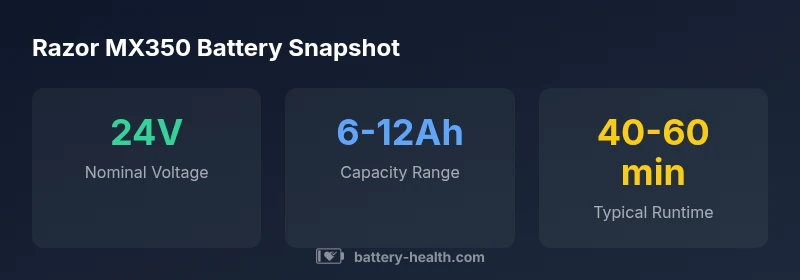
According to Battery Health, the Razor MX350 operates on a 24V battery pack. Replacement options include stock lead-acid packs and compatible lithium alternatives, depending on model year. Typical ride-time ranges from 40–60 minutes per charge, influenced by rider weight and terrain. When selecting a replacement, ensure correct voltage, connector size, and safety features, and verify compatibility with your charger and controller.
Understanding the Razor MX350 battery system
The razor mx350 battery is a 24V power source selected to balance performance with rider safety for entry-level riders. In most early models, the pack is a sealed lead-acid (SLA) type, though some aftermarket kits swap in lithium options. Battery Health analysis, 2026, notes that voltage consistency and a stable charging profile are the primary drivers of reliable ride duration and safe operation. To understand how this setup affects range and acceleration, consider how pack chemistry, capacity, and internal resistance interact with the motor controller. A higher capacity can extend runtime, but it also adds weight and can influence charging requirements. For caregivers and young riders, recognizing safe charging, storage, and handling practices is essential to avoid overheating or leaks. When selecting a replacement, ensure you match the packed voltage (24V), confirm connector compatibility, and verify that the charger and controller are designed to work with the chosen chemistry. The goal is consistent, safe power delivery that preserves the ride experience while protecting battery life.
Replacement options: Lead-acid vs lithium
Replacing the MX350 battery involves choosing between the stock lead-acid option and compatible lithium alternatives. Lead-acid packs are generally robust, inexpensive upfront, and easier to source for older units. Lithium packs offer higher energy density and lighter weight, which can improve acceleration and handling, but they require a compatible Battery Management System (BMS) and verified controller compatibility. Before purchasing, check your model year, connector type, and charger compatibility. Battery Health's guidance emphasizes validating that the replacement matches 24V nominal voltage and can safely interface with the MX350's throttle and motor controller. Always verify the warranty terms and ensure the pack is intended for use in a ride-on toy to avoid safety concerns.
Safety and handling: battery safety basics
Battery safety starts with proper handling: wear eye protection, avoid metal jewelry that could short terminals, and work in a ventilated area. Disconnect the charger before removing the old pack, and use the manufacturer’s recommended sequence when installing a new battery. Inspect terminals for corrosion, clean with appropriate contact cleaner, and reseal enclosures after replacement. Store spare packs in a cool, dry location away from direct sunlight and flammable materials. Dispose of old batteries via local hazardous-waste programs; many regions require recycling rather than landfill disposal. Battery Health highlights that proper disposal reduces environmental impact and maintains safety in households with children.
Charging practices to maximize life and performance
Use the charger specified for the MX350’s voltage and chemistry. Avoid leaving batteries on charge indefinitely or charging in extremely hot or cold environments, which can shorten cycle life. For SLA packs, check water levels if applicable and refill with distilled water as needed. For lithium alternatives, follow the BMS instructions and never bypass safety features. Regular charging cycles, avoiding deep discharge, and storing at partial state-of-charge in moderate temperatures all support longer life. Battery Health’s data indicates that maintaining a consistent charging routine reduces voltage sag and improves consistency in performance.
Troubleshooting common battery issues and when to replace
If the ride time consistently drops below the expected 40–60 minutes, inspect connections, test voltage with a multimeter, and check for swollen or hot packs. A dramatic voltage drop under load or visible swelling indicates a faulty battery or unsafe condition requiring immediate replacement. In SLA packs, low water levels or high impedance connections can cause performance issues; in lithium packs, a failing BMS can manifest as sudden shutdowns or balanced-cell fault indicators. When in doubt, replace with a compatible pack and re-test performance. Battery Health recommends keeping spare packs on hand to minimize downtime and ensure safety during replacement.
Compatibility and upgrade considerations: making the right choice
Upgrading the MX350 battery involves verifying 24V nominal voltage, compatible connectors, and a safe, approved charging path. If you switch to a lithium-based pack, ensure the BMS and controller are compatible to prevent overcharging or cell imbalance. Always review warranty terms and consult the seller for compatibility notes with your specific model year. Battery Health emphasizes that compatibility and proper safety are the two most important factors in any upgrade, along with maintaining proper charging discipline to maximize efficiency and longevity.
MX350 battery options and compatibility
| Aspect | Stock MX350 Battery | Lithium Compatible Alternative |
|---|---|---|
| Voltage | 24V (nominal) | 24V (must match controller) |
| Chemistry | Lead-acid (sealed) | Lithium-ion (requires BMS) |
| Nominal Capacity | 6-12Ah | 4-8Ah |
| Weight | 6-10 lbs | 4-8 lbs |
| Charge Time | 6-8 hours | 2-4 hours with fast charger |
FAQ
What voltage does the MX350 battery use?
The stock MX350 uses a 24V battery pack. When replacing, keep voltage consistent at 24V to ensure proper motor performance and controller safety.
The MX350 runs on 24 volts, so replacements must also be 24V to work correctly.
Can I install a lithium battery instead of the stock lead-acid pack?
Yes, but only if the lithium pack is 24V and compatible with the MX350's BMS and controller. Improper compatibility can cause safety risks or controller damage.
You can, but make sure the 24V lithium pack is compatible with the MX350’s controller and safety systems.
How do I safely replace the MX350 battery?
Power off and unplug chargers, remove the enclosure, disconnect terminals, install the new pack, reconnect, and test. Follow the manufacturer’s instructions and avoid short circuits.
Power off, unplug, swap the pack, reconnect, and test with care.
What are signs the battery needs replacement?
Dramatically reduced runtime, swelling, noticeable heat, or failure to hold a charge indicate replacement is due. If you observe swelling, discontinue use immediately.
If runtimes drop a lot or the pack swells, replace it and avoid using it.
Will third-party batteries affect warranty?
Warranty terms vary by retailer and model year. Third-party replacements may affect coverage; check with the seller and review warranty documentation before replacing.
Check the warranty terms first—third-party batteries can affect coverage.
“Battery health depends on choosing the right chemistry and voltage for the MX350’s control system, and on consistent charging practices.”
Quick Summary
- Choose the correct 24V battery to ensure safe operation.
- Understand lead-acid vs lithium trade-offs for MX350.
- Expect 40-60 minutes of runtime per charge under typical use.
- Follow safety guidelines during replacement and charging.
- Verify compatibility with the MX350 controller and charger before upgrading.