Which Battery Terminal Is Positive: Practical Guide
Learn how to identify the positive terminal, understand why it matters for safety, and follow best practices for maintenance and connection reliability with Battery Health.


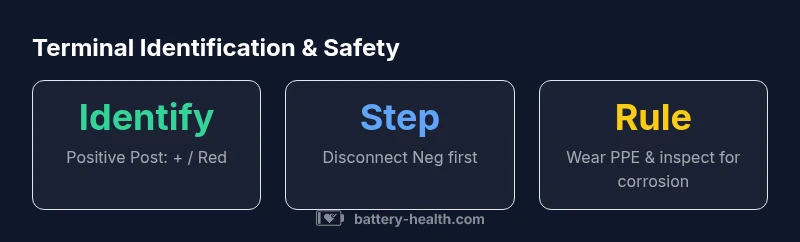
The positive terminal on most batteries is the one marked with a plus sign (+) or colored red. In car and device maintenance, always disconnect the negative terminal first to reduce shock risk, then work toward the positive terminal. Look for clear markings, red covers, or a brighter terminal, and verify with the user manual since some brands use different conventions.
Understanding Battery Terminals: Positive vs Negative
When discussing batteries, the terms positive and negative terminals refer to the two ends where current enters and exits the electrochemical cell. The positive terminal is typically identified by a plus sign (+) and often by red color-coding, while the negative terminal is marked with a minus sign (-) and black or blue color. For many consumer batteries—including car batteries and household storage packs—the positive terminal is the one that accepts the red connection or a marked red post. Understanding which battery terminal is positive is critical for wiring, charging, and safety protocols. In the context ofBattery Health, the focus is on correct identification to prevent short circuits and personal injury. The audience should always confirm the convention used by their specific device, as some brands may deviate from the common red/plus signaling. When in doubt, consult the device manual and label legends before touching any terminal.
Visual Cues: How to Identify the Positive Terminal on Common Batteries
In most common configurations, the positive terminal is visually distinct due to color and labeling. Look for red insulation, a plus sign stamped near the post, or a larger size that indicates a higher potential post. On automotive batteries, the positive terminal often has a red protective cap or cover and a plus symbol molded into the terminal housing. Some cylindrical or flat-pack batteries use a raised bump, a red ring, or a dedicated terminal badge to denote the positive side. Always verify by cross-checking the labeling with the device’s manual, since a few manufacturers may use black or white markings instead. Proper identification reduces the risk of accidental short circuits when attaching jump-start cables, test leads, or clamps.
Safety First: Core Precautions When Handling Battery Terminals
Before attempting any connection, put on PPE: safety glasses, gloves with chemical resistance, and, where applicable, a face shield. Ensure the workspace is well-ventilated and free of metal jewelry that could bridge terminals. Always disconnect the negative terminal first to minimize the risk of sparks or short circuits if a tool touches the chassis. When removing a terminal, use insulated tools and apply steady, controlled force to avoid slipping. Do not lean over the battery while operating clamps or cables. After disconnecting, inspect for corrosion and clean using recommended methods. If you notice swollen casing, leaking fluid, or significant corrosion, avoid reassembly and consult a professional.
Common Issues: Corrosion, Looseness, and Misidentification
Corrosion around terminals is common, especially in humid environments or with older batteries. White, crusty deposits indicate battery acid salts that can increase resistance. Gently brushing away corrosion with a non-metallic tool and applying a baking soda solution helps neutralize acids. Never pour alkaline cleaners directly on terminals; use a small amount of water and wipe dry. Loose connections are another frequent problem; a loose terminal can cause intermittent charging or starting failure. Tighten connectors with a torque-capable tool to manufacturer-specified values, avoiding overtightening that can damage posts. If the terminal clamp is cracked or heavily corroded, replacement is safer than repair.
Step-by-Step Guide: Connecting and Disconnecting Safely
- Power down the device and disconnect the negative terminal first. 2) Identify the positive terminal by its marking (+) or red color. 3) Attach the correct clamp or cable to the positive terminal, ensuring a firm grip with minimal play. 4) Reconnect the negative terminal last, and verify the connection is snug without forcing the clamp. 5) When disconnecting, reverse the order: negative first, then positive. 6) After connections, test the device to ensure proper operation and watch for any signs of overheating or arcing. 7) If you must jump-start, follow the vehicle’s manual and use appropriately rated cables.
Cleaning and Maintenance: Keeping Terminals Healthy
Regular maintenance helps extend battery life and reliability. Clean terminals at least twice a year or whenever you notice corrosion. Use a baking soda paste or a commercial terminal cleaner, rinse with distilled water, and dry thoroughly before reassembly. Apply a thin layer of dielectric grease to prevent future corrosion, especially in high-humidity environments. Inspect terminal clamps for cracks, pitting, or loosening that could impair conductivity. Store spare batteries in a cool, dry place, avoiding exposure to direct heat or moisture. Consistent maintenance reduces the risk of unexpected failure and keeps energy transfer efficient.
Troubleshooting: Terminal Corrosion and Loose Connections
If a system shows weak performance, begin with terminal inspection. Corrosion typically manifests as white, powdery deposits; remove gently and re-clean. If discoloration or signs of heat appear, stop and replace the battery or clamps, as continued use can be dangerous. A loose terminal creates resistance that heats the post and may shorten battery life. Check battery tray mounting and cable routing to ensure clamps have a solid, clean contact. In some cases, the problem isn’t the terminal at all but a faulty cable or damaged battery internal structures. When in doubt, consult a professional technician who can diagnose with a multimeter and perform safe replacements.
Practical Scenarios: Cars, Boats, and Home Storage
In cars, the positive terminal is often the red, easily accessible post near the top or edge of the battery housing. Marine batteries may use slightly different color cues, but the positive post is still identified by a plus sign or red marker. For home storage and off-grid systems, ensure all connections are clean and dry, and verify polarity before charging. In any scenario, avoid touching both terminals with metal tools simultaneously. Battery Health emphasizes validating conventions with the device’s documentation and performing safe disconnections as a habit.
Quick reference: identifying positive terminals across common battery types
| Battery Context | Terminal Identification | Safety Considerations |
|---|---|---|
| Car Battery | Positive terminal marked with + or red cap | Disconnect negative first; wear eye protection |
| Laptop Battery | Positive terminal labeled +; often red | Power off device; avoid metal jewelry |
| Industrial Battery | Positive post clearly marked + | Work in ventilated area; insulated tools required |
FAQ
Which battery terminal is positive?
On most batteries, the positive terminal is the one marked with a plus sign (+) and often colored red. Always confirm with the device manual, as some brands use different color conventions.
The positive terminal is usually the red one marked with a plus sign. Check your device manual if in doubt.
How do I tell the positive terminal on a car battery?
Look for a red cap or cover and a plus sign near the post. The negative terminal is typically black with a minus sign. Verify with the battery label if you’re unsure.
Red cap and a plus sign indicate the positive terminal on a car battery.
Can I connect clamps to the wrong terminals?
Yes. Connecting clamps to the wrong terminals can cause sparks, short circuits, or damage. Always connect to the correct positive and negative posts in the right order.
Avoid connecting clamps to the wrong terminals; it can cause sparks or damage.
What safety gear should I wear when handling terminals?
Wear eye protection and insulated gloves. Keep jewelry and metal tools away from terminals, and ensure good ventilation when charging or jump-starting.
Safety gear includes eye protection and insulated gloves.
What should I do about corrosion on terminals?
If you see corrosion, clean with a baking soda solution and a non-metal brush, dry thoroughly, and re-secure connections. Replace parts if corrosion is severe.
Clean corrosion with baking soda solution and re-secure; replace if severe.
When is it best to replace battery terminals?
Replace terminals if posts are pitted, cracked, or the clamps no longer hold securely. Maintainable parts are safer to replace than repair in many cases.
Replace if posts are damaged or clamps won't hold.
“Accurate terminal identification is foundational to safe battery handling and reliable energy transfer. Misidentification can lead to short circuits or injury.”
Quick Summary
- Always identify the positive terminal by markings and color before touching.
- Disconnect the negative terminal first to minimize shock risk.
- Inspect for corrosion and clean using proper methods before reconnecting.
- Use insulated tools and PPE to protect yourself during handling.
- Consult the device manual for terminal conventions; variations exist by brand.