How a Battery Charger Works: A Comprehensive Guide
Discover how battery chargers regulate voltage and current, the charging stages for Li-ion and other chemistries, and how to choose, use, and maintain chargers. Learn safety tips and common troubleshooting for better battery health.


A battery charger converts AC mains to a controlled DC supply and delivers precise voltage and current to a battery to restore its charge safely. It follows chemistry-specific charging profiles and safety cutoffs to prevent overcharging, overheating, and damage, helping maximize battery health over time.
What is a battery charger?
A battery charger is an electronic device that supplies a controlled DC current and voltage to a rechargeable battery, enabling it to regain stored energy after use. Internally, chargers convert alternating current (AC) from the wall outlet into direct current (DC) and regulate the delivery to match the battery’s chemistry. The device also monitors conditions such as voltage, current, and temperature to decide when to taper the current and terminate charging. In essence, a charger acts as a smart bridge between the power grid and a chemical energy store, translating household power into a battery-friendly charging profile. According to Battery Health, modern chargers blend efficiency with safety features designed to protect both the user and the battery during every cycle.
How charging works in practice
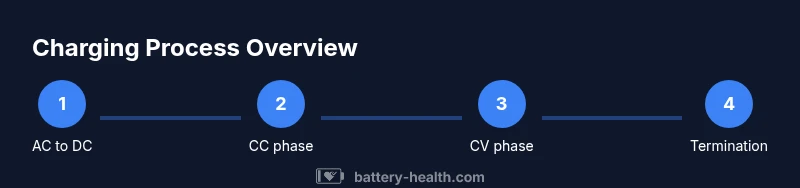
Charging a battery involves several stages and protective measures that ensure safe energy flow. First, the charger converts AC to DC and filters out noise. Then, a charging controller sets an initial current and voltage based on the battery type. As charging proceeds, feedback from the battery’s voltage, current, and temperature informs the controller whether to hold, reduce, or cut the current altogether. The goal is to reach full charge without overheating or stressing the cells. Many chargers employ a CC-CV (constant current, then constant voltage) strategy for lithium-ion chemistries, which optimizes speed while protecting long-term health. Battery Health emphasizes that proper regulation is key to prolonging battery lifespan and maintaining performance.
Charging algorithms by chemistry
Different battery chemistries require distinct charging approaches. Lithium-ion systems usually start with a constant current phase to rapidly raise voltage, then switch to constant voltage to finish charging while tapering current. Nickel-metal hydride and nickel-cadmium batteries often use a controlled current with temperature and voltage checks to prevent memory effects. Lead-acid packs rely on staged charge profiles that balance current with voltage to avoid gassing and overheating. Each chemistry has an ideal charging window, and a capable charger adapts its profile accordingly. Battery Health notes that using the wrong charger can degrade capacity prematurely or cause safety risks.
Major components of a charger
Inside a typical battery charger you’ll find several key parts: a power entry/filter stage to suppress noise and protect the mains; a switching regulator or transformer to convert to the needed DC level; a charge controller IC that manages current, voltage, and termination; sense resistors for feedback; a temperature sensor to monitor heat; and protective features like overcurrent, short-circuit, and input/output protection. Many modern chargers also include communication protocols or smart sensing to match device requirements. Understanding these components helps explain why some chargers charge faster or run cooler than others, and why safety features are essential. Battery Health highlights that robust internal design and quality components correlate with safer, more reliable charging.
Safety considerations and precautions
Charging safety should be the top priority. Always use a charger compatible with your battery’s chemistry and voltage rating. Inspect cables and connectors for wear, avoid charging near flammable materials, and never leave active charging unattended for long periods in risky environments. If the charger or battery becomes excessively hot, unplug and let it cool before testing again. Use proper PPE when testing or disassembling chargers, and keep children and pets away from charging setups. Regularly check for recalls or safety notices from reputable manufacturers. Battery Health stresses that safety is not optional—it directly affects battery longevity and user safety.
How to choose the right charger for your device
Selecting a charger begins with compatibility: verify the correct voltage and a current rating appropriate for your battery’s capacity. Look for a connector that matches your device and supports the charging protocol it needs. Prefer certified or original equipment manufacturer (OEM) chargers from reputable brands, with protective features such as temperature monitoring and automatic shutdown when finished. Check for safety certifications (UL, CE, FCC) and ensure the charger logistically fits your usage pattern (travel, home, or automotive). Battery Health recommends prioritizing chargers that clearly state chemistry support and include temperature and overcurrent safeguards, which typically translate to better battery health over time.
Troubleshooting common charging issues
If charging seems slow or inconsistent, start with basic checks: verify the outlet, inspect the cable for damage, and ensure the charger is properly seated. Use a multimeter to confirm the expected output voltage under load; discrepancies may indicate a faulty charger or cable. For abnormal heating or unusual odors, discontinue use immediately and inspect for signs of damage. Some devices report charging status via the built-in battery indicator or app; use these signals to diagnose whether the issue lies with the charger, the cable, or the battery itself. Battery Health suggests routine checks to catch issues early and prevent long-term damage.
Maintenance and longevity tips for chargers
Keep chargers dry and away from moisture-prone areas. Store them in a cool, ventilated place and avoid wrapping cords tightly for long periods. Regularly inspect for frayed insulation, loose connectors, or cracked housings. When not in use, unplug and coil cords loosely to avoid internal wire fatigue. Clean the connector pins with a dry cloth to maintain good contact. If a charger becomes consistently warm without load, consider replacement. Proper maintenance helps ensure consistent charging performance and protects the battery’s health over time. Battery Health notes that proactive upkeep can extend charger life and battery longevity.
Tools & Materials
- Digital multimeter(To measure output voltage and verify under load, essential for safe testing.)
- Bench power supply or known-good charger(Provides a controlled input when testing charging behavior.)
- Insulated gloves(Optional safety gear for handling hot components.)
- Thermal sensor or thermometer(Useful for monitoring battery temperature during tests.)
- Notebook and pen(Document readings, steps, and observations for reference.)
Steps
Estimated time: 45-60 minutes
- 1
Identify target device and charge needs
Before starting, determine the battery chemistry, nominal voltage, and expected charging current for the device or pack you’ll test. This ensures you select appropriate test settings and avoid mismatches that could harm the battery. Knowing the spec protects both safety and longevity.
Tip: Double-check the device label or the manufacturer’s manual for exact voltage/current specs. - 2
Prepare safety and test setup
Unplug from mains, wear basic PPE if available, and set up a safe testing area. Connect the bench supply to a known-good charger or a controlled input, and have a dummy load or spare battery ready. Clear the workspace of flammable materials.
Tip: Keep a fire extinguisher within reach and never test near liquids. - 3
Measure open-circuit output
With no load, measure the charger's output to verify it matches the rated voltage. Then connect the charger to the test battery or a safe dummy load to observe how the current behaves as charging begins.
Tip: If the voltage is significantly off, stop and check connections or replace the charger. - 4
Watch the charging progression
Monitor voltage rise and current draw during the early phase. In CC-CV profiles, you’ll see a steady current that gradually tapers as the voltage limit is approached. Document any abnormal spikes or rapid temperature changes.
Tip: Use the temperature sensor to catch overheating early and pause if needed. - 5
Test termination and safety cutoffs
Ensure the charger terminates charging properly when the battery reaches its full voltage and low current. Confirm there’s no continuous heating after termination and that the device stops drawing current gracefully.
Tip: A poorly terminating charger can leave cells stressed or imbalanced. - 6
Document results and test again
Record voltages, currents, and temperatures at key milestones. Repeat the test with a fresh battery or another charger to compare behavior and confirm consistency.
Tip: Repeatability indicates a reliable charging setup. - 7
Evaluate device-specific considerations
Some devices use smart charging protocols or data communication with the charger. If applicable, test these features to ensure compatibility and safe operation of the full charging system.
Tip: Unsupported protocols may still function but could charge more slowly or unpredictably.
FAQ
What is the main charging method used by most modern Li-ion batteries?
Most modern Li-ion batteries use a CC-CV (constant current, then constant voltage) charging profile. They start with a constant current to raise voltage quickly, then switch to constant voltage to top off the cells while tapering current to prevent overcharging.
Li-ion batteries typically charge with a two-stage CC-CV method: first constant current, then constant voltage to finish safely.
Can I charge a battery with any charger if I monitor it closely?
No. Chargers must match the battery’s chemistry, voltage, and current ratings. Using an inappropriate charger can cause overheating, reduced capacity, or safety risks. Always use a charger approved for the specific battery type.
No—that could be dangerous. Always use the right charger for the battery type and rating.
What safety features should I look for in a charger?
Look for overcurrent protection, short-circuit protection, temperature monitoring, automatic shutoff at full charge, and safe insulation and enclosures. These features help prevent fire and damage to the battery.
Key safety features include overcurrent protection, temperature monitoring, and automatic shutdown at full charge.
Why does my charger get hot during charging?
A warm charger can be normal, but excessive heat may indicate high load, poor ventilation, or a faulty charger. If it becomes dangerously hot, unplug and inspect the setup.
If it’s very hot, stop charging and check for airflow or a faulty charger.
Is it safe to leave a charging battery unattended overnight?
Unattended charging can be common for many devices, but you should monitor for overheating and ensure the charger has auto-stop and is in a non-flammable area. Always follow manufacturer guidelines.
It’s usually fine with built-in safeguards, but keep an eye on it and place it away from flammables.
Watch Video
Quick Summary
- Understand CC-CV and termination in Li-ion charging
- Choose chargers that match battery chemistry and voltage
- Prioritize safety features and certified devices
- Regular testing helps protect battery longevity