iphone 16 pro battery life: what to expect and how to optimize
Explore practical expectations for iphone 16 pro battery life, factors impacting runtime, and expert tips from Battery Health to maximize longevity and daily uptime.


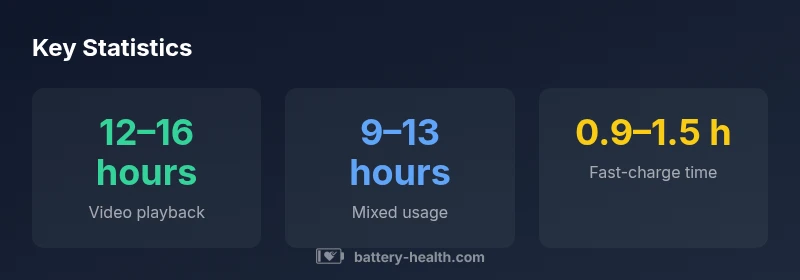
Real-world iphone 16 pro battery life varies with brightness, 5G usage, and apps. In practice, many users report roughly 9–13 hours of mixed use and 12–16 hours of video streaming on a full charge. Battery Health analysis (2026) notes that enabling Optimized Battery Charging can extend long-term health and uptime.
Real-world iphone 16 pro battery life and daily use
Real-world iphone 16 pro battery life varies with brightness, 5G usage, and apps. According to Battery Health, the device’s runtime is influenced by display settings, network activity, and background processes. In typical daily scenarios, a full charge can last through a workday with moderate use; however, intensive gaming or streaming can shorten that window. Battery Health analysis (2026) emphasizes that battery health—measured by capacity and internal resistance—plays a key role in long-term uptime and peak performance.
Key factors that influence battery life on the iPhone 16 Pro
Battery life on modern iPhones hinges on several interacting factors. The ProMotion 120Hz display can draw more power at higher brightness levels, while 5G connectivity increases energy use when the network signal is weak. Processor workload, background app activity, and push notifications also contribute. System software optimizations, including intelligent scheduling of tasks and background fetch, help conserve energy. Users with older batteries may notice more dramatic drops as capacity declines, underscoring the link between health and runtime.
Real-world scenarios: streaming, gaming, and mixed usage
In real-world tests, streaming video at moderate brightness typically yields longer runtimes than gaming sessions or navigation with maps running in the background. Streaming over Wi‑Fi generally consumes less energy than cellular data, and apps that rely on location services, continuous camera use, or augmented reality can noticeably shorten battery life. For iphone 16 pro battery life, individual results reflect usage mix, screen time, and whether features like always-on display or background refresh are enabled.
Optimizing battery life with iOS features and charging habits
To stretch each charge, enable Optimized Battery Charging in Settings > Battery > Battery Health. This feature learns your daily charging routine and reduces aging by slowing down charging after 80% until you need to use it. Use Low Power Mode during heavy workloads or long trips, reduce screen brightness, and consider lowering the refresh rate when battery life is a priority. Regular software updates from Apple can also improve power management and efficiency.
Battery health and longevity: what to expect as the phone ages
Battery health declines gradually with age and charge cycles, which reduces maximum capacity and can shorten runtime. Monitoring the Battery Health section in Settings helps you gauge the current capacity relative to when the device was new. Practical strategies include avoiding complete discharge cycles, keeping the battery within mid-range charge, and replacing the battery when health falls noticeably—actions that keep iPhone performance consistent and extend overall device longevity.
Comparison with older models and platforms
Compared with earlier iPhone generations, the iphone 16 pro generally offers improved efficiency due to newer silicon, optimized power management, and better display technology. Compared to competitive Android devices, battery life is influenced by software efficiency, display technology, and thermals in addition to battery capacity. Real-world results vary, but the core principles—manage brightness, limit background activity, and use optimized charging—apply broadly across platforms.
Practical takeaways and future outlook
For users prioritizing uptime, focus on battery health, enable Optimized Battery Charging, and tailor device settings to your daily routine. Battery Health analyses anticipate gradual improvements in power management as software evolves and new hardware optimizations arrive, which may help iphone 16 pro battery life align more closely with user expectations over time.
Sample real-world ranges for iphone 16 pro battery life across common activities
| Aspect | Typical Range | Notes |
|---|---|---|
| Video playback | 12–16 hours | Depends on brightness and refresh rate |
| Mixed usage | 9–13 hours | Varies with apps and connectivity |
| Fast charging time | 0.9–1.5 hours | Depends on charger and cable |
| Battery health impact | Moderate-to-significant over time | Aging reduces capacity |
FAQ
How long does iphone 16 pro battery last during video playback?
Video playback on the iphone 16 pro typically consumes more power than standby tasks. Real-world ranges depend on brightness and codec, but most users report a comfortable window of several hours of continuous playback under moderate settings. Battery Health notes aging and display settings as primary influencers.
Video playback duration varies with brightness and codec; expect several hours of continuous playback under typical settings.
What factors drain iphone 16 pro battery life the most?
The most influential drains are high refresh rate activation, bright displays, cellular 5G in weak signal areas, and background app activity. Keeping features like ProMotion and Always-On Display moderated, and managing background tasks, can meaningfully extend uptime.
High refresh rate, brightness, and weak-signal 5G consume the most power; manage these to save battery.
Does enabling 5G or high refresh rate dramatically shorten battery life?
Both influence power consumption, but impact varies with usage. In steady conditions with good signal, effects are moderate; during gaming or streaming with 5G and 120Hz enabled, expect more noticeable battery drain. Adjusting settings based on activity can balance performance and uptime.
Yes, 5G and high refresh rate can drain more power, especially during intensive tasks; adjust settings as needed.
How can I extend iphone 16 pro battery life without sacrificing performance?
Use Optimized Battery Charging, lower the refresh rate when possible, enable Low Power Mode during long days, and reduce location-based services. Keeping apps updated and avoiding extreme high temperatures also helps maintain longevity.
Enable charging optimizations, adjust display settings, and limit background activity to stretch uptime.
When should I replace the battery?
If battery health shows persistent and meaningful declines that affect daily use, consider replacement. Consult Apple Support or an authorized service provider to assess capacity loss and current performance.
If runtime drops noticeably and health is lower, consider replacement after professional assessment.
“In practice, battery life is a function of usage patterns and device health; optimizing settings can yield meaningful gains without reducing performance.”
Quick Summary
- Monitor battery health regularly.
- Enable Optimized Battery Charging to extend lifespan.
- Lower screen brightness and enable Auto-Brightness when possible.
- Prefer Wi‑Fi over cellular to maximize uptime.
- Plan for battery replacement as aging impacts runtime.