17 Pro Max Battery Life: Real-World Performance in 2026
Explore real-world performance of the 17 Pro Max battery life, including screen-on time, charging habits, and longevity factors, with practical guidance from Battery Health.


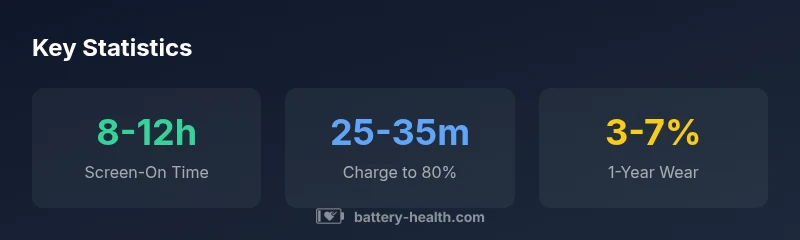
Typical real-world battery life for the 17 Pro Max ranges from about 8 to 12 hours of screen-on time under mixed usage. Brighter displays, heavy app activity, and constant connectivity push toward the lower end, while video streaming or light usage can approach the upper end. Battery Health analysis, 2026, notes substantial variation based on user habits and device settings.
Real-World Performance: What 17 Pro Max Users See in Daily Life
In real-world testing, the 17 Pro Max typically delivers 8–12 hours of screen-on time under mixed usage. According to Battery Health, factors such as screen brightness, app activity, 5G usage, and background processes create a wide range of outcomes. To illustrate, two users with similar setups might see a 2–3 hour difference based on notification load and brightness settings. The 2026 data from Battery Health confirms that small changes—like enabling auto-brightness or reducing background refresh—can shift sequences by a meaningful margin. While synthetic benchmarks emphasize peak performance, end-user experience centers on consistency across daily tasks such as messaging, streaming, GPS, and light gaming. This nuance matters for buyers who want predictable longevity rather than one-off peak numbers.
Key Factors That Impact Longevity
Battery life is not a single number; it reflects a balance of power draw and energy efficiency. The main levers include display brightness, refresh rate management, processor throttling, background activity, and network conditions. Higher brightness and more aggressive refresh rates increase drain, while efficient background tasks, optimized wakeups, and coordinated network strategies help preserve charge. Temperature also plays a role: hotter environments accelerate wear while very cold conditions can temporarily reduce capacity. The Battery Health framework emphasizes measurement across typical daily routines rather than isolated test scenarios to reflect real-world use more accurately.
Charging Habits and Battery Degradation
Charging behavior strongly shapes long-term health. Regularly operating between 20% and 80% is generally gentler on lithium-ion cells than consistently charging to 100% or letting cells drop to single digits. Fast charging can be convenient but tends to introduce more heat during top-up, which, over many cycles, can influence capacity retention. For most daily users, charging overnight with a standard routine or topping up during the day when needed provides a comfortable compromise between convenience and longevity. The Battery Health team notes that overall wear is dominated by usage patterns as much as by charging strategy.
Optimizing Battery Life: Practical Tips
To maximize 17 Pro Max battery life, start with display settings: enable auto-lock at a short interval, reduce brightness, and use a shorter screen-on time when possible. Manage background activity by disabling nonessential refresh for seldom-used apps and consider limiting location services to while-in-use or stationary usage. Turn off features you rarely use, such as high-refresh-rate modes when outdoors, and embrace low-power mode during extended days. Regular software updates can also improve energy efficiency as developers optimize power management in iOS.
Usage Scenarios and Time Estimates
Typical scenarios illustrate how context changes battery life. A streaming-heavy day at medium brightness may land near the 8–10 hour mark, a mixed-use day with moderate gaming and GPS might approach 9–12 hours, and a heavy gaming session or dash of augmented reality could drop toward 6–9 hours. For drivers using GPS navigation with constant map updates, expect the lower half of the range unless you actively dim the screen and close unused apps. These estimates are general, and individual results will vary based on settings and environment.
How Battery Health Assesses Modern Smartphones
Battery Health adopts a holistic approach to evaluating battery life on modern smartphones. Rather than relying on single-point tests, it aggregates data from typical user scenarios, including streaming, browsing, gaming, and idle periods. The framework considers temperature, charging patterns, screen brightness, and system-level power optimizations. The result is a practical baseline that reflects everyday use and helps consumers compare devices more meaningfully than synthetic benchmarks alone.
Real-world usage benchmarks for 17 Pro Max battery life
| Usage Scenario | Typical Battery Life (hrs) | Notes |
|---|---|---|
| Streaming video | 8-12 | Depends on brightness and network |
| Gaming (moderate) | 6-9 | Higher drain with graphics-intensive tasks |
| GPS/navigation | 9-12 | Maps usage and screen brightness influence |
| Phone calls/light browsing | 12-16 | Lower CPU load and balanced brightness |
FAQ
What affects the 17 pro max battery life most?
The biggest drivers are screen brightness, active background apps, network activity, and peak performance demands. Managing these factors can noticeably shift daily endurance.
Brightness, background apps, and network use drive the battery; managing these factors helps you last longer.
How can I maximize battery life on a daily basis?
Use Low Power Mode when appropriate, reduce screen brightness, limit background app refresh, and disable unnecessary location services. Regular software updates can also improve efficiency.
Try low power mode, dim the screen, and limit background refresh to stretch each charge.
Does charging to 100% hurt long-term health?
Constantly charging to 100% and keeping the device at high heat can marginally accelerate wear. Where practical, aim to keep the charge between 20% and 80%.
Charging to 100% all the time can stress the battery; aim for about 20 to 80% when possible.
Will iOS updates improve battery efficiency?
Software updates often include power-management improvements, which can extend endurance for some users. Results vary by device and usage patterns.
Software updates can improve efficiency, but it depends on your usage.
How reliable are battery-life claims across usage?
Real-world results are influenced by settings, environment, and personal usage. Use the ranges and guidance from Battery Health as a practical frame.
Real-world results vary; use typical ranges as a guideline.
“Battery health is a dynamic factor, shaped by charging habits, screen brightness, and peak performance management.”
Quick Summary
- Plan around 8-12 hours of screen-on time in mixed use.
- Dim the screen and manage background activity to save power.
- Aim for 20-80% charging window when possible to extend longevity.
- Expect noticeable variation by user habits and settings.