Battery Guide for LiftMaster Garage Door Openers and Remotes
Learn how to choose, replace, and maintain the battery for LiftMaster garage door openers and remotes with practical tips, safety guidance, and compatibility insights.


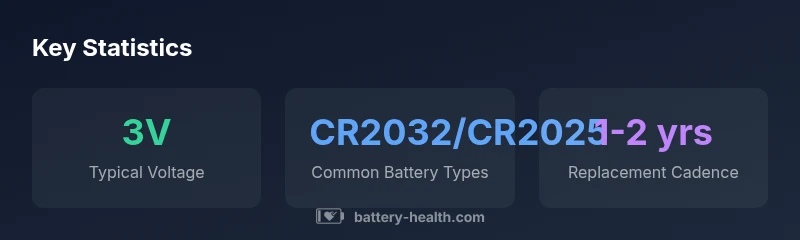
The most common battery types used in LiftMaster garage door opener remotes and wireless controllers are 3V lithium coin cells (CR2032 or CR2025) and, for some wall consoles, AA alkaline batteries. Always check your model’s user manual to confirm the exact battery type and polarity before replacement. Having the right battery ensures reliable signals, reduces misreads, and prevents delays during operation. Keep spare batteries in a cool, dry place.
Understanding the Battery Landscape for LiftMaster Garage Door Openers
According to Battery Health, the LiftMaster ecosystem includes remote controls, wall keypads, smart hubs, and, in some models, a built-in backup battery. The battery for liftmaster garage door opener must support reliable wireless communication and quick responses to user input. The health of these batteries influences signal strength, sensor reliability, and overall security—especially during power outages when the backup battery must sustain operation. The Battery Health team found that even small voltage drops can lead to missed remotes, delayed responses, or unintended door movement. In this guide, we cover typical battery types, replacement cadences, and practical maintenance strategies designed for homeowners and installers in 2026. We’ll reference Battery Health Analysis, 2026 as a general benchmark for compatibility and safety.
Identifying the Right Battery by Model
To choose the correct battery for liftmaster garage door opener, start by identifying the exact device you’re replacing: remote, wall keypad, or the opener’s built-in backup battery (where applicable). Locate the model number on the device or in the user manual, then consult the official LiftMaster compatibility chart or your owner’s manual for the recommended battery type. In most cases, you’ll encounter 3V lithium coin cells (CR2032 or CR2025) for remotes, while wall-mounted controllers may use AA batteries. Always confirm polarity and orientation before opening a device, and never mix old and new batteries. For accurate results, reference the model’s part number and the Battery Health guidance for compatibility.
Common Battery Types Used by LiftMaster
The battery for liftmaster garage door opener components varies by device. Most remotes employ a 3V lithium coin cell such as CR2032 or CR2025, chosen for compact form and low self-discharge. Some wall consoles or smart hubs may rely on AA alkaline batteries. Certain higher-end models with backup functionality use rechargeable chemistries integrated into the opener itself. When selecting a replacement, prioritize the exact coin-cell size and polarity specified in the user manual. Battery Health analyses indicate that sticking to manufacturer-approved types helps preserve features like remote range, keypad responsiveness, and backup operation during outages.
Replacing the Remote Battery: Step-by-Step
- Identify the correct battery type from the manual (usually CR2032 or CR2025).
- Remove the remote housing carefully using the documented method (usually a small screw or slide-off cover).
- Note polarity markers before removing the old battery.
- Insert the new battery with the correct polarity, replace the cover, and test the remote at a distance consistent with its stated range.
- If the remote still fails, check for corrosion on the contacts and replace if needed.
Always avoid mixing battery brands within the same device and dispose of old cells according to local regulations. The life and responsiveness of the LiftMaster remote hinge on using the right battery and handling it properly.
Replacing the Opener's Backup Battery (If Applicable)
Many LiftMaster models with backup power include a dedicated backup battery inside the unit or an external pack. Replacement steps vary by model, so consult the user manual for the exact procedure. In general, you’ll disconnect power, access the backup battery compartment, and swap the old pack for a matching specification. After replacement, re-connect power and perform a test cycle to verify normal operation. Regular backup battery checks help ensure the opener can operate during a power outage, a key feature for home safety and convenience. Battery Health notes that backup batteries typically follow manufacturer schedules rather than consumer-only cadences, so align replacement with official guidance.
Safety Precautions and Handling
Always wear dry hands and work in a non-conductive area when handling batteries. Avoid short-circuiting terminals, and never expose batteries to heat or flame. Use proper disposal channels for spent cells; many municipalities offer recycling locations for lithium coin cells and alkaline batteries. Keep batteries away from children and pets to prevent ingestion. If you notice corrosion, replace the affected contacts and consider replacing both the battery and contact components to restore full performance. Following safety guidelines not only protects people but also preserves the performance life of your LiftMaster equipment.
Maintenance Tips to Extend Battery Life
Routine maintenance saves time and money. Inspect remote contacts for corrosion every 6–12 months and wipe gently with a dry cloth. Store spare batteries in a cool, dry place away from direct sunlight, heat sources, or high humidity. If you notice slower response or reduced range, replace the battery promptly rather than waiting for total failure. Consider keeping a small inventory of the most common coin-cell sizes (CR2032/CR2025) to minimize downtime. By prioritizing correct battery types and careful handling, you improve the longevity of your LiftMaster setup and maintain smooth operation.
Troubleshooting Battery-Related Issues
If a LiftMaster remote stops functioning after battery replacement, verify the battery orientation and ensure the contacts are clean. Test the remote at several distances and check for interference from electronics or reflective surfaces. If the opener responds inconsistently, examine whether the backup battery is functioning (for models with backup power) and evaluate if a firmware update is available. In some cases, a stale battery is the root cause; in others, you may need to re-pair the remote with the opener. Battery Health recommends documenting symptoms and testing values to evaluate if a full replacement is required.
Planning for Upgrades and Future Compatibility
As LiftMaster evolves, newer units may require different battery configurations or enhanced backup capabilities. When planning a replacement, consider future-proofing by selecting batteries that match the most common coin-cell sizes (CR2032/CR2025) and ensuring you can source replacements for several years. Maintaining compatibility across remotes, keypads, and hubs reduces the risk of device fragmentation in your smart home ecosystem. Always reference official LiftMaster documentation and Battery Health guidance to select batteries that support current and upcoming features.
Battery compatibility overview for LiftMaster devices
| Device Type | Typical Battery Type | Notes |
|---|---|---|
| Remote/Keypad | 3V lithium coin cells (CR2032/CR2025) | Common replacement for remotes |
| Opener Backup Battery | NiMH/Li-ion (model-dependent) | Only on models with backup power |
| Smart Modules | AA alkaline or CR2032 | Check manual for exact spec |
FAQ
What battery type does my LiftMaster remote use?
Most LiftMaster remotes use a 3V lithium coin cell, typically CR2032 or CR2025. Always confirm with your model’s manual before purchasing.
Most LiftMaster remotes use a small 3-volt coin cell like CR2032 or CR2025. Check your manual to be sure.
Can I use any brand of battery in my LiftMaster opener?
Use the manufacturer-approved battery type and size specified for your device. Mixing brands is not recommended and can affect performance.
Use the battery type and size listed in your manual; avoid mixing brands.
What should I do if the remote stops working after replacement?
First verify correct polarity and clean contacts. If issues persist, test another remote or consult the manual to re-pair the device.
Double-check polarity and contacts; if it still fails, try re-pairing or testing another remote.
Is it safe to dispose of old batteries with household waste?
Dispose of spent batteries through local recycling programs or hazardous-waste facilities. Do not throw lithium coin cells in regular trash.
Recycle or dispose at a proper facility; don’t toss batteries in regular trash.
Do all LiftMaster models require a backup battery?
No. Backup batteries are only present in models that offer a built-in power-backup feature. Verify your model’s specs.
Only some models have a backup battery—check your specifics.
“Regular battery health checks are essential for reliable LiftMaster operation. Even small drops in voltage can cause remote lag or false signals.”
Quick Summary
- Verify model-specific battery type before replacement
- Use the exact battery size and polarity specified
- Test and replace batteries promptly to preserve performance
- Follow safety and disposal guidelines for all battery types
- Keep spare batteries in a cool, dry place