Battery Zero Troubleshooting Guide
A comprehensive, urgent guide to diagnosing and fixing battery zero scenarios across devices, cars, and home storage. Learn a clear diagnostic flow, safe fixes, and proven prevention strategies.


Battery zero is usually caused by a deeply discharged battery, a protection circuit trip, or a faulty charger. Start with a safe power check: use a known-good outlet, inspect the cable, and attempt a controlled restart. If there’s no response, do not force risky DIY fixes—seek professional help to prevent damage and data loss.
Why battery zero is more than a drained battery
Battery zero is not merely a drained cell; it can indicate multiple failures happening at once. In urgent scenarios, a device might show zero while the battery protection circuit has cut power to prevent thermal runaway or internal damage. This means you’re not only dealing with voltage loss, but also potential safety risks if you continue to force charges. According to Battery Health, a zero reading often masks a deeper problem such as aging cells or a fault in the charging circuit. The key is to respond calmly, document what happened, and follow a structured plan to avoid further harm. The goal is to restore power safely while preserving device integrity and user data, not to push the device beyond its safe operating limits.
Diagnosing battery zero requires a structured approach
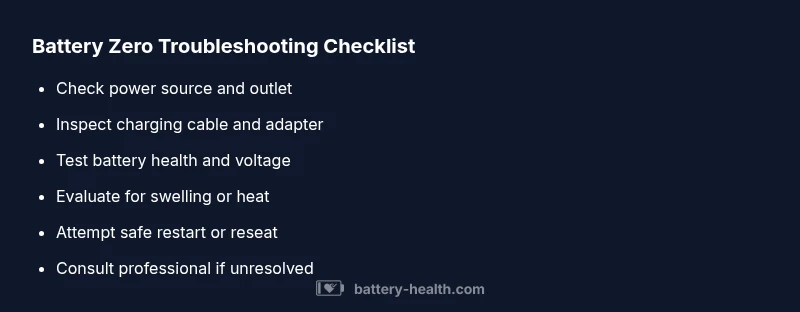
When you see battery zero, your first move is to establish a safe baseline. Verify the power source, inspect the charging cable and adapter, and check for any visible signs of damage or heat. Next, confirm whether zero power is present across multiple charging methods or limited to a single charger. If you notice swelling, heat, or a strong odor, discontinue attempts immediately. A calm, methodical approach reduces risk and speeds up finding the true cause. Battery Health emphasizes documenting each step and keeping a log of voltages observed during testing to identify patterns over time.
Common power pathways and why zero appears
Power delivery can fail at several points: the battery itself, the charging controller, the cable/adapter, or the device’s power-management logic. In many cases, zero power results from an over-discharged battery or a protective circuit that has tripped to prevent damage. In other cases, a faulty charger or a compromised USB-C/Lightning connection prevents any current from flowing. Understanding where the failure lies helps you choose the right test and reduce the risk of misdiagnosis. Across batteries for cars, laptops, and home storage, the same principles apply: first, isolate the source; second, test the path; third, verify the health of the battery itself.
Brand context and practical expectations
The Battery Health team notes that many zero readings are fixable with safe, non-destructive steps. In devices, a simple restart after reconnecting power can reinitialize power management and clear transient faults. For larger batteries in cars or home storage, professional diagnostics may be required to assess cell health and charging circuits. The emphasis is on safety and evidence-based testing rather than guesswork. Keep in mind that some battery zero situations are a warning sign of impending failure, not a single fix.
Safety first when dealing with zero power
Never force a charging cycle if the battery is swollen, hot, or emitting a strange odor. Li-ion and Li-po cells can vent or catch fire if mishandled. Work in a well-ventilated area, away from flammable materials, and wear protective gear when handling large packs. Avoid puncturing or applying leverage to swollen cells. If the device is a vehicle or large storage system, consider having a professional disconnect power safely to prevent accidental short circuits. Safety is the first priority, even before you begin any diagnostic testing.
What you need before testing
Gather a basic testing kit: a known-good charger and cable, a multimeter or device health app, and a clean, dry workspace. Have your device manuals handy to access model-specific recovery steps. If you’re dealing with a car battery, ensure you have the correct jumper settings and PPE. Record voltage readings, temperatures, and any error codes or LED patterns observed during tests. This data helps you or a technician determine whether you’re facing a dead battery, a bad cell, or a charging fault, and it reduces the time to a safe resolution.
Interaction with long-term maintenance
Battery zero episodes are opportunities to rethink maintenance routines. Regular calibration or health checks can catch degradation before a full power loss occurs. For devices, keep software up to date to avoid firmware bugs that falsely report zero power. For large batteries, consistent operating temperatures and proper storage charging levels prevent accelerated aging. By adopting a proactive maintenance routine, you minimize the chances of sudden zero-power events and extend overall battery life.
Quick sanity check you can perform now
If you’re in a safe environment, try a different charger and cable, and plug into a different outlet. If the device responds with a light or a small boot sequence, this points toward a charging path problem rather than a battery health issue. If there’s still zero power even after swapping components, you’re likely looking at a deeper problem that requires a professional assessment. Document your results and prepare to share them with a technician.
What to do next if battery zero persists
If the zero power condition persists after basic checks, stop DIY intervention and seek professional help. A trained technician can perform controlled disassembly, test cell impedance, and verify the integrity of the battery management system. In many cases, battery replacement or refurbishment is the only viable option. Prioritize safety and data integrity; do not attempt risky repairs that could cause a hazardous condition or data loss.
Steps
Estimated time: 30-60 minutes
- 1
Ensure safety and gather tools
Power down the device and unplug any power source. Collect a known-good charger, a spare cable, a multimeter, and the device manual. Create a clean, dry workspace away from liquids or heat sources.
Tip: Safety first: inspect for swelling before proceeding. - 2
Check the power source and outlet
Plug the charger into a different outlet and verify that the outlet has voltage using a tester. If the outlet is controlled by a wall switch, ensure it’s on. This verifies that the issue isn’t upstream from the device.
Tip: A dead outlet is a common cause of false zero readings. - 3
Inspect the charging cable and adapter
Examine the cable for cuts, kinks, or loose connections. Test with a known-good cable and, if possible, another adapter of the same rating. Look for any warning LEDs on the adapter indicating fault conditions.
Tip: Cables wear most at the connector end; check there first. - 4
Test battery voltage with a multimeter
Carefully measure the cell pack voltage when disconnected from power (if safe to do so). Compare to the expected nominal voltage for the battery chemistry. If voltage is near zero, the battery is severely discharged or failed.
Tip: If you’re unsure about disassembly, seek professional help rather than probing internal packs. - 5
Attempt a safe restart after reassembly
Reconnect the battery or reseat the pack if removable, then perform a controlled boot. If the device powers on, monitor behavior and run health diagnostics.
Tip: Don’t force a boot if the device becomes hot. - 6
Check for physical signs of damage
Look for swelling, heat, or venting. Any of these indicate a hazardous condition; stop testing immediately and isolate the device.
Tip: Do not puncture or press on swollen cells. - 7
Try a different charging path
If possible, connect to a different charging technology (USB-C, DC jack, or wireless) to see if the issue is path-specific.
Tip: Some devices restrict charging on certain ports when BMS detects fault. - 8
Assess battery health indicators
Use built-in diagnostics or manufacturer software to check health, impedance, and cycle count. A degraded battery is a common root cause of battery zero.
Tip: Keep software updated for accurate health reporting. - 9
Consider a conservative replacement plan
If health checks indicate aging or repeated zero readings, plan for replacement with OEM parts or recommended third-party options.
Tip: Match battery chemistry and form factor to avoid compatibility issues. - 10
Document the process
Record the steps you took, observed voltages, codes, and temperatures. This helps a technician diagnose on return and improves future troubleshooting.
Tip: A detailed log speeds up service and reduces repeat visits. - 11
Seek professional help when in doubt
If the device continues to show battery zero after tests, contact support or a qualified technician. Do not attempt risky disassembly.
Tip: Professional diagnostics protect safety and warranty. - 12
Prevent future zero-power events
Adopt routine charging practices, avoid heat, and store large packs at partial charge in a cool place. Regular health checks reduce unexpected power loss.
Tip: Preventive care minimizes costly downtime.
Diagnosis: Device shows battery zero (no power when charging or attempting startup)
Possible Causes
- highDeeply discharged battery or aged cells
- mediumBattery protection circuit trip
- mediumFaulty charger or power cable
- lowDamaged battery with internal short
Fixes
- easyTest with a known-good charger and outlet; ensure cable and adapter are functional
- easyMeasure battery voltage with a multimeter and compare to nominal values for the chemistry
- easyReset power management or perform a safe restart after disconnecting and reconnecting power
- hardIf symptoms persist, replace the battery or have a professional diagnose the pack and BMS
FAQ
What does battery zero mean and is it always fixable?
Battery zero usually means the device isn’t receiving power due to deep discharge, a protection circuit trip, or a charging fault. It isn’t always fixable in DIY fashion—some packs require professional testing or replacement.
Battery zero typically means the device isn’t getting power due to discharge, a circuit trip, or a charger fault. Some fixes are DIY, but others need a pro.
Can I safely charge a swollen battery?
No. A swollen battery is a safety hazard. Stop using the device, avoid applying pressure, and seek professional assistance. Do not attempt to puncture or discharge it yourself.
No, a swollen battery is unsafe to charge. Stop using it and get professional help.
What’s a quick test I can perform without tools?
If available, use built-in battery health diagnostics on your device to get a quick readout. This can indicate whether the issue is battery health or charging circuitry, guiding your next steps.
Use your device’s built-in battery diagnostics to get a quick health read.
Is it safe to use a fast charger to revive zero power?
Fast charging is not always safe for a zero-power battery, especially if the battery is old or swollen. Start with a standard charger and cable and observe temperature and behavior.
Don’t rely on fast charging for zero-power batteries; start with a standard charger.
When should I replace the battery instead of troubleshooting?
If the battery shows age, repeated zero readings, swelling, or persistent faults after tests, replacement is often the best option. Check manufacturer guidance and warranty status.
If aging or repeated zero readings persist after tests, replacement is often the best option.
What should I do if the device still won’t power on after charging?
If power remains zero after charging, seek professional diagnostics. The issue may involve the battery management system, internal shorts, or a failed pack requiring safe handling.
If it still won’t power on after charging, get professional diagnostics.
Watch Video
Quick Summary
- Identify battery zero causes before fixes
- Prioritize safety over all tests
- Test power path before replacing cells
- Professional help when in doubt
- Preventive maintenance reduces future risk