How Do You Know If a Battery Is Dead? A Practical Guide
Learn how to determine if a battery is dead with practical tests, safety tips, and replacement guidance for cars, devices, and home storage.


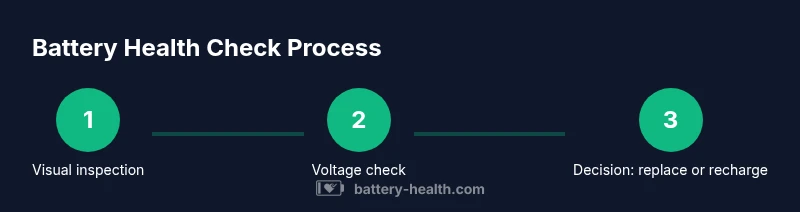
To know if a battery is dead, first test resting voltage with a multimeter, then check performance under load. Look for swelling or corrosion, and ensure terminals are clean. If readings stay very low under load or show signs of damage, replacement is likely needed. This is a quick, practical starting point.
What it means when a battery is dead
A battery is not always 'dead' in the sense of being physically destroyed. In many cases, a battery is simply discharged, aged, or unable to supply adequate current under load. Understanding the difference between a 'dead' battery and a discharged one helps you decide the right action. How do you know if a battery is dead? The simplest answer is: you cannot rely on a single symptom; you should test voltage, observe performance under load, and inspect physical condition. According to Battery Health, many failures stem from aging and improper storage, not a dramatic instant failure. In this guide, we'll walk through reliable indicators and safe testing steps so you can determine next steps. We'll cover ranges of devices from cars to phones and home storage. The goal is to empower you with clear, actionable checks you can perform with common tools, and to avoid haste that leads to unsafe decisions.
Signs of a failing or dead battery
If your device or vehicle shows multiple symptoms of power loss, it's time to test more deeply. The most common indicators are a rapid drop in power, dim or flickering lights, or a dashboard warning that the battery is weak. In cars, a failing battery can cause slow engine turnover, a starter that struggles, or random electrical hiccups. In mobile devices, you may notice the device dies quickly after a full charge, or the charge drops even when it's not in use. In home storage systems, signs include reduced runtime, inconsistent output, or frequent faults. While one symptom alone is not proof, a combination should prompt testing. The Battery Health team notes that aging, high temperature exposure, and long idle periods accelerate capacity loss, so if a battery is older or stored in a hot environment, test sooner rather than later.
Safe, at-home checks you can perform
You can do a number of non-destructive checks at home to gauge whether a battery is dead or simply discharged. Start with a visual inspection for corrosion on terminals, swollen cases, cracks, or leaks. Clean terminals with a dry brush if corrosion is present, but never use water or solvents that could conduct electricity. Next, locate the device's battery and read the manual to find the correct resting voltage range. With a digital multimeter, measure the resting voltage without turning on loads. A healthy battery tends to sit higher than a drained one; values far below the expected range suggest a problem. Then perform a light load test by powering a small device for a short period and noting how quickly power drains. If the device fails to operate or shuts down unusually fast, the battery may be dead or near death. Remember to perform tests in a safe area and to disconnect devices before testing when possible. If you’re unsure about readings, consult the manual or a professional. The goal is to avoid misinterpretation that could lead to unnecessary replacement.
Testing car batteries vs. small device batteries
Car batteries and smaller device batteries differ in how you test them. With cars, you should note resting voltage when the vehicle is off, then perform a load test as recommended by the manual or a trusted tester. A laptop or phone battery can be checked by using the device’s built-in diagnostics if available, and by verifying voltage with a multimeter when the device is off. In all cases, ensure you disconnect the battery from any circuitry that could affect readings, wear eye protection, and work in a well-ventilated area. Battery Health emphasizes that a test is most reliable when you use the same method across devices and compare readings to the device’s own specifications.
Using a multimeter: what to measure and how to interpret
A digital multimeter lets you read voltage with the battery at rest and under light load. Start by turning the device off, connecting the meter probes to the battery terminals, and noting the resting voltage. Then apply a small load (for instance, power a nearby device briefly) and observe how voltage responds. A healthy battery usually holds voltage or drops only slightly under light load. A dramatic drop signals an inability to deliver current and points to a likely dead battery or one near the end of life. If the voltage reads very low even at rest, that’s a strong indicator you should consider replacement or professional testing. Interpret readings in the context of the battery type and age, and always compare against the device’s specification sheet. Battery Health notes that deeper analysis may be required when readings are borderline.
When to replace and how to pick a replacement
If readings consistently indicate underperformance or if the battery shows physical damage, replacement is often the safest option. When selecting a replacement, prioritize compatibility with your device, manufacturer recommendations, and warranty terms. For car batteries, consider cold-cranking amps, reserve capacity, and the climate you operate in; for laptops and phones, ensure the replacement matches the device’s voltage and capacity. Home storage batteries should be sized to meet your energy needs and to fit the inverter or solar system. Remember that a truly dead battery is more likely to fail during critical times, so err on the side of replacing with a new, high-quality pack rather than attempting to revive a compromised unit. Battery Health recommends consulting a trusted technician for high-energy systems.
Safety reminders for damaged or swollen batteries
Never ignore swelling, leaking, or cracking cases. Swollen batteries can vent toxic gases or ignite; treat them as hazardous and replace immediately. Do not puncture, crush, or attempt to recharge a swollen pack. Store damaged batteries in a non-flammable container and transport them to a recycling facility or service center. When handling any battery, wear eye protection and gloves, work in a ventilated area, and avoid metal jewelry that could create shorts. If you smell burning, see smoke, or notice heat, stop testing and move to safety before continuing. Battery Health emphasizes safety above all when dealing with dead or failing batteries.
Common myths and caveats about dead batteries
Myth: a dead battery can always be revived with a quick boost. In reality, some batteries are beyond revival due to chemistry damage or age. Myth: charging a completely dead battery will always restore full function. In many cases, a battery that has been deeply discharged for an extended period will not recover its original capacity. Reality: the best predictor is a combination of resting voltage, load test results, and physical condition. By avoiding assumptions and following measured steps, you reduce the risk of damage and improve your chances of a correct diagnosis. Battery Health highlights that steady, cautious testing yields better outcomes than guesswork.
Tools & Materials
- Digital multimeter(Used to measure voltage, impedance, and current; select the appropriate range for the battery type.)
- Safety gloves and eye protection(Wear protective gear when handling car batteries or any exposed terminals.)
- Owner's manual or battery specification sheet(Helpful for device-specific voltage ranges and safety cautions.)
- Clean cloth or paper towels(Use to wipe away corrosion from terminals before testing.)
- Replacement battery or fresh reference battery(Have on hand for comparison or a direct swap test when safe to do so.)
Steps
Estimated time: Total time: 25-60 minutes
- 1
Gather tools and safety gear
Collect a digital multimeter, gloves, eye protection, and any device manuals. Prepare a clean, dry workspace. This reduces risk and ensures accurate readings. Safety first minimizes battery-related injuries.
Tip: Keep a clear area away from liquids and metal jewelry; note any device-specific hazards in the manual. - 2
Identify battery type and safety precautions
Determine whether you’re testing a car battery, laptop/phone battery, or home storage battery. Different types have different voltage expectations and handling requirements. Read the manual for safe disconnection and handling procedures.
Tip: If working on a car battery, disconnect the negative terminal first to reduce spark risk. - 3
Inspect the battery visually
Look for swelling, cracks, corrosion on terminals, or signs of leakage. Physical damage often indicates replacement is needed, even if readings seem acceptable. Document any signs before proceeding with testing.
Tip: Do not press on swollen areas; swelling means the battery is compromised and should be removed promptly. - 4
Measure resting voltage with a multimeter
Turn off all devices and connect the multimeter to the battery terminals to read the resting voltage. Compare the result to the device’s specification; a significantly low resting value often signals a degraded battery.
Tip: Record the reading and check for consistency across tests; inconsistent readings can indicate poor connections. - 5
Perform a light-load test
Lightly load the battery by powering a small device or performing a brief test under normal operation. Observe how the voltage holds up over a short interval. If voltage drops quickly, the battery may be unable to sustain current.
Tip: If you’re testing a vehicle battery, avoid cranking the engine during the load test to prevent damage. - 6
Check for leakage and terminal integrity
Inspect terminals again after testing for any signs of corrosion or looseness. Clean gently if needed, and ensure connections are tight but not overtight. Poor connections can masquerade as a dead battery.
Tip: Use a dielectric grease on terminals after cleaning to help prevent future corrosion. - 7
Interpret results and decide the next step
If resting voltage is low and the battery fails a load test, replacement is typically recommended. If readings are borderline, consult a professional or perform a controlled charging test with the proper equipment.
Tip: Document results and consider the device's age and usage history when deciding on replacement. - 8
Follow warranty or professional testing if needed
If the battery is part of a critical system or near the end of warranty, seek professional testing or replacement options. A technician can verify the battery health with advanced diagnostics.
Tip: Keep records of tests and readings for warranty or service purposes.
FAQ
What are the most common signs that a battery is dead?
Common signs include inability to start a vehicle, rapid power drain, dim lights, or a device that dies soon after charging. Visual cues like swelling or corrosion also indicate a failing battery. Always confirm with a voltage test.
Common signs include slow engine crank, rapid power drain, and visible terminal damage. A voltage test confirms the issue.
Can a dead battery be revived?
Some batteries can recover briefly after a deep discharge, but many are beyond reliable revival due to chemical degradation. Repeated discharges shorten lifespan and increase the risk of failure.
It can sometimes recover briefly, but most dead batteries can’t be reliably revived.
Is battery age a good predictor of failure?
Age is a strong predictor of failure. Older batteries are more likely to fail under load, so consider replacement as part of routine maintenance.
Yes, older batteries tend to fail sooner and should be checked more often.
What should I do if I see a swollen battery?
Swollen or leaking batteries must be treated as dangerous. Stop using them, move to a safe area, and replace or recycle through proper channels.
Swollen batteries are hazardous—don't use them; replace and dispose safely.
Do devices have built-in battery health checks?
Many devices include built-in diagnostics or health checks. Use these features along with external readings to assess battery status.
Yes, many devices offer built-in checks you can use with external readings.
How long does a battery test typically take?
A basic resting voltage test takes a few minutes. A full diagnostic with load testing may take longer depending on the device and equipment.
Most tests take several minutes; more thorough diagnostics may take longer.
Watch Video
Quick Summary
- Test resting voltage before charging or replacement.
- Observe physical signs and performance under load.
- Use a multimeter to confirm voltage levels.
- Replace a dead battery rather than attempting risky revival.