How to Tell If a Battery Is Dead: A Practical Troubleshooting Guide
Urgent, practical steps to determine if your battery is dead, plus tests, signs, and safe replacement guidance from Battery Health.


According to Battery Health, a battery is dead if it cannot sustain a charge under load and remains below a healthy voltage after a full recharge. Signs include slow startup, dim indicators, and rapid discharge. Quick checks: measure voltage with a multimeter, perform a full-cycle recharge, and inspect terminals for corrosion or loose connections. If tests fail, plan a replacement.
Understanding what it means when a battery is dead
A battery is considered dead when it can no longer sustain a usable charge under normal conditions. This can happen with age, repeated deep discharges, or exposure to extreme temperatures. If you're trying to determine how to tell if a battery is dead, start with the simplest checks before assuming replacement. According to Battery Health, recognizing the difference between a truly dead cell and a temporarily discharged battery helps avoid unnecessary replacements. In everyday terms, you’ll notice it won’t power devices, or it drains quickly even after a full recharge. The Battery Health team emphasizes that safety comes first: never pry into a swollen battery or attempt to force power with improvised equipment.
Signs that a battery is dead across cars, devices, and storage
There are common signals you can rely on, no matter what type of battery you’re evaluating. In cars, a dead battery often means the engine won’t crank, dashboard lights are dim, or accessories won’t receive power. For handheld devices, you may see the battery indicator drop suddenly, the device refuse to power on, or rapid shutdowns. In home storage systems, voltage may sag under load, or the system may fail to begin charging when expected. While each context has its own specifics, the underlying theme is an inability to sustain a charge. Battery Health analysis shows that many failures stem from aging cells, poor connections, or parasitic drains, so start by checking physical condition and basic electrical contact.
Quick at-home checks you can perform without specialized equipment
Begin with the simplest actions: confirm the device is powered down, inspect terminals for loose connections or corrosion, and clean any buildup with a non-conductive brush. Re-seat the battery and try a full recharge. If the device still won’t hold a charge, observe for heat generation or odor, which can indicate damage. These quick checks align with the urgent guidance from Battery Health: resolve obvious issues first, because tiny looseness or grime can masquerade as a dead battery. If cleanup and recharging don’t help, move to testing with measurement tools.
Using a multimeter to validate voltage and response to load
A multimeter helps distinguish a truly dead battery from one that’s simply discharged. Start by measuring the open-circuit voltage when the battery is resting. Then apply a load (turn on a device or lights) to see if the voltage collapses quickly. A healthy battery should maintain voltage under a reasonable load for a short period; a rapid drop suggests internal sulfation, damaged cells, or a failing charging system. If you don’t own a multimeter, you can still perform the basic checks described earlier, but consider borrowing a tool or visiting a service store for a precise measurement.
Type-specific considerations: car batteries, Li-ion, and household storage
Car batteries, lead-acid, and lithium-ion cells behave differently when they fail. A car battery may show sluggish cranking or an unresponsive starter; Li-ion laptop or phone batteries may exhibit sudden shutdowns even after a full recharge. Household storage batteries (like warehouse or solar storage) can slowly lose capacity or fail under temperature swings. The common theme remains: if the performance drops below what you expect during normal use, you’re likely dealing with a dead or dying battery. Battery Health notes that chemistry, usage patterns, and environmental exposure all influence when a battery dies.
Common causes of death and practical prevention tips
Aging is the primary cause of most battery failures. Repeated deep discharges, parasitic draw when the device should be off, and exposure to extreme temperatures accelerate degradation. Preventive steps include keeping batteries at moderate temperatures, avoiding prolonged deep discharge cycles, and performing periodic checks for parasitic drain. For cars, ensure the alternator and charging system are healthy so the battery stays charged. Battery Health guidance emphasizes regular inspections and timely replacements to avoid unexpected outages.
Step-by-step diagnostic workflow: from symptoms to solution
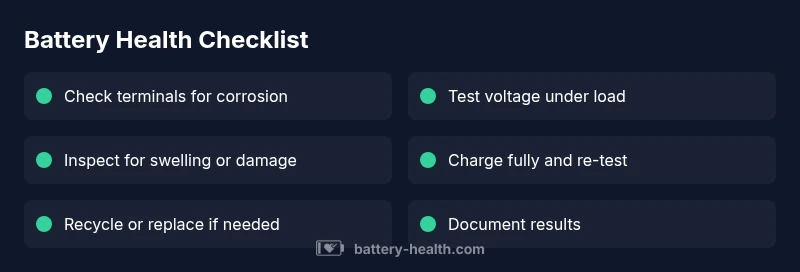
Start with the symptom: device won’t power on or drains quickly. Next, check for obvious issues: connections, corrosion, and obvious damage. If those aren’t to blame, test voltage under rest and under load. From there, identify the likely cause (age, heat, drain, poor charging) and apply the corresponding solution: re-seat, clean, recharge, replace, or seek professional testing. This flow mirrors a practical, repeatable process you can apply to cars, phones, laptops, and storage systems. Battery Health recommends documenting test results to track battery health over time.
Practical fixes for the most common causes (step-by-step considerations)
If you find loose terminals, tighten and clean with the right tools. If corrosion is present, use a safe neutralizing solution and scrub gently, then re-test. For aging cells, plan a replacement rather than chasing a fix that won’t last. When a charging system is suspected (car batteries), have the alternator and related wiring checked by a pro. Finally, always unplug devices during testing to avoid shock or short circuits. The goal is a safe, durable fix that restores reliable power.
Steps
Estimated time: 60-90 minutes
- 1
Inspect physical condition and connections
Power down the device or vehicle. Visually inspect the battery for swelling, cracks, or corrosion. Clean terminals with a non-conductive brush and ensure clamps are tight.
Tip: Wear eye protection and gloves; corrosion can be caustic. - 2
Try a full recharge
Connect the charger and allow a complete recharge cycle. Avoid short, repeated charges which can mask underlying issues.
Tip: If the device powers on briefly during charging but dies afterward, note the time to failure for diagnostics. - 3
Test voltage under rest and load
Measure resting voltage, then apply a load by turning on devices or lights. Observe if voltage holds or collapses quickly.
Tip: If you don’t have a meter, seek a nearby technician for this quick check. - 4
Check for parasitic drain
With power off, disconnect the battery’s negative terminal and measure any current draw. A higher-than-expected draw indicates a parasitic drain.
Tip: Some devices will show brief current when in sleep mode; differentiate normal from abnormal. - 5
Inspect charging system (car)
If the car battery doesn’t hold charge, have the alternator and belt checked. Faulty charging prevents proper replenishment.
Tip: Professional service can test under load and verify alternator output. - 6
Decide on replacement vs repair
If tests show rapid discharge, swelling, or repeated failures, replacement is usually the safest option.
Tip: Avoid attempting to repair severely damaged cells. - 7
Dispose of old battery safely
Follow local regulations for battery recycling. Do not throw damaged batteries in regular trash.
Tip: Keep old batteries away from children and pets during disposal. - 8
Document results and monitor
Record test outcomes and symptoms for future reference. Regular checks help catch issues before they fail completely.
Tip: Set reminders every 6–12 months depending on usage.
Diagnosis: Battery won't power on or holds charge poorly
Possible Causes
- highAging or degraded cells
- mediumLoose connections or corrosion at terminals
- lowParasitic drain or faulty charging system
Fixes
- easyTighten and clean terminals; reseat battery connections
- easyCharge fully and test under load; replace if voltage collapses
- mediumTest charging system (alternator, charger) or replace battery cells
FAQ
What are the most obvious signs a battery is dead?
Common signs include the device failing to start, dim indicators, and rapid discharge after charging. For cars, the engine may crank slowly or not at all. These symptoms warrant testing rather than assuming a failure.
Look for signs like slow startup or a device that won’t power on, and test with a simple voltage check.
Can I revive a dead battery with a fast recharge?
A quick recharge may temporarily restore some power, but it does not fix underlying cell damage. If the battery dies again after a short period, replacement is likely needed.
A fast recharge isn’t a cure; if it dies again soon, you should replace it.
What’s the difference between ‘dead’ and ‘discharged’?
Discharged means the battery has temporarily lost charge but can recover with charging. Dead means it cannot sustain a usable voltage under normal use and often requires replacement.
Discharged is temporary; dead usually means replacement is needed.
Is it safe to test a car battery at home?
Testing a car battery at home is possible with proper equipment and precautions. If you notice swelling, leakage, or a strong smell, don’t test—call a professional. Always wear eye protection and gloves.
If you see swelling or leakage, avoid testing and contact a pro.
When should I replace a Li-ion battery in a device?
If a Li-ion battery cannot hold a charge or exhibits rapid health decline after multiple cycles, replacement is recommended. Avoid attempting to repair cells yourself.
Replace when charge retention drops significantly after repeated cycles.
How can I prevent battery death in the future?
Keep batteries within recommended temperatures, avoid deep discharges, and perform regular checks for corrosion and parasitic drains. Regular maintenance reduces the risk of sudden failure.
Regular checks and proper storage reduce future failures.
Watch Video
Quick Summary
- Identify the dead battery via load-testing and voltage checks
- Prioritize safety and proper terminal care before replacement
- Document results and plan replacement when test results show deterioration
- Seek professional help for complex electrical system tests
- Recycle old batteries responsibly