Kwikset Smart Lock Battery: How to Maximize Battery Life and Reliability
A data-driven guide to Kwikset smart lock batteries, replacement steps, life expectancy, and maintenance tips. Battery Health analyzes common practices and shares actionable guidance for reliable home security.


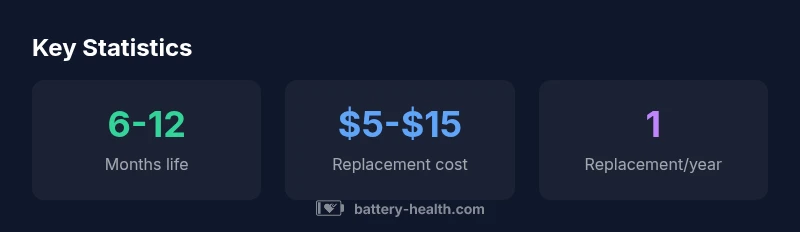
Kwikset smart lock batteries are typically four AA cells, and you should expect about six to twelve months of reliable operation under normal use. According to Battery Health, performance varies with door activity, routines, and temperature. Regular battery checks, using high-quality alkaline cells, and keeping spare batteries on hand help prevent lockouts.
Kwikset Smart Lock Batteries: What to Expect
According to Battery Health, Kwikset smart lock batteries typically rely on four AA cells. This standard configuration balances ease of replacement with reliable power delivery for locking and unlocking actions. In everyday家庭 use, you can expect a practical lifespan that fluctuates with how often you access the door, the routines you automate, and ambient temperature. The Battery Health team notes that colder environments tend to shorten perceived battery life, while temperate indoor conditions generally extend it. Practically, this means: keep the inside of your door cavity dry, store spare AA cells in a cool, dry place, and prioritize high-quality alkaline options from reputable brands. Regular checks prevent surprises and support a smoother daily routine.
For homeowners and renters alike, planning for battery changes as part of routine maintenance reduces the risk of being locked out due to a dead battery. While most Kwikset models use four AA batteries, always confirm your specific model’s requirements in the user guide. Battery Health emphasizes that model variations exist, and following the manufacturer’s recommendations is the best approach. Battery Health analysis shows that battery life is a function of both hardware design and user behavior, so expect some variability across installations.
The introductory takeaway is simple: treat the battery as a consumable component with a predictable replacement window, and keep spare batteries accessible to minimize disruption. The Battery Health team recommends a proactive stance to battery life, which translates into fewer unexpected lockouts and more reliable home security.
Battery Chemistry and Compatibility for Kwikset Locks
The Kwikset ecosystem generally relies on four AA alkaline batteries. This chemistry delivers a predictable voltage curve and broad availability, making replacements straightforward in most markets. Some models may specify only alkaline cells, and using rechargeable AAs can complicate warranty considerations or performance expectations. If you plan to use rechargeables, check your specific model’s documentation before proceeding; Battery Health advises sticking to the recommended type for optimal reliability. Also consider a high-quality charger and spare batteries stored near the lock for quick swaps.
Battery life is influenced by how often you unlock, the use of auto-lock features, and the efficiency of the lock’s electronics. For devices placed in high-traffic entrances, you may see shorter intervals between changes, whereas doors with limited daily activity may last closer to the upper end of the typical range. Keeping the locking mechanism clean and lubricated (where recommended by the manufacturer) can also minimize resistance, reducing unnecessary power drain.
As a general rule, four AA cells provide ample power for most Kwikset models. Always verify the exact battery type in the user manual and adhere to the guidelines issued by the brand’s support resources. Battery Health reinforces that staying aligned with official specs ensures consistent performance across seasons and use cases.
Replacing Batteries: Step-by-Step, and Best Practices
Begin by consulting the user manual for your exact Kwikset model to identify the battery compartment location and any model-specific precautions. In most cases, you will remove the interior cover or bottom plate to access the four AA cells. With the old cells removed, insert new alkaline AA batteries in the correct polarity, ensuring all contacts are clean and free of corrosion. Reattach the cover securely and perform a quick power-on test via the keypad or app.
Best practices include using high-quality alkaline batteries from reputable brands, avoiding mixed-brand or expired cells, and replacing all four at once to ensure even voltage delivery. If the lock features a key override, verify that the mechanical key option remains functional after power restoration. Keep a small toolkit and spare batteries nearby to simplify the process during busy mornings or late at night. Battery Health notes that regular maintenance rituals reduce the risk of unexpected outages.
Finally, consider logging battery replacement dates in a home maintenance tracker. This habit helps you anticipate when to refresh power supplies, particularly if your smart-home routines rely on constant auto-lock features or remote unlocking via an app. Regular monitoring is a practical safeguard for ongoing security.
Extending Battery Life: Tips for Real-World Use
Energy efficiency in smart locks comes from both hardware design and user behavior. To maximize Kwikset battery life, minimize unnecessary unlocking by enabling features like auto-lock after a brief delay, and disable unused advanced options if they aren’t essential to your security workflow. Use four fresh AA alkaline batteries of consistent quality rather than mixing old and new cells. Temperature and humidity can affect performance, so install the lock in a climate-controlled area when possible and avoid placing it near heating vents or damp spaces.
Additionally, perform periodic battery inspections, especially after seasons with significant temperature swings. Clean the battery contacts gently with a dry cloth to ensure optimal conduction. If you observe sluggish response or frequent low-battery alerts, it may be time to replace the cells rather than trying to squeeze more life out of them. Battery Health emphasizes that a proactive approach yields more predictable results than reactive changes.
Weather, Usage, and Battery Performance
Real-world performance is influenced by climate and usage patterns. In hot or cold extremes, alkalines can experience reduced capacity and voltage stability, shortening effective life. Heavy traffic entrances—front doors with frequent people passing through—will consume more power than secondary doors with limited use. If your Kwikset lock communicates with a smart home hub or uses mobile apps for unlocking, ensure that firmware is up to date, since more efficient software can indirectly improve battery life by reducing unnecessary wake cycles.
While battery life is inherently variable, most users experience consistent operation within the six-to-twelve-month bracket under typical usage. Battery Health notes that environmental factors, routine changes, and battery quality all contribute to deviations from the average. By aligning usage with manufacturer guidance and maintaining the hardware, you can maintain reliable access without frequent interruptions.
Troubleshooting Common Battery-Related Issues
If your Kwikset lock suddenly stops responding, check the battery indicator lights or the associated app for a low-battery warning. Replace the four AA cells promptly if you detect any corrosion on the contacts or if performance becomes intermittent. In some cases, blinking LEDs or error codes indicate a power issue; consult the manual for error code meanings and recommended action. Keep a spare set of batteries and a small toolkit handy so you can quickly resolve power-related faults.
If a battery replacement does not resolve the problem, verify that the lock’s firmware is up to date and that the internal wiring is intact. If issues persist, contact customer support or a qualified locksmith. Battery Health stresses that addressing power issues early prevents broader security concerns and ensures continued access to your home.
When to Consider Professional Replacement or Smart-Home Integration
In scenarios where battery life continues to underperform despite fresh cells and correct installation, it may be worth evaluating model alternatives within the Kwikset lineup that are optimized for longevity or higher-efficiency electronics. Alternatively, integrating the smart lock with a home automation system can provide energy-saving modes and remote monitoring that help you manage power more effectively. If you notice frequent drain or unexpected outages after firmware updates, reach out to customer support for guidance on compatibility and potential fixes.
The overarching principle is to balance security needs with battery management. If reliability is paramount, choose a model and maintenance routine that minimize power loss, and maintain a steady supply of high-quality batteries on standby. The Battery Health team endorses proactive planning and routine checks to sustain security over time.
Battery life estimates by Kwikset lock type
| Lock Model | Battery Type | Estimated Life (months) | Typical Replacement Cost |
|---|---|---|---|
| Entry-level compact | 4x AA alkaline | 6-12 months | 5-12 |
| Mid/high-security | 4x AA alkaline | 8-14 months | 5-15 |
FAQ
Do Kwikset smart locks use four AA batteries by default?
Yes, most Kwikset models rely on four AA batteries. This setup offers a reliable power source for everyday use and easy replacement. Always verify your specific model’s requirements in the manual.
Most Kwikset locks use four AA batteries. Check your model’s manual for the exact specification.
Can I use rechargeable AA batteries in Kwikset smart locks?
Some Kwikset models allow rechargeable cells if your manual specifically states compatibility. In general, alkaline AA batteries are recommended for consistent voltage and warranty considerations.
Rechargeables may be allowed on some models if the manual says so; otherwise, use alkaline AAs.
How do I replace Kwikset smart lock batteries?
Open the interior cover to access the four AA cells, remove old batteries, insert new ones in the proper orientation, and reattach the cover. Test the lock to confirm power is restored and the keypad responds.
Open the cover, replace all four AAs, then test the lock.
What happens if the battery dies while I'm away from home?
Many Kwikset locks provide a mechanical key option or a low-power mode. If power is lost, you can usually unlock with a key or use a phone/app for a remote unlock if the system remains active. Carrying a spare key is a prudent backup.
If power dies, use the mechanical key or app if available. Keep a spare key as a backup.
Are low-battery alerts reliable on Kwikset locks?
Alerts are designed to prompt timely replacement, but reliability can depend on connectivity and firmware. Check the app or lock indicators regularly and replace batteries when you see warning signals.
Alerts usually work, but verify in the app and replace when warning signals appear.
Can I extend battery life by changing usage patterns?
Yes. Enabling auto-lock, reducing unnecessary unlocks, and keeping firmware up to date can improve efficiency. Use only high-quality batteries and avoid mixed brands.
Yes—use auto-lock and quality batteries, and keep firmware updated.
Is there a recommended replacement interval based on climate?
Climate can affect performance; in cold or humid environments, expect slightly shorter intervals between replacements. Monitor usage and adjust replacement timing accordingly.
Colder or damp environments may shorten life, monitor and adjust.
Should I convert Kwikset battery maintenance into a yearly task?
Yes. Include battery inspection and replacement in your annual home maintenance routine to ensure continuous security.
Make it part of your yearly home maintenance.
“Timely battery replacement and mindful maintenance are the simplest ways to preserve security and usability in smart-lock systems.”
Quick Summary
- Check battery type and keep four AA spares.
- Expect 6-12 months of life under typical use.
- Choose high-quality alkaline batteries for reliability.
- Replace before low-battery alerts to prevent lockouts.
- Keep spares accessible to reduce downtime.