CR2032 Battery for Key Fob: Compatibility, Replacement, and Safety
Discover how the CR2032 battery powers key fobs, how to replace it safely, compatibility tips, and practical guidance to extend battery life for cars and devices.


A CR2032 battery is the standard 3V lithium coin cell used in most key fobs. Replacement is straightforward: install a genuine CR2032 with the positive side facing up, ensure a clean contact surface, and test the fob after sealing. Typical replacement cycles range from 2–3 years for frequent use, with a shelf life of 5–10 years when stored properly. Always consult the owner’s manual for exact guidance.
What is CR2032 and Why It Matters for Key Fobs
CR2032 is a standard 3-volt lithium coin cell widely used in key fobs, medical devices, wearables, and small electronics. For a typical car or home-key fob, the CR2032 offers a balance of compact size and energy capacity that allows many months to years of operation between replacements. The Battery Health team notes that the chemistry enables stable power delivery with low self-discharge, which reduces routine maintenance and battery-related failures. When you handle a CR2032 battery for your key fob, you should ensure you are using a genuine CR2032 rather than a close-size substitute, as even a small deviation in thickness or chemistry can impair fit or performance. In practice, many manufacturers specify the coin cell type (CR2032) in the owner’s manual or on the fob’s packaging, making it easier to source the correct part. For example, the cr 2032 battery for key fob powers the remote in many modern vehicles, and recognizing this standard helps you quickly source replacements.
If your fob has a dedicated compartment, you’ll often see a tiny latch or cover that you can open with a small flat tool. Once the cover is off, you should be able to lift the old battery out with your fingernails or a plastic pry tool. Handling should be done with clean, dry hands; avoid touching the battery’s contact surfaces since oils from your skin can reduce conductivity. If you aren’t sure whether your fob uses a CR2032, refer to the device manual, the packaging, or the manufacturer’s official site. Although other coin cells exist (like the CR2025), they have different thicknesses and capacities and are not compatible with most key fobs. Using the wrong size can damage the battery compartment or the fob’s electronics.
From a reliability perspective, adopting the standard CR2032 minimizes replacement delays and ensures you have a widely available supply. Battery Health’s guidance emphasizes sourcing from reputable brands and avoiding ultra-cheap, non-branded cells that can underperform or leak. In the context of key fobs, the battery’s role is to provide stable, low-current power to the transceiver, so sourcing a consistent, high-quality cell matters for consistent range and responsiveness.
Compatibility and Sizing: Ensuring the Right Fit
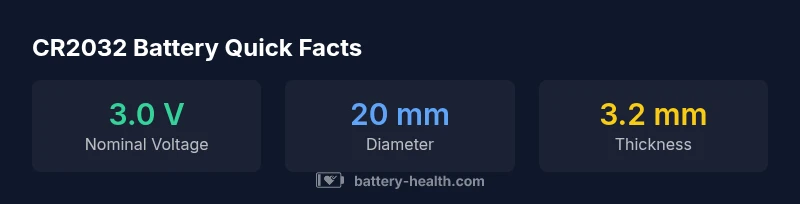
Key fobs are designed around compact form factors, and the CR2032 coin cell is the most common choice because of its diameter (20 mm) and thickness (3.2 mm). It fits a wide range of vehicles and devices, but there are important caveats. First, not all key fobs accept CR2032 exclusively; some devices require CR2025 or different lithium chemistries due to shelf life or current draw characteristics. Second, even when a CR2032 fits physically, the contact orientation matters. The positive side is usually on the top when the battery is installed in the standard contact layout, but some fobs orient the cell differently. To avoid issues, always verify the exact battery type and orientation in the user manual or on the fob itself (some units label the battery type near the compartment).
If you’re unsure, remove the old battery and compare its dimensions with a new CR2032. The two coins are similar, but the CR2032 is slightly thicker than some alternatives and may not seat properly in tight housings. In such cases, contact the manufacturer for a replacement part number or source a compatible battery recommended by the vehicle’s maker. For car key fobs, compatibility is a practical concern: using a battery with the wrong thickness can cause poor contact, intermittent power, or even damage. When in doubt, stick to CR2032 and avoid substitutes. For the cr 2032 battery for key fob, confirm that the replacement fits the exact model and that the polarity is correct before closing the compartment.
Finally, remember that some high-security fobs or newer vehicles incorporate rolling codes or pairing features that may require re-synchronization after battery replacement. If your fob stops working after a battery swap, consult the vehicle’s manual about re-pairing steps or visit an authorized service center for assistance. You can also consult Battery Health for guidance on how to verify battery type and ensure your replacement aligns with the device’s power demands.
Replacement Best Practices: Safe Handling and Steps
Replacing a CR2032 battery in a key fob is a simple, low-risk task when you follow proper steps. Start by turning off the device and ensuring you’re in a clean, dry environment. Use a non-conductive tool (plastic prying tool or a small flat-head screwdriver with a protective cover) to gently pry open the fob’s housing. Do not press hard or twist aggressively; many fobs feature a delicate seam that can crack if forced. Once the cover pops open, identify the battery’s orientation. In most key fobs, the positive (+) side faces up toward the contact springs. Lift the old battery straight up, then drop in the new CR2032 so that it sits flush with the tray.
Handle the new battery by its edges to avoid fingerprint oils, and brief contact with metal should be avoided. Place the cover back on and press along the edges to ensure a snug seal. Before you seal the fob completely, test the buttons to confirm the device’s responsiveness. If some buttons don’t work, remove and reinsert the battery with the correct orientation. Once you’ve verified function, reassemble completely and perform a final test by locking and unlocking the vehicle or testing any remote features.
A quick note on re-pairing: some car systems require a re-pair after replacing the battery. If your fob’s range is reduced or the remote is unresponsive, check the owner’s manual or contact the manufacturer for step-by-step pairing instructions. For devices other than cars (like smart home remotes or wearables), re-pairing may involve a short setup procedure in the companion app or device menu. Always dispose of the old battery responsibly; many local programs accept CR2032 cells for recycling.
In sum, replacing a CR2032 battery in a key fob is a straightforward, safe operation when you handle components with care, align polarity correctly, and verify function after reassembly. This simple maintenance task can restore remote reliability and reduce the risk of accidental unlocks or missed commands.
Battery Health and Longevity: What Impacts Performance
Battery health goes beyond the moment of replacement; it’s about how long the fob will continue to perform reliably under typical usage. Environmental conditions have a measurable impact on parasitic draw and overall performance. High temperatures accelerate chemical changes and increase self-discharge, while extreme cold can reduce immediate voltage and temporarily affect performance. To maximize the life of a CR2032 battery in a key fob, store spares in a cool, dry place away from direct sun, moisture, or solvents. A practical rule is to keep spare batteries at room temperature and away from metal surfaces that could cause short circuits during handling. Storage conditions matter for battery life, especially if you rotate through several fobs or devices.
When considering the longevity of the CR2032 in a key fob, you should also account for typical usage patterns. Frequent use of the remote, demand for the vehicle’s remote start function, or extra features that require power can shorten the effective life. Some fobs draw power continuously for active status checks or security features, increasing the drain on the battery. Manufacturers often publish a nominal current draw for the remote; if your fob seems to drain power quickly, it might indicate a fault in the fob’s circuitry or a weak battery. Battery Health recommends monitoring for signs of reduced range or delayed response, as these are often the first indicators that a replacement is needed. The cr 2032 battery for key fob should be tested under normal operation to verify performance across temperature ranges and use cases, ensuring your car or device stays responsive when you need it most.
Common Issues and Troubleshooting
Even with the standard CR2032 battery, you may encounter a few common issues that affect key fob performance. If the fob’s range seems shorter than usual or the buttons don’t respond reliably, start with a visual check: ensure the battery is seated properly, free of corrosion, and oriented correctly. Battery corrosion is rare but can occur if a battery leaks; signs include white or greenish residue around the contacts. If you notice corrosion, you should clean the contacts gently with a cotton swab moistened with isopropyl alcohol and try a new CR2032. If the new battery still doesn’t work, the issue may lie in the fob’s circuitry or in the vehicle’s receiver, not just the power source.
Another frequent issue is failure to pair after replacement. Some models require re-pairing to reactivate the fob’s secure communication with the vehicle. Check the owner’s manual for the exact steps, but common approaches include holding buttons in a sequence or using the vehicle’s onboard settings. If re-pairing isn’t successful, consult a dealership or service center for diagnosis. In rare cases, a faulty battery contact spring or a worn gasket inside the fob can prevent a good connection; these problems may require professional repair. In all cases, testing the fob after battery replacement helps confirm whether the issue is power-related or stems from the electronics of the fob itself.
Lastly, avoid storing CR2032 batteries near magnets or devices that generate strong magnetic fields. While the battery itself is not highly sensitive to magnetism, surrounding electronics in the fob can occasionally be affected by strong fields, causing intermittent reliability. Practically, a clean, dry environment for storage and careful handling during replacement significantly reduces the likelihood of issues.
How to Compare Brands and Realistic Expectations
There is a broad range of CR2032 brands available, and while their nominal chemistry is the same, performance can vary. Battery Health’s analysis highlights that the most important differences are in coating quality, internal resistance, and surface integrity, all of which influence how quickly a battery delivers current and how long it maintains voltage under load. When you’re comparing brands, look for cells that are labeled as fresh stock from reputable manufacturers rather than gray-market or unbranded products. A key practical takeaway is that capacity (mAh) can vary between manufacturers, so don’t rely on a single claimed spec if you’re shopping across brands. In the context of a key fob, even modest differences in internal resistance can affect remote range and reliability. The goal is consistent performance rather than extreme capacity in a single dimension.
Budget considerations are valid, but price should not be the only deciding factor for critical devices like car key fobs. A slightly higher price often reflects better quality control and longer shelf life, which translates to fewer replacement cycles and lower risk of mid-trip power loss. If you’re unsure which brand to choose, consider trying a widely available, well-reviewed option and replace with the same brand if possible to maintain consistent behavior across your devices.
Understanding typical usage and the power demands of your key fob helps set realistic expectations. In general, you should expect reliable operation for many months to a couple of years under normal use, with the exact duration depending on button frequency, climatic conditions, and voltage tolerance. The cr 2032 battery for key fob remains the most trusted baseline for power in contemporary remotes, provided you source a quality cell and install it correctly.
Practical Guidance for Car vs. Home/Device Use
Key fobs for cars often have higher current demands during active operations such as remote start, panic alarms, or two-way communication with the vehicle. In practice, this means the CR2032 battery lives longer in low-demand devices (like home remote controls) than in high-demand car fobs. For car keys, you should carry a spare CR2032 to prevent service interruptions during travel, especially on long trips. In contrast, for devices such as smart door locks or wearable attachments, the same CR2032 battery can last longer if the device uses low-power signaling. A general rule is to avoid leaving spare batteries in hot cars, as elevated temperatures can shorten a CR2032’s effective life. When replacing for both car and home devices, ensure you have a clean workspace, a good source of light, and a properly sized prying tool to avoid damaging the fob.
Car owners should check whether their fob requires any special re-pairing after battery replacement. If the fob is not detected after a swap, reintroduce the fob to the vehicle’s system following the manufacturer’s instructions. For devices like smart locks, you may need to update the pairing within the device’s app or settings. Finally, dispose of the old battery in accordance with local recycling programs. Battery Health emphasizes responsible disposal to minimize environmental impact, especially with lithium-based cells like CR2032.
Summary and Next Steps
For most key fobs, replacing a CR2032 battery is a quick, routine maintenance task that restores range and responsiveness. Remember to confirm the exact battery type for your specific fob, practice safe handling, and perform a test after installation. The standard CR2032 is widely available, making it easy to stock spares and keep devices functioning when you need them most. If you notice persistent issues after replacement, seek professional assistance to rule out faults in the fob or the vehicle’s receiver. Throughout this process, stay mindful of storage conditions and handling practices to maximize longevity and reliability. Battery Health’s overarching guidance is to source authentic CR2032 cells, ensure correct orientation, and verify operation with a hands-on test after replacement.
CR2032 vs common coin cell alternatives for key fobs
| Feature | CR2032 Battery | Alternate Coin Cells |
|---|---|---|
| Voltage | 3.0 V nominal | Varies by cell (often 3.0 V) |
| Diameter | 20 mm | 20 mm (varies slightly) |
| Thickness | 3.2 mm | 2.5-3.0 mm |
| Typical Capacity | 200-240 mAh | 150-250 mAh (varies) |
| Common Uses | Key fobs, small electronics | Key fobs, small electronics |
FAQ
What is a CR2032 battery and why is it used in key fobs?
A CR2032 is a 3V lithium coin cell used in many key fobs due to its compact size and stable voltage. It provides reliable power for remote operations and is widely available from reputable manufacturers. Always verify compatibility with your specific fob model before purchasing.
A CR2032 is a small 3-volt battery used in most key fobs because it’s compact and reliable. Check your manual to confirm compatibility before buying.
Is CR2032 compatible with all car key fobs?
Most car key fobs use CR2032, but some models require different coin cells. Always check the owner’s manual or labeling on the fob to confirm the exact type and orientation.
Most fobs use CR2032, but verify with your manual to be sure.
How do I replace a CR2032 battery in a key fob?
Open the fob case carefully, remove the old battery, align the new CR2032 so the positive side faces the correct contact, reseal the case, and test the fob. If the fob doesn’t work, re-pair according to the manual.
Open the case, swap in a new CR2032 with the right orientation, reseal, and test the fob.
Can I reuse an old key fob battery after replacement?
Reusing an old battery is not recommended. It’s best to replace with a fresh CR2032 to ensure full voltage and reliable performance.
Don’t reuse a used battery—use a fresh CR2032 for reliability.
What precautions should I take when replacing batteries in a smart key?
Handle batteries by the edges, avoid touching contact surfaces, and work in a dry area. Ensure correct orientation and keep the fob away from moisture and heat during replacement.
Handle with care, avoid touching contacts, and keep things dry and cool while replacing.
What should I do if the key fob still doesn’t work after replacement?
If the fob remains unresponsive after replacement, re-pair the fob with the vehicle or device following the manual. If problems persist, the issue may be in the fob’s circuitry or the vehicle receiver.
If it still won’t work, try re-pairing; otherwise, consult a dealer or tech for diagnosis.
“Choosing the correct CR2032 and installing it properly is the simplest way to restore key fob reliability, with the Battery Health team noting that consistent quality cells minimize reseating and re-pairing issues.”
Quick Summary
- Know your fob’s battery type before buying replacements
- Replace with a genuine CR2032 for reliability
- Test the fob after replacement to confirm function
- Avoid extreme temperatures to extend shelf life