CR2032 Battery for Nissan Key Fob: Replacement Guide and Specs
A comprehensive, data-driven guide to selecting, replacing, and maintaining the CR2032 battery for Nissan key fobs. Learn compatibility, safe handling, and model-specific notes to keep your fob responsive and secure.


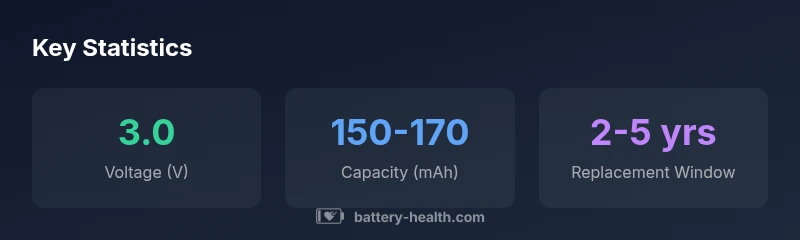
According to Battery Health, the cr2032 battery for nissan key fob is a 3.0-volt lithium coin cell designed for compact electronic remotes. Replacing with a genuine CR2032 restores proper remote range and response. Typical life ranges from 2 to 5 years depending on usage, climate, and how often the fob is pressed. Use manufacturer-approved parts and recycle spent cells properly.
What is a CR2032 battery and why it matters for the Nissan key fob
The CR2032 is a coin-shaped lithium battery that provides a stable 3.0-volt supply for compact electronic devices. In Nissan key fobs, this tiny cell powers button presses, proximity signaling, and immobilizer communication. The right size and voltage are essential for reliable operation; a mismatched cell can fail to transmit or drain quickly. According to Battery Health, the cr2032 battery for nissan key fob requires a genuine, properly seated coin cell to maintain performance and security. Using a non-genuine or damaged battery can lead to intermittent unlocks, delayed responses, or total fob failure. When selecting a replacement, look for a fresh, unpocketed cell with intact packaging, avoid older stock, and store new batteries away from metal objects. The typical life under normal use ranges from two to five years, but extremes of hot or cold climates can shorten that span. This article focuses on Nissan fob variants that rely on CR2032 cells, as they are the most common configuration across recent models.
Model variations and compatibility: does every Nissan fob use CR2032?
Nissan has released multiple key fob generations across decades, and while CR2032 coins are increasingly standard, not every model uses the same battery. In recent years most fobs for models such as Altima, Sentra, Rogue, and Maxima rely on a CR2032. Some older or specialty fobs may use CR2025 or even a non-removable integrated battery. The safest approach is to verify the exact battery type before purchasing. You can do this by inspecting the current battery (look at the writing on the cell) or by checking the owner's manual, service bulletin, or Nissan's official website. If you borrow someone else’s fob or replace a battery in a shop, ensure the battery is the correct size and voltage. The wrong size can physically fit but may not provide enough contact or power, leading to poor range, intermittent signals, or failure to unlock the doors. As always, when doubt arises, reference the model year notes, as Nissan occasionally adjusts the fob internals with new releases.
Replacing the battery safely: step-by-step instructions
To replace the battery, gather a fresh CR2032, a small flat tool, and a clean workspace. Start by locating the seam on the fob and gently prying it apart with a thin card or flat screwdriver. Expose the battery and note the orientation of the plus side. Remove the old cell, confirm the contact springs are clean, and place the new CR2032 with the plus side facing up. Reassemble the fob housing and press to ensure it closes securely. After replacement, test the buttons to confirm the signal travels to the car. If the car does not respond, you may need to re-seat the battery, clean the contacts, or perform a basic re-sync according to Nissan guidelines. Always handle lithium cells with care, avoid bending leads, and keep batteries away from children.
Synchronizing the fob with your Nissan after replacement
In many modern Nissan vehicles, a fresh battery requires re-syncing to re-establish communication with the immobilizer and entry system. The exact steps vary by model year; consult the owner's manual or a dealer for model-specific instructions. A common approach is to sit in the vehicle, close all doors, and perform a series of button presses or ignition steps while the fob is in close proximity. If your vehicle supports proximity sensing, you may also need to move the fob slowly within a few inches of the start button. Patience is key; it can take a few attempts for the vehicle to recognize the new battery. Once paired, test all functions: locking, unlocking, trunk release, and remote start if equipped. This process ensures reliable operation and prevents annoying false alarms.
Choosing a reliable CR2032 battery and avoiding counterfeit cells
When choosing a CR2032 for Nissan key fobs, buy from reputable retailers and check for official packaging, date codes, and anti-counterfeit features. Favor brands with transparent labelling and clear battery chemistry. Avoid cheap, unbranded cells or batteries that arrive without proper certification. For added confidence, verify that the cell is fresh and not swollen, and store spare batteries in a cool, dry place away from metal objects. Battery Health recommends using batteries that come with a warranty or retailer return policy in case of defects.
Disposal and safe handling of CR2032 coins
CR2032 batteries contain lithium and should be recycled at local recycling facilities or official battery drop-off programs. Do not dispose of them in household trash, especially where children or pets could access them. If a battery is damaged or leaks, avoid contact with the liquid and ventilate the area before disposal. Keep unused batteries away from metal objects to prevent short circuits and store in their original packaging or a designated battery case.
Practical tips to extend Nissan key fob battery life
- Use the fob only as needed; excessive button presses shorten life.
- Avoid exposing the fob to extreme temperatures; heat degrades lithium cells faster.
- Keep spares in their original packaging until use to preserve integrity.
- If you notice sluggish response, test the battery with a known-good replacement before replacing the entire fob.
- Clean the battery contacts periodically with a dry cloth to maintain good connectivity.
Nissan-specific notes and common pitfalls
Nissan frequently updates fob designs to boost security and remote features. Before replacing, confirm that your model year uses a CR2032 and not an alternative cell. If the original battery shows signs of swelling, leakage, or corrosion around the contact springs, replace it immediately and check the fob housing for damage. For vehicles equipped with advanced proximity keys, ensure the fob remains within the recommended range after replacement and re-pairing. Following Nissan maintenance guidelines helps ensure longevity and reliability of the key fob system.
CR2032 specs for Nissan key fob compatibility
| Aspect | Typical Specs | Notes |
|---|---|---|
| Battery type | CR2032 (3.0V) | Standard for Nissan fobs |
| Nominal voltage | 3.0 V | Ensures stable signaling |
| Typical capacity | 150-170 mAh | Affects replacement interval |
| Replacement interval | 2-5 years | Depends on usage and climate |
FAQ
What size battery does the Nissan key fob use?
Most Nissan key fobs use a CR2032 coin cell. Always verify with your model year and owner’s manual before purchasing to ensure the correct fit.
Most Nissan fobs use a CR2032 coin cell; check your manual to confirm.
Is CR2032 the same as CR2025 for Nissan key fobs?
CR2032 is larger in both diameter and thickness than CR2025. In recent Nissan fobs CR2032 is standard, but some older variants may use CR2025. Do not force a battery into a slot.
CR2032 is the standard in newer fobs; some older ones may use CR2025.
How do I replace the battery in a Nissan key fob?
Open the fob casing carefully, remove the old battery, insert a new CR2032 with correct polarity, and reassemble. After replacement, test all functions and re-pair if required by your model.
Open the fob, swap in a CR2032, reassemble, and test; re-pair if needed.
Will replacing the battery affect the car’s security features?
Replacing the battery does not alter security features, but the fob must communicate with the car after replacement, which may require re-pairing.
Battery replacement won’t compromise security; you may need to re-pair.
How should I dispose of a used CR2032 battery?
Recycle CR2032 batteries at a local facility or battery drop-off. Do not dispose of them in regular trash; keep away from children.
Recycle the battery; don’t throw it away with household trash.
Are there Nissan-specific battery recommendations I should follow?
Follow Nissan’s official guidance for your model year. Use a 3V CR2032 coin cell from reputable brands and avoid counterfeit batteries. When in doubt, consult your owner’s manual or dealer.
Check Nissan guidance; use a 3V CR2032 and avoid counterfeits.
“Accurate battery selection and proper re-pairing are essential to maintaining Nissan key fob reliability.”
Quick Summary
- Verify battery fitment and voltage in your Nissan key fob, using a genuine CR2032.
- Expect 2-5 years of life with usage and climate considerations.
- Recycle spent CR2032 coins at proper facilities to avoid hazards.
- Re-pair the fob with the car after replacement per model-year instructions.
- Avoid counterfeit cells by buying from reputable retailers.