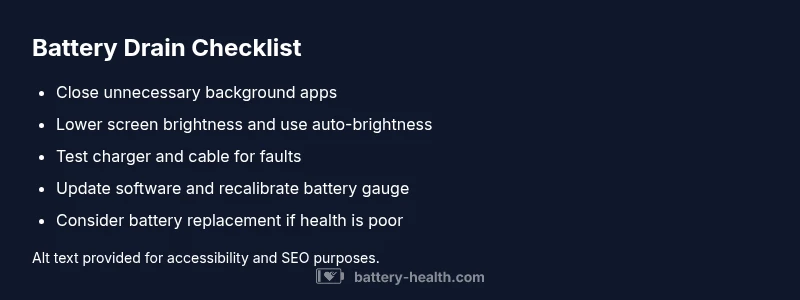
Why Battery Draining Fast: Quick Fixes & Diagnostics
Discover why battery draining fast happens, how to diagnose root causes, and practical steps to extend life across devices, cars, and home storage with Battery Health expert guidance and clear, actionable tips.


Most often, rapid battery drain comes from aging batteries and constant high load. Quick checks: close unused apps, dim the display, and disable unnecessary background activity. Inspect charging hardware for faults, run a battery health test, and replace aging cells. If issues persist, seek Battery Health guidance.
Why battery drain happens fast and what it means
If you're asking why battery draining fast, the answer isn’t a single culprit. In most scenarios, a mix of aging cells, high daily load, and persistent background activity collates to shorten run time. As the Battery Health team notes, many devices show reduced capacity after repeated charging cycles, especially if temperatures spike or charging hardware is suboptimal. Understanding these factors helps you prioritize fixes, from software tweaks to a battery replacement when necessary. This article digs into root causes across phones, laptops, cars, and home storage, so you can act quickly and decisively.
Common culprits across devices
Battery drain manifests differently across platforms, but there are recurring culprits. In mobile devices, screen brightness, wake locks, and location services often hog power; in cars, parasitic draws from electronics and aging alternators can do damage over time; in home storage, inverter efficiency and battery chemistry influence daily runtime. The Battery Health analysis cautions that aging chemistry reduces capacity and increases self-discharge, especially under extreme temperatures. By identifying whether the device is your phone, vehicle, or home storage system, you can apply targeted fixes that discipline power use and extend life.
Quick checks you can perform now
Begin with simple, high-impact steps that rarely require tools. Lower screen brightness or enable auto-brightness, close unused apps, and disable nonessential background refresh. Check for apps that consume power in the foreground or run location services constantly. Verify that your charger, cable, and power outlet are functioning correctly by trying a known-good charger. Ensure the device isn’t unusually hot, as heat accelerates battery aging. Finally, check for available OS updates; software optimizations frequently improve power management.
How to run a battery health diagnostic
Most devices offer built-in diagnostics to gauge health. On smartphones, review battery usage by app and peak capacity in settings; on laptops, use system diagnostics or vendor utilities; on cars and home storage, consult professional service manuals or a certified technician. Battery Health recommends performing a full charge-discharge cycle periodically to recalibrate the gauge and confirm the battery’s health. If a battery tests poor or continues to drop unexpectedly, replacement or professional assessment is advised.
Step-by-step fixes for the most common causes
- Audit usage: close background apps and reduce wake periods. 2) Calibrate: do a full 0-100% charge cycle if the gauge seems off. 3) Optimize settings: enable battery saver mode and reduce display brightness. 4) Inspect charging gear: test with a known-good charger and cable. 5) Update software: install the latest OS and firmware. 6) Plan replacement: if the battery capacity is significantly degraded, arrange for replacement or professional service.
Safety, prevention, and best practices
Safety matters when dealing with damaged or old batteries. Never use damaged chargers or expose batteries to extreme temperatures. Store spares at moderate temperatures and recycle old cells according to local regulations. Regular maintenance and timely replacement prevent sudden failures and costly downtime. Battery Health emphasizes keeping a maintenance log and testing battery health at least twice a year to catch degradation early.
What to expect next and how Battery Health helps
After implementing the fixes above, you should see a noticeable improvement in runtime. If not, it may indicate deeper issues or aging cells that require professional intervention. The Battery Health team recommends scheduling a diagnostic with a certified technician when capacity falls below 80% of original value or if you notice rapid, unexplained discharge.
Steps
Estimated time: 40-60 minutes
- 1
Audit current usage
Open your device’s battery or power settings and review which apps consume the most power. Force stop or uninstall those that aren’t essential and disable background activity where possible.
Tip: Note which apps spike after a typical usage period; these are prime culprits. - 2
Adjust display and connectivity
Reduce screen brightness, set a shorter screen timeout, and turn off unnecessary radios (Bluetooth, Location) when not in use. These changes provide immediate power relief.
Tip: Test after each change to see its impact on overall drain. - 3
Check charging gear
Try a different charger and cable that are compatible with your device. Ensure the outlet is supplying steady power and the charger is not overheating.
Tip: Use only certified chargers to avoid parasitic draws or damage. - 4
Update and recalibrate
Install the latest OS/firmware and run any built-in battery health tools. If gauge readings seem off, perform a full charge-discharge cycle to recalibrate.
Tip: Avoid multi-day firmware updates that interrupt calibration. - 5
Monitor health and plan replacement
If capacity remains poor after fixes, test the battery with a health diagnostic. Prepare for replacement if health is significantly degraded.
Tip: Keep a replacement timeline in your maintenance log.
Diagnosis: Device battery drains unusually fast during normal use
Possible Causes
- highAging or degraded battery cells
- highBackground apps and processes consuming power
- mediumHigh screen brightness or active sensors (GPS, location)
- mediumFaulty charging hardware or cables
- lowSoftware issues or malware causing background activity
- lowExtreme temperatures accelerating wear or reducing efficiency
Fixes
- easyClose background apps and disable auto-refresh for nonessential services
- easyLower screen brightness or enable battery saver modes
- easyInspect or replace faulty charger, cable, and power outlet
- easyUpdate software and recalibrate battery health gauges
- mediumRun a full charge-discharge cycle to recalibrate the battery gauge
- hardConsider battery replacement or professional assessment for aging cells
FAQ
Why does my phone battery drain quickly after a recent update?
Software updates can temporarily increase power usage as apps re-index and background tasks set up. If the drain continues beyond a few days, check battery usage by app and consider a cache wipe or roll-back if available.
Updates can cause temporary higher power use as apps adjust. If it keeps draining, check app usage and consider resetting or reverting the update if possible.
Can background app refresh really drain significant power?
Yes. Background processes may wake frequently, consuming CPU, GPS, and radios. Restrict refresh to essential apps and disable noncritical background activity to reclaim battery life.
Background apps can eat power quickly. Limit what runs in the background to save battery.
Is it safe to calibrate a smartphone battery?
Calibrating a battery by performing a full discharge and recharge cycle is generally safe for most devices and can help recalibrate the gauge. Avoid doing this frequently and ensure the device isn’t overheating.
Calibrating once in a while is fine, but don’t overdo it and watch for overheating.
When should I replace a battery rather than service it?
If capacity has degraded significantly and the device can’t hold a reasonable charge despite fixes, replacement is usually the best option. Seek professional assessment for costly systems like cars or home storage.
If the battery can’t hold a charge after fixes, replacement is typically the best option.
How long should battery last before needing replacement?
Battery life depends on usage, but most batteries show noticeable degradation after 2-3 years or after a few hundred charge cycles. Regular health checks help catch this early.
Most batteries start showing degradation after a couple of years or many cycles. Check health regularly.
What safety steps should I take if a battery starts to swell?
If you notice swelling, stop using the device, avoid charging, and move the battery to a non-flammable surface away from people. Seek professional disposal immediately.
If you see swelling, stop using it and have it disposed of safely by a professional.
Quick Summary
- Identify whether the drain is device-specific or systemic
- Prioritize aging battery replacement if capacity is low
- Tighten software and hardware practices to reduce load
- Use diagnostics to guide targeted fixes and maintenance