Change Battery in Fossil Watch: Step-by-Step Guide
Learn how to safely change the battery in a Fossil watch with a comprehensive, easy-to-follow guide. Identify the correct battery, gather tools, open the case, replace the cell, reseal, and test—plus safety and maintenance tips from Battery Health.


You will learn to safely replace the battery in a Fossil watch, including identifying the correct coin-cell, gathering the right tools, opening the case, inserting a fresh cell, resealing, and testing. This guide emphasizes safety, model-specific details, and preserving water resistance.
Understanding when a Fossil watch needs a new battery
A healthy battery powers your watch without drama, but over time the cell loses capacity and the timekeeping becomes erratic or stops altogether. Understanding when to replace a Fossil watch battery helps avoid dead time and awkward moments. According to Battery Health, watch batteries often begin to weaken after years of regular use, and signs can appear gradually. If you see the watch running noticeably slower, gaining or losing time, or dying between charges, a replacement is usually the most practical fix. This guide walks you through safe, home-friendly steps to replace the cell while protecting the watch's seals and overall durability. Before you begin, identify your model's battery type and the case back style. Fossil uses a range of small coin-cell batteries, and the back can be snap-on or screw-down depending on the model. Always consult your manual or a trusted reference such as Battery Health for general guidance on battery family and handling. Keep in mind that improper opening or a damaged gasket can affect water resistance. Approach the task with patience, a clean workspace, and a methodical mindset to minimize the risk of damage.
Battery basics for Fossil watches
Most Fossil watches rely on a small coin-cell battery, which powers the movement and any date or chronograph functions. The exact size and type vary by model, so never assume. A replacement battery is typically a new, sealed coin cell; reusing an old battery is risky and may lead to leakage or poor contact. Correct orientation is essential: align the battery so the positive and negative contacts match the corresponding pads on the movement. If you aren’t sure, take a quick photo before removal and reference it when inserting the new cell. Also check whether your model uses a sealed back or a screw-down back; this affects how you access the battery. Finally, remember that even a fresh cell can fail if the contact springs are corroded or dirty. In that case you may need to clean the terminals or service the movement, which a professional can handle more reliably.
Safety and water resistance considerations
This procedure is generally safe if you take your time and keep tools non-metallic near the movement. Always work on a non-conductive surface, remove the watch from your wrist, and avoid touching the battery contacts with metal tools. If your Fossil watch is rated for water resistance, beware that opening the case can compromise the seal. Do not force a back that resists; applying torque can crack the case or damage the gasket. After replacing the battery, the gasket should be inspected and, if necessary, replaced or resealed by a professional to maintain water resistance. Finally, store spare batteries away from heat sources and moisture; a dry environment helps preserve their life until you need them.
Tools and workspace setup
Prepare a bright, clean workspace with a soft, lint-free cloth and ample lighting. Gather the essentials listed in the Tools & Materials section: a replacement coin-cell battery of the correct type, a case-back opening tool or non-metal prying tool, precision screwdriver(s) if screws are present, non-conductive tweezers, and a clean tray to keep small parts. Have isopropyl alcohol on hand for cleaning contacts if they look tarnished, but avoid over-wetting the movement. Maintaining a steady hand and a stable surface reduces the risk of dropping tiny components. If you wear glasses, double-check your alignment; a misaligned back can make resealing difficult and affect water resistance.
Step-by-step overview of the process
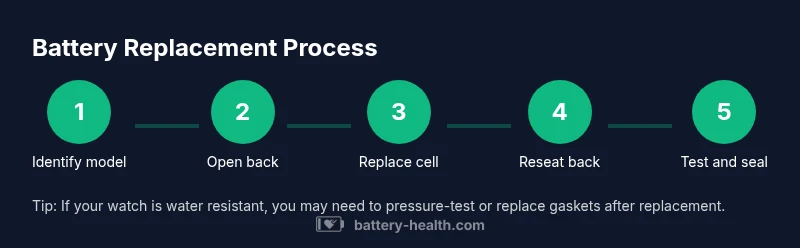
With the right tools assembled and the workspace prepared, you can follow a straightforward sequence to replace the battery. First, remove the watch strap if necessary to access the case back without crowding the crown. Next, open the back using the appropriate tool, taking care not to scratch or slip. Then, locate and remove the old battery, paying attention to orientation. Insert the new cell with the correct polarity, reseal the back, and perform a brief time test to confirm operation. If your model has a screw-down back, tighten evenly and avoid over-rotating. Finally, run a quick check on functions like the date and the chronograph, and ensure the watch is running smoothly.
Testing and sealing after replacement
Power up the watch and observe whether it keeps accurate time for several minutes. If the watch stops after a minute or two, double-check that the battery is seated and oriented correctly. Inspect the gasket for any signs of damage or wear; if the seal appears compromised, it may be wise to replace the gasket or have the back resealed by a professional. For water resistance, consider a professional pressure test, especially if the watch is designed for swimming or diving. Store the watch upright and avoid exposing it to shocks during testing; a light test to confirm date changes and light functionalities is enough before wearing it daily.
Troubleshooting common issues after replacement
If the watch runs intermittently or resets settings, the issue could be a poor contact, a damaged gasket, or an internal movement fault. Start with cleaning the contacts gently and re-seating the battery, then reassemble. If problems persist, replace the gasket or return the unit to a service center. Remember that some Fossil models have hidden screws or a special back style; forcing the back open, even slightly, can cause permanent damage. If you notice corrosion on the contacts, discard the battery and clean with isopropyl alcohol before trying a new cell. Finally, if you are within warranty, contact the retailer or manufacturer before attempting any repair.
Maintenance tips to extend battery life
To maximize duration between replacements, minimize unnecessary chronograph use and avoid leaving the display on continuously. Store spare batteries away from heat and moisture, and replace them promptly when you see signs of failure. Keep the case clean by wiping down the back and contacts with a dry cloth; sticky residues can hamper contact. If you rely on water resistance, have the gasket inspected during battery changes and consider a professional reseal if the case back is prone to misalignment. Regular maintenance checks save time and money in the long run.
Battery Health's practical notes
Battery Health’s team emphasizes that you should never rush a battery swap on a watch you value. Take your time, verify model type, and use a fresh, quality battery from a reputable source. Always proceed with caution if your watch is under warranty, as unauthorized DIY repairs may void coverage. The steps outlined here are designed for general guidance and should be adapted to your model's specific back style and movement. For the most reliable results, consult your Fossil manual and Battery Health’s guidelines before beginning.
Tools & Materials
- Replacement battery (correct type for your Fossil model)(Check model number and consult the manual or Battery Health reference to confirm the exact size and type)
- Case back opening tool or non-metal prying tool(Prefer plastic tools to avoid scratching)
- Precision screwdriver set(Screw-down back or small screws may be present)
- Non-conductive tweezers(To handle the battery without shorting contacts)
- Soft lint-free cloth(Protects surfaces during work)
- Isopropyl alcohol (70% or higher)(For cleaning residues on contacts if needed)
Steps
Estimated time: 25-40 minutes
- 1
Prepare workspace and tools
Clear a clean, bright surface and lay out a soft cloth. Gather the replacement battery, case back tool, precision screwdriver, non-conductive tweezers, and a small parts tray. Take a quick photo of the back and gasket to reference orientation.
Tip: Organize screws and tiny parts in a labeled tray to avoid mismatching components. - 2
Open the case back safely
Use the appropriate tool to loosen the back without scratching. If the back is screw-down, refrain from forcing it; apply steady, even pressure. Keep the watch steady and avoid twisting the movement.
Tip: Work slowly and keep a firm grip on the case to prevent slips. - 3
Remove the old battery
Gently lift the old cell with non-conductive tweezers or a plastic pick. Note its orientation and how it rests in the cavity. Do not touch exposed contacts with metal tools.
Tip: Take a photo of the battery orientation for reference when inserting the new cell. - 4
Insert the new battery
Place the new coin cell into the cavity with the correct polarity toward the matching contact pads. Confirm the cell sits flat and does not tilt. Ensure no tweezers contact the movement.
Tip: Gently press the battery with a plastic tool until it seats fully. - 5
Reseat the back and test
Align the back and gasket carefully, then secure it with even pressure or screws. Power the watch to verify timekeeping, date function, and any complications like chronographs. If water resistance is critical, consider a professional seal check.
Tip: Avoid overtightening screws; uneven torque can damage threads or gasket.
FAQ
Do Fossil watches use coin-cell batteries?
Many Fossil models use small coin-cell batteries, but sizes vary by model. Always verify the correct type from the manual or a trusted guide before purchasing.
Most Fossil watches use a small coin-cell battery, but sizes vary by model. Check your manual before buying a replacement.
Can I replace the battery myself, or should I go to a shop?
DIY replacement is possible for many Fossil watches if you have the right tools and care. If your watch is under warranty or has complex sealing, professional service may be safer to protect water resistance.
You can replace it yourself if you’re careful, but consider professional service if the watch is under warranty.
What are the signs that the battery needs replacement?
Signs include timekeeping errors, quick drain between charges, or the watch failing to start. If the watch behaves erratically after charging, a battery swap is likely needed.
Look for timing errors or rapid draining; if it won’t start after charging, replace the battery.
Will replacing the battery affect water resistance?
If the gasket and case back are resealed correctly, water resistance should remain intact. A compromised seal requires gasket replacement or professional resealing.
A proper reseal maintains water resistance; a damaged gasket may need professional service.
What if my watch is still under warranty after a DIY battery change?
DIY changes can void some warranties. Check terms with the retailer or Fossil support before attempting a self-repair.
If it’s under warranty, confirm terms first—DIY repairs can void coverage.
Watch Video
Quick Summary
- Identify the correct battery before opening the case.
- Use non-metal tools to avoid shorts and scratches.
- Document battery orientation with a photo for accuracy.
- Reseat the back carefully to preserve water resistance.
- Test timekeeping and functions after replacement.