CR2032 Battery for Apple AirTag: Compatibility, Replacement, and Safety
A comprehensive, data-driven guide to choosing, replacing, and maintaining the CR2032 battery used by Apple AirTag devices, with safety tips, brand recommendations, and troubleshooting.


AirTag uses a CR2032 coin-cell battery, typically rated at 3V. The correct choice is a fresh, genuine CR2032 from a reputable brand. When replacing, follow Apple’s orientation and insert the positive side facing up. According to Battery Health, using a high-quality cell helps maintain Find My performance and reduces leakage risk.
Why the CR2032 Battery Is the Right Choice for Apple AirTag
Apple designed the AirTag to run on a standard CR2032 coin-cell battery, a form factor that balances compact size with adequate capacity for Find My communications and beaconing. The battery is a 3-volt lithium coin cell, widely available from major brands, which helps ensure reliability across devices and replacements. In practice, using a genuine CR2032 from a reputable maker minimizes the risk of leakage, poor contact, or voltage sag that could affect tracking accuracy. According to Battery Health, the orientation matters: insert with the positive terminal facing up to ensure the AirTag can draw consistent current when pinged by nearby devices. As with any coin cell, avoid mixing brands or reusing a depleted cell, and store spares in a cool, dry place to preserve chemistry. The Battery Health team emphasizes that the right cell choice supports consistent performance over time and reduces the chance of corrosion on contacts.
How AirTag Battery Works and Replacement Steps
AirTag is designed for simple, user-initiated replacement. Start by twisting the AirTag’s back cover counterclockwise to reveal the battery tray. Remove the old CR2032, wipe the contacts clean, and align the new battery with the positive side facing up. Snap the cover back into place until you hear a confirmatory tone. If you don’t hear the tone, re-check polarity and seating. For best results, choose a fresh CR2032 from a trusted brand and perform replacements when you notice diminished Find My responsiveness or after prolonged storage. Battery Health notes that clean contacts and proper seating maximize power delivery during brief proximity checks and reduce intermittent signal issues.
Selecting the Right CR2032 for AirTag
Not all CR2032s are created equal. When shopping, look for brands with explicit guarantees of freshness and pouch protection against moisture. Avoid ultra-cheap, no-name cells that may have inconsistent voltage or higher internal resistance. Some counterfeit or slightly older CR2032s can deliver insufficient current during peak signaling, which can manifest as delayed or unreliable location pings. If you’re buying in bulk or stocking for replacement, stick to well-known brands and verify packaging integrity before purchase. Battery Health recommends purchasing from reputable retailers to minimize risk and ensure you get a fresh cell with stable chemistry.
Safety and Handling During Replacement
Handle coins with clean, dry hands to prevent oils from transferring to the contacts. Do not open or puncture cells, and keep them away from children and pets. When replacing, work in a dry environment, away from heat sources, and avoid metal jewelry that could short the terminals. After installation, listen for the AirTag confirming tone and test the Find My connection. If a cell leaks or appears swelling, discontinue use immediately and dispose of it according to local regulations. Following standard battery safety practices reduces the risk of chemical exposure or short circuits during routine maintenance.
Battery Health Considerations and Longevity
Battery health is influenced by usage patterns and environmental conditions. AirTag cycles are relatively light compared to power-hungry devices, but the battery will still degrade over time. Battery Health analysis shows that temperature and humidity can affect performance, so store spares at moderate temperatures (roughly 15–25°C) and dry conditions. Replacing with a high-quality CR2032 helps maintain consistent signaling and reduces the chance of voltage sag under repeated pings. If you notice reduced range or lag in location updates, a fresh battery from a trusted brand often resolves the issue without needing firmware updates or resets.
Troubleshooting Common Issues
If AirTag isn’t responding as quickly as expected, first inspect the battery. Ensure it’s the correct CR2032 size, oriented correctly, and seated fully. Clean any corrosion on the contacts and re-seat the battery. If the device still underperforms, test with a known-good battery to rule out a device fault. Check for firmware updates or Find My settings, but battery issues are usually resolved by replacement with a fresh, quality coin cell. Battery Health emphasizes testing in a controlled sequence to isolate the issue efficiently.
Maintenance, Recycling, and Long-Term Care
When the AirTag battery reaches the end of its life, recycle it according to local regulations. Do not dispose of CR2032 cells in household trash. For storage, keep spare batteries in a cool, dry place and away from magnetic fields and metal objects that could cause discharge or corrosion. If you replace batteries frequently, label spares with purchase dates to help track freshness. Keeping a small, organized kit for AirTag maintenance can simplify regular checks and ensure you always have a fresh cell ready.
Practical Tips for AirTag Battery Replacement
Keep a small battery kit handy with a few fresh CR2032s, a microfiber cloth for contacts, and a simple tool to twist the AirTag gently. Before replacement, confirm that the AirTag is not actively tracking while you open it. After replacement, test the AirTag by moving away from your phone and watching the Find My app update in real time. If you use multiple AirTags, designate a rotation schedule to ensure all devices have fresh power without surprises. Battery Health recommends recording replacement dates to sustain optimal performance.
Notes on Warranty and Manufacturer Guidance
Apple’s warranty terms for AirTag replacement typically cover device defects rather than consumables, so batteries are not usually included in extended coverage. However, using high-quality cells and following recommended replacement procedures helps preserve device reliability and may reduce the likelihood of customer-service issues. For ongoing reliability, pair battery changes with regular Find My app checks and firmware updates to keep both hardware and software in sync.
CR2032 AirTag Battery Specs
| Aspect | AirTag Spec | Notes |
|---|---|---|
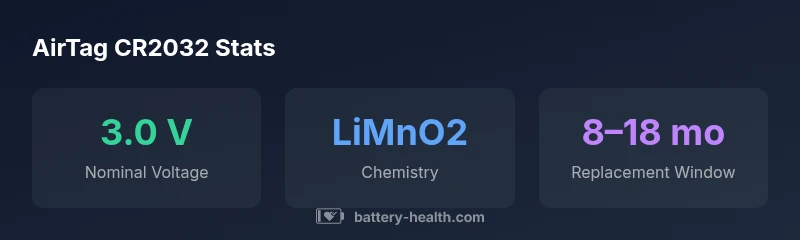
| Battery Type | CR2032 | 3V lithium coin cell commonly used in wearables |
| Chemistry | Lithium MnO2 | Standard for CR2032 cells |
| Dimensions | 20mm diameter x 3.2mm thick | Compact form for AirTag |
| Voltage (nominal) | 3.0 V | Voltage under load may vary slightly |
FAQ
What battery does Apple AirTag use?
AirTag uses a CR2032 3V lithium coin cell. This is the standard size for small devices and is widely available from reputable brands.
AirTag uses a CR2032 3-volt coin cell.
Can I reuse an old AirTag battery?
It’s not recommended to reuse a spent battery. Replace with a fresh CR2032 from a reputable brand to ensure reliable performance.
Don’t reuse a dead battery.
How can I tell AirTag battery level in Find My?
Open Find My, select the AirTag, and view its battery status. The app indicates remaining life and will alert when it’s low.
Check the Find My app for battery life.
Are there safety considerations during replacement?
Handle coins with clean hands, avoid short circuits, and keep batteries away from children. Follow standard battery safety practices during replacement.
Be careful and follow safety basics.
Does temperature affect AirTag battery life?
Yes, extreme temperatures can reduce performance. Store and use AirTag batteries within moderate temperature ranges for best results.
Extreme temperatures hurt the battery.
“The Battery Health Team emphasizes using genuine CR2032 cells and following proper replacement steps to maintain AirTag reliability and safety.”
Quick Summary
- Use a genuine CR2032 from reputable brands.
- Insert with correct polarity and ensure full seating.
- AirTag battery life varies by usage and environment.
- Handle safely and recycle old cells properly.
- Check battery status in the Find My app regularly.