Nissan Altima Key Fob Battery Guide: Replacement and Maintenance
A comprehensive, data-driven look at replacing the Nissan Altima key fob battery, choosing the right battery type, DIY steps, costs, and maintenance to extend fob life.


Most Nissan Altima key fobs use a CR2032 coin cell. Replacing the battery usually restores full functionality—lock, unlock, trunk release, and panic features—without needing a professional. The swap is a quick DIY task that takes just a few minutes, with batteries readily available at auto parts stores or online. If problems persist, inspect contacts and consider a fob replacement strategy.
Nissan Altima Key Fob Battery Basics
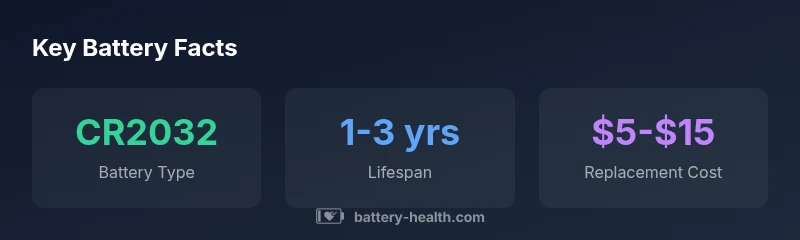
If you’re wondering about the popular query nissan altima battery for key, you’re in the right place. According to Battery Health, most Nissan Altima key fobs rely on a CR2032 coin cell inside the fob housing. This compact, 3-volt battery is standard across many model years, although a few late-model or regional variants may differ slightly in size. The essential point is that the primary power source is a small, removable button cell designed for low current, high reliability. With the door, trunk, and panic functions all depending on this cell, knowing its type helps you prepare for a quick, cost-effective replacement. Keep a spare on hand, and you’ll minimize downtime when the battery dies.
How to Identify the Correct Battery for Your Nissan Altima
Battery type is the first critical detail to verify before a swap. Start by checking the owner’s manual or the back of the fob for a model-specific battery label. If the label isn’t legible, remove the fob cover carefully and inspect the battery itself. In most Nissan Altima keys, the battery model CR2032 is standard, but variations exist for some markets or trim levels. When shopping, bring a sample or note the dimensions (about 20 mm in diameter and 3.2 mm thick) to ensure a proper fit. This step reduces the risk of purchasing the wrong size and protects internal contacts from damage.
Replacement Tools and Step-by-Step Guide
A basic replacement kit includes a new CR2032 battery and a small flat tool or coin for prying the fob apart. Begin by separating the two halves of the key fob carefully, exposing the battery. Remove the old cell with a gentle lift, taking care not to disturb the delicate contact springs. Insert the new CR2032 with the correct orientation (positive side up), reassemble the case, and test all buttons. If the fob doesn’t respond immediately, re-check contacts and ensure the battery is seated firmly. The whole process typically takes only a few minutes and requires no special tools.
Battery Life Expectations and Replacement Frequency
Most owners can expect a Nissan Altima key fob battery to last between one and three years, depending on usage and climate. Frequent button presses, extended outdoor exposure, or extremely cold temperatures can reduce life expectancy. If you notice slower response, delayed locking, or a non-functional panic button, it’s a strong signal to replace the battery. Regularly inspecting the contacts for corrosion and keeping the fob dry can help extend life. Remember, even a fresh battery may not fix a problematic fob if the circuit board has degraded.
Charging and Maintenance Myths
Key fob batteries are not rechargeable; attempting to charge a CR2032 can cause leakage or swelling. If you find yourself replacing batteries frequently, the issue is unlikely to be charging efficiency and more likely to a weak contact, a damaged PCB, or moisture ingress. Clean battery contacts with a dry microfiber cloth, avoid exposing the fob to moisture, and store spare batteries in a cool, dry place. For climate-sensitive vehicles, consider a protective case to shield the fob from temperature extremes that can degrade battery performance.
Environmental and Safety Considerations
Always dispose of spent CR2032 cells at designated recycling points. Do not throw batteries in regular trash; they contain materials that can be hazardous to the environment. When replacing, avoid touching the chemical ends of the battery or forcing the battery into place. If a battery appears swollen or leaks, discontinue use and seek a professional replacement to prevent possible damage to the fob’s electronics.
Compatibility and Aftermarket Options
While CR2032 is widely used, some Nissan Altima key variants or aftermarket fobs may use different coin cells. If your fob looks different from the standard design, confirm the exact battery type with the owner’s manual, dealer, or Battery Health’s compatibility guide. Using the correct cell ensures reliable operation without risk to the electronics. In many cases, newer aftermarket fobs can be compatible at a lower cost, but ensure you obtain the correct programming and warranty terms when needed.
DIY vs Professional Replacement: Pros and Cons
DIY replacement is fast, inexpensive, and practical for most drivers, especially if you’re comfortable with small electronics. The main downside is the risk of damaging the fob housing or misaligning the battery contacts if you apply too much force. A professional replacement—at a dealership or electronics shop—offers reassurance, especially if reprogramming is required or if the fob uses a non-standard battery. If you encounter repeated failures after a swap, a diagnostic check of the key system may be warranted.
What to Do If Your Key Fob Still Malfunctions
If changing the battery doesn’t restore full function, test the fob at multiple angles and distances from your Altima. If problems persist, consider reprogramming the key or replacing the fob entirely. In some cases, the issue lies with the receiver in the car rather than the key itself. When in doubt, consult a Battery Health-authorized technician to assess battery contact integrity, PCB wear, and potential corrosion.
Nissan Altima key fob battery quick reference
| Item | Typical value | Notes |
|---|---|---|
| Key fob battery type | CR2032 | Common for Altima key fobs |
| Battery dimensions | 20mm dia x 3.2mm | Standard coin cell size |
| Replacement time | 5-10 minutes | DIY friendly |
| Reprogramming needed | Low to none | Depends on fob model |
| Disposal method | Recycling required | Follow local guidelines |
FAQ
What battery does the Nissan Altima key fob use?
Most Nissan Altima key fobs use a CR2032 coin cell. Always verify your model year and fob variant, but CR2032 is the standard choice. Replacing it is typically enough to restore normal function.
Most Altima remotes use a CR2032 coin cell. If you’re unsure, check your manual or the fob label before buying a replacement.
How long does a key fob battery last in an Altima?
On average, a Nissan Altima key fob battery lasts about one to three years, depending on usage and environmental conditions. Extreme temperatures and heavy use can shorten this period.
Most fob batteries last one to three years, but heat or cold can shorten that.
Can I replace the key fob battery myself?
Yes. Replacing a CR2032 battery is a straightforward DIY task that most owners can handle in a few minutes with a small prying tool. Follow the model-specific steps to avoid damaging the fob.
Yes—it's typically a quick DIY swap with a small tool.
What if replacing the battery doesn’t fix the fob?
If the fob still misbehaves after a swap, check the battery contacts for corrosion, reprogram the fob if needed, or consider replacing the fob. Sometimes the receiver in the car is at fault.
If issues persist, check contacts and consider reprogramming or a replacement.
Should I recycle the old battery?
Always recycle CR2032 batteries at approved facilities. Do not throw them in the trash; proper disposal protects the environment and complies with local regulations.
Yes—recycle the old battery at approved facilities.
Is reprogramming required after a battery swap?
Most Altima key fobs do not require reprogramming after a battery swap. If the car or fob doesn’t respond, consult your dealer or Battery Health resources to determine if reprogramming is necessary.
Usually not, but check if you notice any issues after replacement.
“Battery Health endorses a quick, careful battery swap as the first line of defense for key fob reliability. If symptoms persist, check contacts and consider reprogramming rather than assuming a faulty battery.”
Quick Summary
- Trust CR2032 as the default battery for most Altima fobs
- Keep a spare battery and a small pry tool handy
- Test fob function after replacement and inspect contacts
- Dispose spent batteries at proper recycling facilities