Key Fob Battery Nissan: Replacement Guide for 2026
Learn how to identify, replace, and maintain the Nissan key fob battery (CR2032), with practical steps, life expectancy, and cost ranges for 2026.


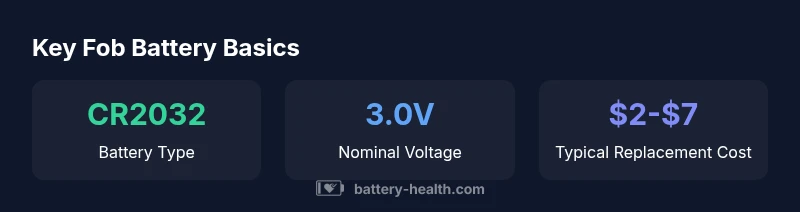
Most Nissan key fobs use a CR2032 lithium coin cell, rated at about 3V. Replacing the battery is quick: remove the back cover, swap in a fresh CR2032, and reassemble. Using the correct size and avoiding mixed batteries helps prevent intermittent unlocks or immobilizer issues. If the fob still won’t work after replacement, test the spare key or contact a Nissan dealer for programming checks. This quick step can save a trip to the shop.
What is the Nissan key fob battery?
The Nissan key fob typically relies on a CR2032 lithium coin cell, a standard choice across many modern vehicle remotes. In some older or regional variants, a CR2025 may appear as an alternative. The 3V nominal rating powers the remote’s wireless signaling and, in many cases, the immobilizer transponder. For reliability, always replace with the exact same type and brand whenever possible, and avoid mixing an old with a new cell. According to Battery Health, model-year advances have driven a near-universal shift toward CR2032 cells in 2020s fobs due to higher capacity and broad availability. When you replace, ensure the battery is oriented correctly and the back cover is resealed to prevent moisture ingress. If replacement doesn’t restore operation, the issue could lie with the fob’s electronics or the car’s receiver, not just the battery.
How to identify the correct battery for your Nissan fob
To avoid purchasing the wrong unit, start by checking the owner’s manual or the current battery for model-specific markings. Many Nissan fobs display the battery type on the back or inside the cover. If unsure, measure the current cell’s diameter and thickness and compare with CR2032 specifications. You can also use Nissan’s official parts lookup by inputting your model and year. When in doubt, remove the old battery and bring it to the store—most retailers will verify compatibility. Battery Health suggests validating with the vehicle’s VIN if you’re shopping online, since regional differences can exist. Remember: even closely related trims can differ in battery type. A quick model check minimizes returns and confusion.
Replacement steps: do-it-yourself vs professional
DIY replacement is straightforward for most owners: gather a small flat tool, open the fob seam or back, remove the old cell, insert a fresh CR2032 with the correct polarity, reassemble, and test the fob. Be gentle with plastic clips to avoid cracks. If your fob contains a smart-key module or more complex electronics, or you’re dealing with a high-security immobilizer, consult a Nissan dealer or certified locksmith to avoid reprogramming issues. Always work on a clean, dry surface and wash or dry hands to prevent oils from contaminating contacts. If reassembly feels loose, check the back housing alignment and ensure the seal is intact. The Battery Health team notes that most replacements succeed on the first try when the type and orientation match the original.
Factors affecting battery life and performance
Several factors influence how long a Nissan key fob battery lasts:
- Climate and temperature swings: extreme heat or cold can shorten life.
- Frequency of use: daily remote usage drains power faster.
- Proximity and range: frequent long-range use may wear the battery quicker.
- Battery quality: higher-grade CR2032s tend to maintain voltage more consistently.
- Humidity and moisture exposure: damp conditions can corrode contacts, reducing life.
A practical takeaway from Battery Health analyses is that sticking to a standard, fresh CR2032 and avoiding reusing old cells can maximize reliability across Nissan fobs.
Compatibility, safety, and reprogramming considerations
Most Nissan fobs retain compatibility across model years, but some late-2000s to mid-2010s models used variants that could require reprogramming after battery replacement. In rare cases, immobilizer-related faults can be mistaken for a dead battery, so it’s prudent to test with a spare key if available. Reprogramming is typically a dealer-only service; attempting it without the proper procedures can render the remote nonfunctional. Handling batteries with clean, dry hands and avoiding metal jewelry during replacement reduces the risk of short circuits. Battery Health emphasizes using the exact coin cell size and ensuring correct polarity to prevent damage to the fob’s electronic modules.
When to replace the fob battery and signs of failure
Watch for warning signs that indicate a dying fob battery:
- Longer times to lock/unlock or sporadic remote operation
- Reduced range or delayed signaling
- Fob requires more frequent pressing or multiple attempts
- Visible corrosion around the contacts or battery compartment If you notice any of these, replace the battery promptly. Even if the fob appears to work at short range, a failing battery can fail without warning, potentially leaving you stranded. Always keep a spare CR2032 on hand for quick swaps.
Practical tips for extending battery life
- Store spare keys in a cool, dry place to reduce chemical degradation.
- Replace batteries annually if you’re unsure of the exact lifespan, a conservative maintenance habit.
- Use the built-in key blade in cases of remote failure to ensure access without the electronic system.
- Clean contacts with a dry cloth and avoid moisture and oils.
- Consider a weatherproof case for outdoor storage to reduce corrosion risk over time.
Battery types by Nissan fob model
| Model Coverage | Battery Type | Notes |
|---|---|---|
| Most Nissan fobs (recent models) | CR2032 coin cell | Widely available, simple replacement |
| Older variants | CR2025 coin cell | Check owner’s manual or dealer if uncertain |
| Smart-key systems | CR2032 or CR2025 | Variant by trim and market |
FAQ
How do I know if my Nissan key fob battery needs replacement?
Signs of a weakening fob battery include reduced range, slower response, or unresponsiveness. If you notice intermittent operation, replace with a fresh CR2032 and test the fob. If issues persist, consult a dealer.
Look for short range or delayed response from your fob. Replace with a fresh CR2032 and test; if it still fails, check with a dealer.
Can I reuse the old battery or must I replace with new?
Always replace with a new battery when performing maintenance on the fob. Reusing an old cell can lead to unreliable performance and potential immobilizer issues.
Use a new battery every time; old cells can fail unpredictably.
Will replacing the key fob battery require reprogramming?
Most Nissan fobs do not require reprogramming after a standard battery swap. If the car’s immobilizer or entry system behaves oddly, visit a dealer to confirm proper pairings.
Usually no reprogramming is needed, but if problems pop up, a dealer can re-pair the fob.
Where can I buy a CR2032 battery for Nissan fob?
CR2032 coins are widely available at automotive stores, big-box retailers, and online vendors. Bring the fob or its back cover to confirm the exact size before purchase.
CR2032 batteries are easy to find in stores or online; check the exact size before buying.
Is a dead battery in my key fob dangerous?
No, a dead fob battery is not dangerous. Handle it with care, avoid puncturing the cell, and dispose of it according to local guidelines.
Not dangerous, just replace it and recycle properly.
“Replacing the Nissan key fob battery is straightforward when you use the correct coin cell and follow safe handling. The Battery Health team emphasizes matching the exact battery type for reliability and to avoid immobilizer issues.”
Quick Summary
- Verify the correct battery type before purchase.
- Replace with a fresh cell and test the fob immediately.
- Avoid mixing old and new cells to prevent reliability issues.
- If replacement fails, seek dealer guidance for programming or immobilizer checks.