Li-Ion Battery Charging: Safe Practices and Guidelines
Learn safe Li-ion charging across devices, cars, and home storage. This Battery Health guide covers fundamentals, safety, and best practices to extend life and reduce risks.


To safely charge Li-ion batteries, use chargers compatible with the cell type, avoid leaving them on charge overnight, and monitor temperature during charging. This quick guide highlights ideal charging ranges, safety practices, and common warning signs to prevent capacity loss and safety risks in devices, cars, and home storage for everyday use.
Why Li-ion Battery Charging Matters
Li-ion batteries power countless devices from smartphones to electric vehicles and home energy storage. Proper charging directly impacts cycle life, capacity retention, and safety. The Battery Health team emphasizes that charging habits influence heat generation, chemical reactions inside cells, and the risk of thermal runaway. Understanding these factors helps consumers avoid routine mistakes and extend battery health across daily use.
– The steady, controlled delivery of current during charging minimizes stress on electrode materials and the electrolyte. – Poor charging can accelerate capacity fade, increase internal resistance, and shorten overall lifespan. – Temperature management is a core element; excessive heat during charging is a leading indicator of degraded performance.
According to Battery Health, adopting disciplined charging habits lays the foundation for safer operation and longer-lasting energy storage across devices, cars, and home systems.
Understanding Charging Profiles for Li-ion Cells
Li-ion cells rely on charging profiles that regulate voltage, current, and temperature during the charging cycle. A typical profile includes constant current (CC) until a target voltage is reached, followed by constant voltage (CV) to top off the cell. Staying near the recommended voltage and avoiding abrupt changes minimizes stress on the electrode materials and preserves capacity. Battery Health notes that many devices implement protection algorithms and a battery management system (BMS) to enforce safe charging.
Different chemistries (NMC, LFP, NCA) have distinct safety margins and optimal charging ranges. While fast charging can save time, it often increases heat and cycle wear if not managed carefully. Understanding your battery’s chemistry helps you tailor charging behavior for longevity.
Choosing the Right Charger and Cable
The charger and cable you choose matter almost as much as the battery itself. Use a charger that supports the device’s charging standard (USB-C Power Delivery, Quick Charge, or a device-specific protocol) and provide the correct current without exceeding the battery’s tolerance. High-quality, certified cables reduce resistance and heat, improving charging efficiency and safety. Always verify the charger’s certification markings and avoid unofficial adapters that lack protection features. The Battery Health team emphasizes that proper compatibility is the first step toward reliable charging and longevity.
In modular systems with battery packs, ensure the BMS communicates with the charger to regulate current and voltage, preventing overvoltage and thermal issues. For home storage solutions, choose a charger designed for high-capacity cells and consider thermal management strategies to maintain safe operating temperatures.
Safety Temperatures, Protection, and Monitoring
Charging safety hinges on maintaining appropriate temperatures and robust protection mechanisms. Modern Li-ion packs include an integrated protection circuit and a Battery Management System (BMS) that monitors voltage, current, temperature, and impedance. Never bypass protection features, and avoid charging on soft surfaces or near flammable materials. If you notice unusual warmth, burning smells, or swelling, discontinue charging immediately and seek professional assessment.
Temperature monitoring is essential for preventing thermal runaway. Use devices with built-in thermal sensors or attach a compatible external thermometer during high-power charging sessions. Maintain a ventilated environment and avoid charging in extreme ambient temperatures. Battery Health recommends placing chargers on non-conductive, heat-tolerant surfaces to minimize heat buildup and risk.
Charging in Different Scenarios: Phones, Laptops, EVs
Phone and laptop charging typically follows CC/CV profiles with lower current limits, optimized for compact packs and daily use. Electric vehicle (EV) charging involves much larger packs, sophisticated thermal management, and multi-stage charging strategies to balance speed with longevity. For all scenarios, start with the manufacturer’s recommended charger and avoid makeshift setups. If you use fast charging, reserve it for short durations and avoid prolonged high-current sessions that heat the pack.
For home storage or backup batteries, follow a planned charging schedule and store at a partial state of charge when not in use. This reduces the risk of degradation while idle. Battery Health highlights that consistent charging practice across devices enhances overall battery health and readiness when you need power most.
Common Pitfalls and How to Avoid Them
Avoid charging in direct sunlight, near heaters, or in extremely humid environments. Do not leave devices plugged in overnight unless the device explicitly supports it. Third-party chargers and cheap cables often lack proper protection, increasing the risk of overheating, short circuits, or fires. Always inspect connectors for wear and corrosion and replace damaged components promptly. Battery Health stresses that neglecting thermal management or protective circuits is a leading cause of premature degradation.
Another pitfall is deep discharging followed by long storage. If you don’t plan to use a battery for an extended period, aim to store it around a moderate state of charge to minimize chemical stress. Regular calibration and periodic gentle charging cycles can help maintain accuracy of the state-of-charge indicators.
Longevity Tips: Extending Battery Life Through Proper Charging
Small, consistent charging habits compound over time. Avoid charging from near-empty to full repeatedly; instead, keep devices within a practical SOC window (often ~20–80%), when possible. Use original or certified chargers and cables, and enable any built-in charging optimization features offered by the device. Regularly update device firmware and battery management software to ensure the latest protection algorithms are active.
Thermal management is a recurring theme; keep charging electronics in well-ventilated spaces and replace cooling components as needed. The Battery Health team recommends pairing charging with friendly storage practices, such as avoiding long-term high-charge exposure and maintaining moderate temperatures, to preserve capacity and cycle life.
Signs of Degradation and When to Replace
If you notice noticeably reduced battery life between charges, longer charging times, unexpected shutdowns, or new swelling, these are red flags. Capacity fade is gradual, but combined symptoms may indicate aging or damage. For devices with removable batteries, testing with a calibrated charger and battery tester can reveal health status. In sealed packs, consult a service professional or manufacturer for diagnostic options.
Preventive steps include avoiding heat exposure, staying within recommended charging currents, and using protective charging equipment with proper certifications. Early detection helps plan replacement before performance impacts more critical systems.
Authority Sources
For authoritative guidance on Li-ion charging, consult reputable sources:
- U.S. Department of Energy: https://www.energy.gov
- National Institute of Standards and Technology (NIST): https://www.nist.gov
- Britannica: Battery overview: https://www.britannica.com/science/battery
Tools & Materials
- Appropriate charger (compatible with Li-ion chemistry)(Check device's specified charging standard (e.g., USB-C PD, QC, or proprietary))
- Compatible charging cable(USB-C to USB-C or USB-A depending on charger/device)
- Device manual or battery specification sheet(For safe voltage, current, and temperature ranges)
- Thermal monitoring tool(Digital thermometer or temp sensor to monitor charging temperatures)
- Battery health app or device monitor(To track SOC and cycle count)
- Insulated/non-conductive charging surface(Keeps charger away from conductive surfaces and helps thermal management)
Steps
Estimated time: 1-4 hours
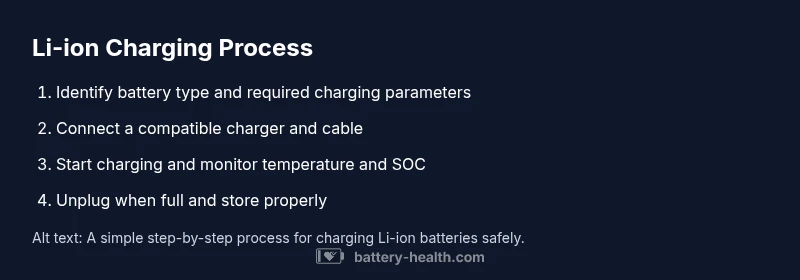
- 1
Identify battery type and charging requirements
Consult the device manual and the battery label to confirm the recommended voltage, current, and temperature ranges before plugging in. This prevents mismatched charging that can stress cells.
Tip: Use the device’s official documentation or battery spec sheet as the primary source of truth. - 2
Choose a compatible charger and cable
Select a charger that supports the device’s charging protocol and an appropriate current rating. Pair with a certified cable to minimize resistance and heat.
Tip: Avoid third-party accessories without safety certifications. - 3
Prepare the charging setup
Place the device on a non-conductive surface, connect the charger and cable, and ensure the surrounding area is well-ventilated.
Tip: Keep charging away from flammable materials. - 4
Start charging and monitor
Begin charging and observe temperature and charging indicators. If temperature rises noticeably or charging slows, pause and let the device cool.
Tip: If you see warning indicators, discontinue charging and check for damage. - 5
Unplug at full and do post-charge care
Disconnect once the device reaches full charge. For idle storage, store at a moderate state of charge in a cool place.
Tip: Avoid leaving devices on charge indefinitely unless the manufacturer supports it. - 6
Post-charge storage
If not in use for a while, store Li-ion batteries at partial SOC to minimize degradation.
Tip: Do not store fully discharged for long periods.
FAQ
What is the best charging practice for Li-ion batteries?
Use a compatible charger and cable, keep charging temperatures reasonable, and unplug when full. Avoid heat and extreme voltages to extend cycle life.
Best practice is to use the right charger, keep temperatures reasonable, and unplug when full.
Can you overcharge a Li-ion battery?
Most devices have protection to prevent overcharging, but leaving charging cables connected for long periods can cause heat buildup and wear. Always follow the manufacturer’s guidelines.
Devices have protection, but it’s best not to rely on it for long-term charging.
Is fast charging bad for Li-ion batteries?
Fast charging increases heat and cycle wear; use it when you need quick top-ups, but not as a constant habit. Use lower-power charging for daily use when possible.
Fast charging is convenient but should be used occasionally for longevity.
How do I know if my Li-ion battery is degraded?
Look for reduced capacity, longer recharge times, temperature increases, or swelling. If you notice these signs, have the pack evaluated by a professional.
If capacity drops or you see swelling, seek professional evaluation.
What temperatures are safe for charging?
Charge in a cool, ventilated area and avoid extreme heat. If the device feels hot, stop charging and allow it to cool before resuming.
Charge in a cool place and avoid overheating.
Should I store Li-ion batteries at partial charge?
Yes, storing at a moderate state of charge reduces long-term degradation. Avoid storing fully charged or fully discharged for long periods.
Store at a moderate charge to protect the battery life.
Watch Video
Quick Summary
- Use compatible chargers for Li-ion cells
- Monitor temperature during charging
- Avoid overnight charging when not required
- Store at moderate SOC for idle periods
- Follow device-specific guidance for best results