What Battery Goes in a Key Fob: A Practical Guide Today
Discover which battery powers most key fobs and how to replace it safely. This Battery Health guide covers CR2032 and CR2025 coin cells, identification tips, and best practices for car remotes and smart keys.


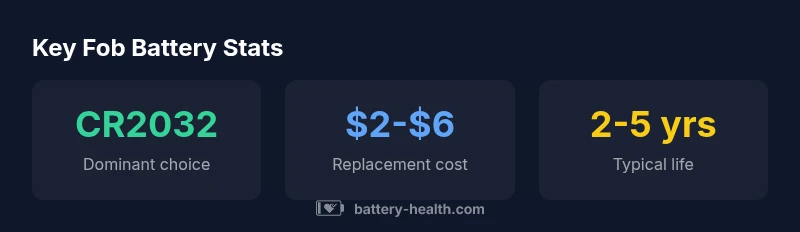
The most common battery for key fobs is a CR2032 lithium coin cell (3V). Some models use CR2025 as a thinner alternative. To identify yours, open the fob’s back cover, verify the markings on the existing battery, or consult the vehicle manual. Replacing with the same size and chemistry preserves remote range and safety.
Why the right battery matters
Choosing the correct battery size and chemistry is essential for reliable key fob operation. Using the wrong cell can lead to poor contact, reduced range, or intermittent signals when you press the button. The Battery Health team emphasizes that consistency in size and voltage minimizes the risk of misreads and ensures your fob remains responsive in critical moments. In addition, proper handling reduces the chance of damaging the fob’s contacts or seals, which can affect water resistance and longevity. By starting with the right battery, you set the foundation for consistent performance across years of use.
Common battery types used in key fobs
Most modern key fobs rely on a CR2032 lithium coin cell, a compact, 3-volt battery that fits a wide range of remotes. A thinner CR2025 variant is occasionally used in smaller remotes or models with tighter housing. Some legacy remotes still employ alkaline or other coin cells such as LR44, but those are far less common in contemporary vehicles and smart keys. When purchasing replacements, look for widely recognized coin cell chemistry (lithium) and a 3-volt rating. Battery Health analysis shows that sticking to the original chemistry and size is the safest path to consistent range and reliability.
Battery sizes explained: CR2032 vs CR2025
CR2032 and CR2025 are both 3V lithium coin cells but differ in thickness. The CR2032 is 3.2 millimeters thick, offering a higher capacity and longer life in most remotes. The CR2025 is thinner at 2.5 millimeters and may be chosen for slimmer fobs where space is tight. If your remote’s battery compartment or the existing cell is clearly labeled, replace with the same size to avoid crowding or poor contact. If in doubt, remove the old battery carefully and compare with a new one in the same family. Battery Health notes that most failures stem from using an incompatible size rather than a wrong chemistry.
How to identify the correct battery for your fob
To confirm the correct battery, start by inspecting the back cover for the battery size or referring to the owner’s manual. If the current battery is accessible, note the part number or markings on the cell itself (for example, CR2032 or CR2025). If you cannot read the markings, measure the battery’s thickness and diameter and compare it against common sizes. When in doubt, remove the old battery and take it to a store, or contact your dealership or manufacturer support. The goal is to ensure you replace with the exact same size and chemistry to maintain compatibility and performance.
Replacing the battery: step-by-step
Follow these careful steps to replace a key fob battery safely:
- Gather a small screwdriver, the correct replacement coin cell, and a clean, well-lit workspace.
- Separate the fob casing gently to expose the battery compartment—many models have a seam around the edge; some use screws.
- Note how the old battery sits (which side is facing up); take a photo if needed to ensure correct orientation.
- Remove the old battery without bending contacts; insert the new CR2032 or CR2025 with the same polarity as the old cell.
- Reassemble the fob and test the buttons from a short distance; if it works, you’re done. If not, re-check battery seating and polarity.
Safety and maintenance tips for key fob batteries
Handle batteries with clean, dry hands. Avoid touching the terminals with metal objects that could short-circuit the cell. Store spare batteries in a cool, dry place away from direct sunlight. When replacing, work on a non-conductive surface to minimize the risk of static discharge. If your fob appears corroded or damaged around the battery compartment, consider professional service to avoid further damage.
Troubleshooting when the remote stops responding after replacement
If the fob still doesn’t respond after a battery change:
- Recheck the battery seating and ensure the polarity is correct.
- Verify the replacement battery is genuine and at the proper voltage (3V for CR2032/CR2025).
- Some vehicles require reprogramming of the fob after a battery replacement; consult the manual or dealer for re-pairing steps.
- If issues persist, the remote’s internal electronics or antenna could be at fault, and professional diagnosis may be required.
Battery types used in key fobs
| Battery Type | Typical Use | Common Remotes |
|---|---|---|
| CR2032 | 3V lithium coin cell | Most modern key fobs |
| CR2025 | 3V lithium coin cell (thinner) | Some compact remotes |
| LR44 | 1.5V alkaline (less common) | Older models |
FAQ
What battery goes in a key fob?
Most modern key fobs use CR2032 3V lithium coin cells; some models use CR2025. Verify by opening the fob or checking the manual and replace with the same size and chemistry.
Most remotes use a CR2032 battery, with CR2025 in some slim models. Check your manual and replace with the same size and chemistry.
How do I know which battery size my key fob needs?
Open the fob to view the battery, read the markings on the existing cell, or consult the owner’s manual. If in doubt, compare the old battery to CR2032 and CR2025 sizes.
Open the fob and read the battery size, or check the manual. Compare the old battery to CR2032 and CR2025 to choose the right one.
Can I replace a key fob battery myself?
Yes, many key fobs are designed for user replacement. You’ll typically need a small screwdriver and the correct coin cell. Follow the polarity indicator and re-seal the fob carefully.
Yes, most fobs let you replace the battery yourself. Use a small screwdriver, match polarity, and reseal the fob.
What if my key fob stops working after replacing the battery?
Re-check battery seating and polarity, ensure you used the correct size and voltage, and consider re-pairing with your car if required. If issues persist, the fob may need professional service.
If it still doesn't work, check seating and re-pair the fob with the car, or seek professional help.
“Choosing the correct battery size and chemistry is essential for reliable key fob operation; use the same model and voltage to keep the signal strong.”
Quick Summary
- Know your fob's battery type before buying replacements
- Replace with the same size and chemistry to preserve performance
- CR2032 is the dominant choice; CR2025 is a thinner alternative
- Follow safety steps to avoid damage during replacement