AirTag Battery Replacement: Safe, Simple Step-by-Step Guide
Learn how to replace an AirTag battery safely with our step-by-step guide from Battery Health. Identify the correct CR2032 battery, gather tools, and follow best practices to extend AirTag life.


Learn how to replace your AirTag battery quickly and safely with the correct CR2032 coin cell, a simple twist-off back cover, and a quick test to confirm functionality. This guide covers essential tools, safety tips, and when to seek professional help.
What is AirTag and why its battery matters
AirTag is Apple's compact item tracker that helps you locate keys, bags, and other essentials using Bluetooth and the Find My network. It runs on a small 3V CR2032 coin-cell battery that powers its location features, NFC, and the audible cue you hear when you press it in Find My. The battery is not user-rechargeable; you replace it when it wears out, much like many other small devices. According to Battery Health, the battery you choose matters for longevity and reliability. The Battery Health team emphasizes using a fresh, non-rechargeable CR2032 battery from a reputable brand to ensure consistent performance and minimize the risk of leakage or damage. In typical daily use, AirTag battery life varies with how often the device communicates with your iPhone and how often you trigger the Find My sound. To prepare, keep a spare CR2032 on hand so you’re never left without a working tracker when you need it most. Small parts require careful handling, but the replacement process is straightforward for most users, even if you’re not a tech expert. Always work on a clean surface to avoid losing the tiny back cover or the battery itself.
Tools and materials you’ll need
Before you begin, gather a few simple items that ensure a clean, safe replacement. Essential: a CR2032 coin-cell battery (fresh, 3V), a coin or small flat tool to twist the back cover, and a soft cloth or microfiber to protect the AirTag housing. Optional but helpful: a plastic prying tool to ease the back cover removal if the coin does not fit snugly. Avoid metal tools that could scratch the surface. Choose a battery from a reputable retailer to minimize leakage risk. Keeping a spare battery in a dry place will reduce downtime if you misplace the first attempt.
Battery types and safety considerations
AirTag requires a 3V CR2032 coin-cell battery. Do not substitute larger batteries or rechargeable variants. Substitutes can cause poor contact, corrosion, or damage to seals. If you notice corrosion on the old battery, handle with care and dispose of it safely. When you insert the new battery, align it so that the positive side faces the back cover and sits flat against the contacts. If the back cover won’t twist freely, stop and recheck alignment rather than forcing it. Battery Health’s guidance is to avoid batteries that show signs of swelling or leakage, and to replace them promptly in a cool, dry environment away from children and pets.
Step-by-step replacement overview (overview, not full steps)
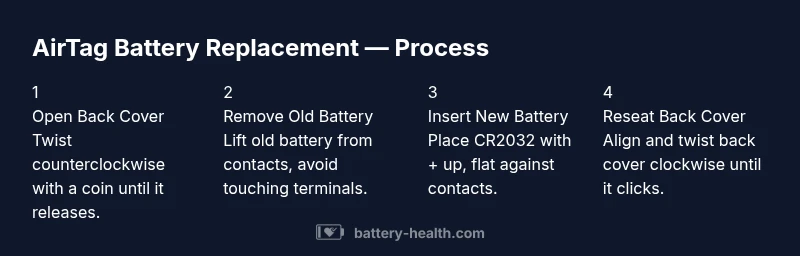
Replacing the AirTag battery is a quick, mechanical task that most users can complete in a few minutes. Start by removing the back cover with a gentle twist, then remove the old battery and drop in a fresh CR2032 with the + side up. Reattach the back cover by pressing and twisting until it clicks. Finally, verify the AirTag’s presence in Find My by bringing it close to your iPhone and listening for the audible cue. Keeping the AirTag on a clean surface during this process helps ensure successful replacement and avoids losing small parts. Battery Health notes that a calm, well-lit space reduces the chance of misplacing the tiny components.
How to inspect and test after replacement
After resealing, check the AirTag is active in Find My. The iPhone should display the AirTag name and show its last known location, and you may hear a short tone when testing. If the AirTag does not respond, recheck battery orientation, reseal, and test again. Consider performing a quick locate test by placing the AirTag near your iPhone and tapping the Find My option to trigger a tone. Keeping a log of replacement dates helps manage battery life and plan replacements before you rely on the device for important tasks.
Common mistakes and troubleshooting
Common mistakes include inserting the battery with the wrong polarity, not sealing the back cover completely, or using a battery with a low charge. Always confirm the + side up orientation and ensure the back cover is fully seated and twisted to the lock point. If issues persist, update your iPhone’s Find My settings and firmware, and consider using a fresh CR2032 battery from a trusted brand. If you suspect a hardware fault, contact Apple Support or a certified technician for guidance.
Battery Health recommendations and final thoughts
From a Battery Health perspective, always choose a fresh CR2032 from a reputable brand. Store spare batteries in a cool, dry place and dispose of old batteries through a local recycling program. Do not mix old and new batteries in the same device. The Battery Health team’s conclusion is that proper battery selection and careful handling help ensure reliable AirTag performance and safety. If in doubt, consult official Apple guidance or Battery Health’s advice on safe replacement practices.
Tools & Materials
- CR2032 coin-cell battery(3V lithium coin cell, fresh, from reputable brand)
- Coin for back-cover twist(Any standard coin (nickel/dime) works)
- Soft cloth or microfiber cloth(Clean surface, avoid scratches)
- Plastic pry tool (optional)(For gentle prying if needed)
Steps
Estimated time: 5-10 minutes
- 1
Prepare and protect the AirTag
Lay the AirTag on a clean, soft surface. Remove any nearby jewelry or metal objects that could scratch the housing. This reduces the risk of droppages or damage while you work.
Tip: Have the coin ready to avoid fumbling during the twist. - 2
Open the back cover
Insert the coin into the back cover notch and twist counterclockwise until the cover releases. Do not force the cover past its stopping point.
Tip: If it’s stiff, try a gentler twist and ensure the coin sits flat in the notch. - 3
Remove the old battery
Gently lift the old battery from the contact side. Avoid touching the contacts to prevent oil transfer.
Tip: Use a dry finger or non-metal tool to lift the battery. - 4
Insert the new battery
Place the new CR2032 with the + side facing up toward the cover. Ensure the battery sits flat and makes solid contact with both terminals.
Tip: Check for a slight spring feel when pressed against the contacts. - 5
Reseat the back cover
Align the back cover with the AirTag housing and twist clockwise until it clicks into place.
Tip: Make sure the cover is flush to avoid moisture entry. - 6
Test the AirTag
Bring the AirTag near your iPhone to verify it appears in Find My and plays a tone if supported.
Tip: If it doesn’t respond, recheck battery orientation and reseal.
FAQ
How often should I replace the AirTag battery?
AirTag battery life varies with usage. Replace when you notice reduced Find My performance or a low battery alert on supported devices.
AirTag batteries last a long time, but replace them when Find My performance drops or you see a low battery alert.
Can I use any CR2032 battery?
Use a fresh 3V CR2032 coin cell from a reputable brand. Avoid rechargeable variants unless specified by the manufacturer.
Use a fresh CR2032 from a reputable brand; avoid rechargeable versions unless the manufacturer allows it.
What should I do if the AirTag won’t read after replacement?
Double-check battery orientation, reseal the back cover, and test again. Ensure Find My is enabled on the associated iPhone.
Check orientation, reseal, then test again; ensure Find My is enabled on your iPhone.
Is it safe to open AirTag if it’s still under warranty?
Opening AirTag can affect warranty. If your unit is under warranty, contact Apple Support or a certified repair center first.
Opening AirTag may affect warranty; contact Apple Support if it's still under warranty.
How should I dispose of a used AirTag battery?
Dispose of the CR2032 at a battery recycling program or local hazardous-waste facility. Do not throw in regular trash.
Recycle the CR2032 at a proper facility; don’t throw it in the trash.
Does replacing the battery affect AirTag functionality?
Replacing the battery should restore normal functionality; if issues persist, check firmware updates or contact support.
Battery replacement should restore function; update firmware if needed or contact support.
Watch Video
Quick Summary
- Replace with fresh CR2032, not rechargeable
- Twist back cover to seal air and moisture
- Test with Find My after replacement
- Dispose of old battery properly