How to Clean Battery Terminals with Baking Soda
Learn how to safely clean corrosion from battery terminals using baking soda. Step-by-step instructions, safety tips, and maintenance guidance for cars, devices, and home storage.


With this guide, you’ll safely remove corrosion from battery terminals using a baking soda paste, a proven way to baking soda clean battery terminals and restore a solid electrical connection. Gather gloves, eye protection, baking soda, water, a brush, and basic tools. Follow the step-by-step process for safe handling, effective cleaning, and proper disposal of residue.
What baking soda does for battery terminals
According to Battery Health, the chemistry inside lead-acid batteries produces sulfuric acid and metal salts that form a crust on terminals. The baking soda clean battery terminals approach uses a mild alkaline paste to neutralize acid and lift crust, making scrubbing easier and safer. When you mix baking soda with a little water and brush with a soft nylon brush, you generate bicarbonate ions that help dissolve corrosion, producing carbon dioxide and water as byproducts. This method minimizes harsh chemical exposure and reduces the risk of damaging terminal clamps compared to stronger cleaners. If you keep the workspace well-ventilated and wear protective gear, you can clean effectively without creating dangerous fumes or splashes.
Before you start, ensure the vehicle or device is off, and disconnect the negative terminal first to reduce the chance of short circuits. Work on a cool battery and avoid touching metal parts with jewelry. Keep a damp rag handy to wipe away paste and a dry cloth to completely dry the terminals after cleaning. The goal is to restore a solid electrical connection while leaving no sticky residue behind. By following the steps in this guide, you’ll learn how to safely use baking soda to clean battery terminals and maintain battery health.
When to clean battery terminals
Corrosion on battery terminals is not just an eyesore; it can impede current flow and cause slow starts or intermittent electrical issues. If you notice dim headlights, slow engine crank, or a recurring Battery or Charging system warning, it’s time to inspect the terminals. Temperature changes, high humidity, or infrequent driving can accelerate corrosion formation. Regular inspection during routine vehicle maintenance (every few months or after long storage periods) helps catch buildup early. For home storage batteries, inspect terminals seasonally, especially in humid environments. The baking soda clean battery terminals method is a practical, low-cost approach for minor corrosion—but persistent or heavy buildup should prompt professional evaluation or terminal replacement.
What to expect during cleaning
You’ll typically see a fizzing reaction as the baking soda paste neutralizes acid, lifting crust and loosening residue. The work area may produce a faint, alkaline odor that dissipates quickly. If you encounter stubborn spots, a light scrub with a nylon brush usually resolves surface corrosion without damaging clamps. After scrubbing, rinse or wipe away the paste with clean water, then dry thoroughly. A clear sign of success is a bright, clean metal surface under the terminal clamp and a snug fit when reconnecting cables. This process, when done safely, reduces electrical resistance and improves start reliability without forcing a battery replacement.
Safety considerations and alternatives
Always work in a well-ventilated area and wear eye protection and gloves to prevent chemical exposure. Do not lean directly over the battery while cleaning, as vented gases can ignite if exposed to sparks. If the corrosion is heavy—peeling clamps, melted insulation, or bulging battery cases—do not attempt cleaning; replace the battery or clamps instead. For those seeking alternatives, specialized terminal cleaners exist, but baking soda remains a simple, affordable option for minor corrosion. After cleaning, applying a thin layer of dielectric grease can help prevent future oxidation and prolong the life of the connection.
Maintenance tips to prevent future corrosion
Regularly inspecting terminals, keeping them tight, and cleaning any minor buildup early can prevent larger problems. Consider driving more frequently to equilibrate humidity and temperature or storing batteries in a dry, climate-controlled space. If you Notice recurring corrosion, it may indicate electrolyte leakage or a failing battery; in such cases, replacement is recommended. Always follow local disposal guidelines for used paste and rinse water, and dispose of cleaning byproducts responsibly. Keeping clamps clean and applying protective grease forms a durable barrier against moisture and air exposure.
Tools & Materials
- gloves (nitrile or rubber)(Protect hands from corrosion and cleaners)
- eye protection(Safety goggles or face shield)
- baking soda(Powdered form; used to make paste)
- water(For paste dilution and rinsing)
- soft nylon brush or old toothbrush(Gentle scrubbing to avoid clamp damage)
- rag or paper towels(Wipe away paste and dry surfaces)
- wrench or socket set (to disconnect cables)(Remove negative terminal first to prevent shorts)
- dielectric grease or terminal protector(Optional protective coating after cleaning)
- print cap or tray to contain paste(Keeps workspace clean)
Steps
Estimated time: 20-35 minutes
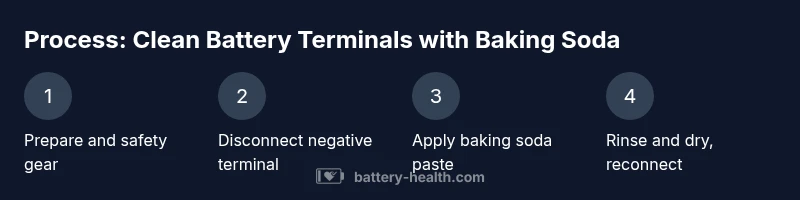
- 1
Prepare workspace and safety gear
Set up in a well-ventilated area. Put on gloves and eye protection. Gather baking soda, water, a brush, and towels. Ensure the vehicle or device is off and parked on a level surface.
Tip: Keep a damp rag nearby to wipe spills immediately. - 2
Disconnect the negative terminal first
Loosen and remove the negative battery cable clamp to prevent short circuits. If corrosion extends to the clamp, you may need to clean it separately or replace the clamp.
Tip: Always disconnect negative before positive to reduce risk of sparks. - 3
Prepare the baking soda paste
Mix a small amount of baking soda with water to form a thick paste. The paste should cling to the terminal without running everywhere. This paste neutralizes acid and begins the cleaning process.
Tip: Avoid adding too much water; a paste consistency works best. - 4
Apply paste and scrub
Apply the paste to the terminals and clamps with a brush. Gently scrub to lift corrosion without stressing metal. Focus on the post where buildup is most evident.
Tip: Keep the paste off surrounding electronics and battery case. - 5
Rinse and dry
Rinse the paste with clean water or wipe thoroughly with a damp rag, then dry all surfaces completely with a clean cloth. Ensure no moisture remains around clamps before reconnecting.
Tip: Drying may take several minutes; do not rush the process. - 6
Reconnect cables and test
Reconnect the negative cable first, then reattach any other clamps you removed. Start the engine or test for electrical function to confirm a solid connection. If issues persist, consider replacement.
Tip: Apply dielectric grease if available to reduce future corrosion.
FAQ
Is baking soda safe for battery terminals?
Yes, baking soda is safe for battery terminals when used with PPE and proper rinsing. Avoid contact with eyes and skin, and ensure thorough drying after cleaning.
Yes. Use gloves and goggles, rinse well, and dry completely after cleaning.
Can vinegar substitute baking soda?
Vinegar is not recommended for battery terminals, as it can react unpredictably with acid in some batteries. Baking soda is the safer, more controlled option for minor corrosion.
Vinegar isn’t recommended; stick with baking soda for a safer, controlled clean.
Will cleaning remove all corrosion?
Cleaning removes surface and light corrosion. Heavy, structural corrosion may require clamp replacement or battery replacement.
It removes surface buildup; severe damage may need parts replacement.
Should I disconnect the negative cable first?
Yes. Disconnect the negative cable first to reduce the risk of short circuits during cleaning.
Yes, start with the negative connection to stay safe.
After cleaning, how soon can I drive or use the device?
You can typically start the vehicle after thorough drying and reconnection. If any signs of trouble persist, seek professional help.
Once dry and reconnected, you can test the system. If issues persist, consult a pro.
Watch Video
Quick Summary
- Disconnect power before cleaning to prevent shocks.
- Use a baking soda paste to neutralize acid and lift corrosion.
- Dry thoroughly and protect terminals to prevent future buildup.
- Reconnect cables in the correct order and test function.
- Consider replacement if corrosion is persistent.