Baking Soda for Battery Corrosion: Safe, Simple Cleanup Guide
Learn how to safely neutralize battery corrosion with baking soda, including step-by-step instructions, safety tips, and maintenance ideas. Battery Health provides expert guidance for devices, cars, and home storage.


You can safely tackle light battery-terminal corrosion by making a baking soda paste, applying it with a non-metal brush, and rinsing with water. Start by disconnecting power, wearing eye protection, and working in a ventilated area. This method neutralizes acid residues and reduces further corrosion, but avoid contact with the battery cells themselves.
Why Baking Soda for Battery Corrosion Matters
Batteries use acids that can corrode metal terminals, forming a crust that interferes with connections. The technique of using baking soda for battery corrosion is popular because baking soda is alkaline and helps neutralize acidic residues. According to Battery Health, a simple baking soda paste can slow further deterioration on exposed terminals if you act quickly and safely. This method is most effective for minor, surface-level corrosion on lead-acid automotive batteries and similar devices. It is not a cure-all for deep structural damage or compromised seals, and it should be part of a broader maintenance routine rather than a substitute for professional service. When used correctly, baking soda-based cleaning reduces conductivity issues and makes subsequent maintenance easier.
For many users, this approach is a practical first step in preserving battery life and ensuring reliable connections. The concept rests on a simple chemistry principle: baking soda’s mild alkalinity neutralizes acidic residues, creating a safer, cleaner surface for future contacts. In practice, you’ll see a gentle fizz as the paste interacts with exposed corrosion, which helps lift away crusty buildup without aggressive scrubbing. The Battery Health team emphasizes that even modest corrosion can escalate if moisture or dirt remains, so timely cleaning matters. This is particularly true for vehicles and devices that rely on frequent connection changes or long-term storage, where tiny deposits can gradually impede performance.
Safety First: Prep and PPE
Before you touch anything, protect yourself and the surroundings. Battery terminals can vent hydrogen gas in rare cases, and contact with acid can cause skin irritation or burns. Put on chemical-resistant gloves, safety goggles, and a lightweight long-sleeve shirt. Work in a well-ventilated area away from flames or sparks. If you are cleaning a car battery, disconnect the negative terminal first, then the positive, and keep track of the order to avoid short circuits. Do not lean over the battery while cleaning, and keep metal jewelry and tools away from the terminals to prevent shorting. If you notice a crack in the casing, report it immediately and do not attempt cleaning.
When This Method Is Appropriate
This method is best for minor, surface-level corrosion on exposed metal terminals. It is not a substitute for professional testing or replacement when a battery shows swelling, leakage, or a significant loss of capacity. For sealed or specialty batteries (like some Li-ion packs), consult the manufacturer’s instructions before attempting any chemical cleaning. If you’re unsure about the battery type, stop and seek expert guidance. Battery Health’s guidance emphasizes safety first: never clean around live electrical systems without proper precautions, and always disconnect power before starting.
What You Need: Baking Soda, Tools, and Prep
Gather the essentials in advance to keep the workflow smooth: baking soda, clean water (preferably distilled), a plastic brush or wooden stick, non-metal tweezers, paper towels, and a small disposable bowl for mixing. Optional items include a small spray bottle with distilled water for rinsing, a dielectric grease or protective terminal spray, and a flashlight to inspect the terminals. For larger jobs, you may also want a protective tray and a second person to help with safety. Label parts if you’re cleaning multiple batteries to avoid cross-contact. Keep pets and children away from the workspace.
How to Apply the Baking Soda Paste Safely
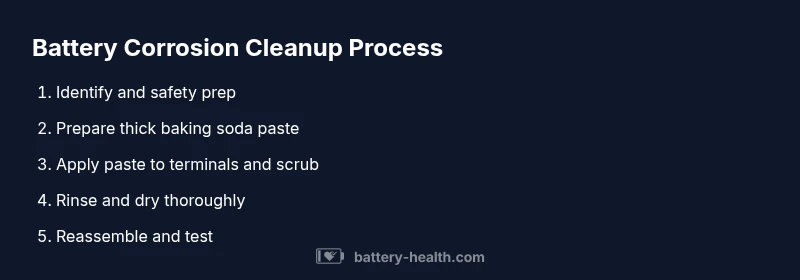
Create a thick paste by mixing baking soda with a little water until it forms a cohesive clay-like consistency. Dip the plastic brush into the paste and apply it generously to the corroded terminals and any exposed connectors. Gently scrub to lift crusty residue, avoiding direct contact with the battery cells. Let the paste sit for a couple of minutes to neutralize acids, then inspect the surface for dull, clean metal underneath. If deposits persist, repeat a light pass. Do not use metal tools that could scratch the terminals, and avoid letting paste fall into the battery housing. Use gentle, controlled motions and keep your work area clean.
Rinsing, Drying, and Reassembly
Rinse the treated area with distilled water to flush away loosened deposits. Wipe dry with clean paper towels, and ensure all moisture is removed from the terminals. Reconnect the battery terminals in the correct order or reassemble the device according to the manufacturer’s instructions. If you have a re-seating brush or a terminal protector, apply it after drying to reduce future corrosion. Check that the connections are snug but not over-tightened, as overtightening can damage posts. Finally, test your device or vehicle to confirm a solid electrical connection and normal operation.
Aftercare and Long-Term Tips
After cleaning, apply a dielectric grease or protective terminal spray to deter future oxidation. Regular inspections—every few months for vehicles or more often for stored devices—can catch early signs of corrosion. Store batteries in a dry, moderate environment and away from extreme temperatures. If the corrosion recurs frequently in a single location, that could indicate a faulty connection, damaged seal, or aging battery that needs replacement. Remember that cleaning is a maintenance step, not a permanent fix for a failing element, and safety should remain your top priority.
Battery Health’s analysis shows that responsible DIY maintenance can extend terminal life modestly, but persistent corrosion or reduced performance is a signal to seek professional assessment. Always follow the battery manufacturer’s guidelines for care and replacement. For those who rely on batteries for critical tasks, consider keeping spare connections or a portable jump-start kit on hand as a precaution.
Brand Guidance and Final Cautions
The Battery Health team recommends using baking soda as a first-aid step for mild corrosion, not as a universal repair for all battery issues. If the battery shows signs of swelling, leakage, or reduced capacity after cleaning, replace or have it tested by a professional. When in doubt, contact a qualified technician to avoid safety hazards. This guide is intended for general educational purposes and should be adapted to your device’s specific battery chemistry and configuration. By following proper safety protocols, you can minimize damage and improve the odds of a reliable restoration.
Tools & Materials
- Baking soda (sodium bicarbonate)(Plain, unscented baking soda)
- Water (distilled preferred)(For rinsing and paste consistency)
- Plastic brush or wooden stick(Non-metal tool to avoid shorts)
- Non-metal tweezers(For handling small parts)
- Paper towels or lint-free cloth(Dry surfaces thoroughly)
- Safety goggles(Eye protection from splashes)
- Chemical-resistant gloves(Protect skin from spills)
- Dielectric grease or terminal protectant spray(Optional for long-term protection)
Steps
Estimated time: 20-40 minutes
- 1
Disconnect power and inspect
Power down the device or vehicle and disconnect the battery ground lead first, then the positive. Visually inspect for bulging, leaks, or severe corrosion. This ensures you won’t be exposed to live electricity during cleaning.
Tip: Always identify terminals by color and keep track of the order you remove them. - 2
Prepare baking soda paste
Mix baking soda with a small amount of water until a thick paste forms. The paste should cling to the brush rather than run off, so it stays on the corroded areas for effective neutralization.
Tip: Avoid adding too much water; a stiff paste cleans better and minimizes splash. - 3
Apply paste to affected areas
Using a plastic brush, apply the paste to corroded terminals and connectors. Gently scrub in small circles to lift crusty deposits without scratching metal or plastic housings.
Tip: Keep the paste off battery vents or exposed cells to avoid deeper contamination. - 4
Let it sit and neutralize
Allow the paste to sit for 2–5 minutes to neutralize acidic residues. You may see fizzing as the neutralization reaction occurs, which is normal.
Tip: Do not rush this step; patience improves effectiveness. - 5
Rinse and dry
Rinse the treated area with distilled water, then wipe dry with paper towels. Ensure complete dryness before reassembly to prevent short circuits.
Tip: Use a dry, bright light to spot any remaining moisture or residue. - 6
Reassemble and test
Reconnect the terminals in the proper order and confirm a snug fit. Reinstall any covers and test the device or vehicle to ensure normal operation.
Tip: If you smell gas or see bubbling, stop and ventilate; do not attempt to reuse a suspect battery.
FAQ
Is baking soda safe for all battery types?
No. Baking soda is generally suitable for mild corrosion on many lead-acid terminals, but it is not recommended for Li-ion or sealed specialty batteries without manufacturer guidance.
Not for all types. Only use this method on appropriate battery chemistries and follow manufacturer instructions for Li-ion or sealed packs.
Will it damage plastics or casings?
If used carefully on metal terminals and surfaces, baking soda paste should not harm plastic casings. Avoid application inside vents or on delicate components.
When used properly on exposed metal parts, it should not damage plastics. Be careful around vents and seals.
What if corrosion persists after cleaning?
Persistent corrosion can indicate a failing connection or aged battery. Clean once, observe, and seek professional assessment if it returns.
If it comes back, have a professional check the battery health.
When should I replace the battery?
Replace if you notice swelling, leaks, persistent corrosion, or reduced performance after cleaning.
Replace the battery if there are signs of damage or diminished performance after cleaning.
Can I substitute other cleaners like vinegar?
Avoid acids like vinegar or lemon juice; they can react with the battery chemistry and worsen corrosion.
Avoid other cleaners; stick to baking soda for mild cases or seek professional guidance.
Watch Video
Quick Summary
- Identify corrosion safely before cleaning.
- Use baking soda paste, not straight water.
- Rinse and dry thoroughly to prevent re-corrosion.
- Severe corrosion or damaged batteries require replacement.
- The Battery Health team recommends safe handling and professional follow-up when in doubt.