Battery Is Corroded: Quick Fix and Safety Guide for Cars
Urgent, practical guide to diagnose and fix battery terminal corrosion, with safe steps, troubleshooting flow, and prevention tips for cars, devices, and home storage.


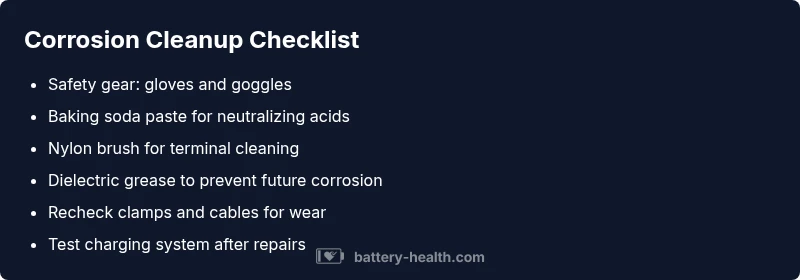
Likeliest cause is terminal corrosion from sulfuric acid byproducts and moisture, which prevents a solid electrical connection. Quick fix: power down, wear gloves, disconnect negative terminal first, neutralize with a baking soda solution, scrub gently with a wire brush, dry, then reassemble and apply dielectric grease. If you still see corrosion or the battery won’t hold charge, replace terminals or battery.
What to know about battery corrosion
A corroded battery is more than an unsightly crust around the clamps. When the phrase battery is corroded is used, it usually means the terminal connections have built up white, blue-green, or brown crust from chemical reactions inside the battery and weather exposure. These deposits impede current flow, increasing resistance and causing starts that are slow or fail altogether. In late-model cars, even small buildup can fool sensors and trigger warning lights. According to Battery Health, corrosion is common in aged systems or ones exposed to moisture and heat, and it often signals that maintenance or component replacement is due. Understanding that corrosion is a symptom, not just a cosmetic issue, helps guide safer, faster fixes. This guide emphasizes safe handling, proper tools, and a clear path to restore reliable power while protecting battery life.
Steps
Estimated time: 45-60 minutes
- 1
Power down and prepare safety gear
Put on eye protection and gloves. Ensure the vehicle is off, keys removed, and the area is well-ventilated. Disconnect the negative terminal first, then the positive.
Tip: Double-check the vehicle is not in gear and the parking brake is engaged. - 2
Neutralize and prep the corrosion
Mix a small amount of baking soda with water to form a paste. Apply to the crust to neutralize acid and create a safer cleaning surface.
Tip: Avoid splashing baking soda solution onto painted surfaces. - 3
Clean terminals and clamps
Use a nylon brush to scrub the terminals and clamps until white crust is gone. Rinse with minimal water or wipe clean, then dry thoroughly.
Tip: If crust persists, do not force it—proceed to replacement. - 4
Inspect cables and posts
Check for frayed cables, cracks in the terminal, or loosened posts. Replace damaged parts before reconnecting.
Tip: Use manufacturer torque specs when securing clamps. - 5
Reassemble and protect
Reconnect in reverse order (positive first or negative first depending on your car's protocol). Apply dielectric grease to terminals and reseat securely.
Tip: Avoid overtightening to prevent terminal damage. - 6
Test and monitor
Start the vehicle and monitor for smooth operation. If problems persist, run a charging test or seek professional help.
Tip: Record voltage readings for future reference.
Diagnosis: Visible corrosion on terminals or poor starting performance
Possible Causes
- highTerminal corrosion buildup from battery chemistry and moisture
- mediumLoose or damaged terminal connections
- lowCracked clamps or degraded cables
Fixes
- easyDisconnect power, neutralize residue with baking soda paste, and clean with a nylon brush
- mediumReplace damaged clamps or corroded cables and retorque clamps to spec
- hardTest charging system and battery health after cleaning; replace battery if capacity is poor
FAQ
What are the signs of terminal corrosion on a battery?
Visible crust around terminals, reduced starting power, and dim lights indicate terminal corrosion. Inspect clamps for looseness and clean as needed.
Look for crusty buildup around the terminals and weak starting power.
Can corrosion cause a no-start condition?
Yes, heavy corrosion can block current flow enough to prevent the engine from starting. Cleaning and secure connections often restore operation.
Yes, corrosion can prevent starting; fix by cleaning and resealing.
Is it safe to clean battery terminals myself?
It is safe when you follow precautions: work in ventilated area, wear eye protection, and use baking soda solution. Avoid metal tools that could cause sparks.
Yes, with safety precautions and proper cleaning agents.
When should I replace the battery due to corrosion?
If the battery shows swelling, repeated corrosion, or fails load tests, replacement is recommended rather than another cleaning.
If swelling or repeated failures occur, replace the battery.
Do cables and clamps need replacement after corrosion?
Often yes if cables are frayed or clamps are weakened. Replacing ensures solid connectivity and reduces future corrosion.
Yes, replace worn cables or clamps for reliable power.
Watch Video
Quick Summary
- Inspect and clean corroded terminals promptly
- Neutralize corrosion before cleaning to avoid splashes
- Replace damaged cables or clamps when needed
- Test charging system after any repair
- Prevent recurrence with dielectric grease and proper storage