How to Change the Battery in a Smoke Detector
Learn to safely replace the battery in your smoke detector with this comprehensive, step-by-step guide. Includes safety tips, detector types, testing, and maintenance to keep your home protected.


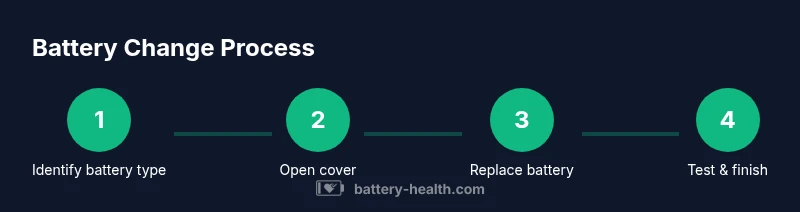
By following these steps, you’ll safely replace a smoke detector battery and restore reliable alarms. Start by identifying the battery type (common options include 9V, AA/AAA, or lithium cells) and ensure the device is either off or de-energized if hardwired. Then remove the cover, replace the battery, reseat the unit, and test the alarm.
Identify your detector and battery type
Smoke detectors come in several designs and battery configurations. Some run on a 9V battery, others use AA or AAA cells, and a few modern models use a sealed lithium battery with a 10-year life. Before you replace the battery, check the label on the back of the unit or the user manual to confirm the exact battery type and replacement interval. If you live in a rental or multi-unit building, verify that the detector you’re servicing is the one linked to the correct alarm circuit. Using the wrong battery type can cause poor performance or a chirp that won’t stop.
Safety and preparation before replacement
Safety comes first. If your detector is hardwired into your home’s electrical system, turn off the circuit breaker or switch off the detector’s power if possible before touching the unit. Use a stable ladder or step stool for ceiling-mounted devices, and have a helper nearby in case you need an extra set of hands. Avoid using metal tools that could short the contacts, and never force a stubborn cover open. Keep the area clear of dust and moisture while you work, and wash your hands before handling clean contacts to prevent corrosion.
What you’ll need: tools and replacement batteries
Prepare the right replacement battery(s) and the basic tools you’ll need. The essential item is the battery type that matches your detector—most devices use 9V alkaline, AA, or AAA lithium batteries; some models use a sealed 10-year battery and cannot be replaced. In addition, have a small screwdriver (Phillips or flat-head, depending on your model) and a sturdy step ladder. A soft cloth for wiping the housing and a pencil or label to note the replacement date can help with routine maintenance. Do not skip safety checks; if you’re unsure about the battery type, consult the user manual or contact the manufacturer.
Step-by-step overview of the replacement process
In general, you will access the battery compartment by removing the cover, identify the battery type, remove the existing battery, install the new one with the correct orientation, reseat the cover, and test the unit. The exact sequence can vary by model, so refer to your detector’s label and manual for specifics. After replacement, listen for a brief chirp or test button indicator to confirm the new battery is functioning, and check interconnected alarms if applicable.
Testing and post-replacement checks
After installing a new battery, press the test button to verify the alarm sounds and that the unit responds correctly to smoke- or heat-simulated triggers. If you have multiple interconnected detectors, test the entire network to ensure each unit alerts properly. If the alarm chirps continuously or won’t chirp after battery replacement, re-check the battery orientation, ensure the connections are clean, and replace again if necessary. If the chirp persists, replace the detector or contact support.
Battery disposal and environmental considerations
Dispose of old batteries according to local rules. Many places offer battery recycling programs for household batteries. Do not dispose of alkaline batteries in general trash in some jurisdictions; check local guidelines. If you replaced a sealed 10-year battery model, you will not remove a battery and should replace the entire unit when it no longer operates. Store spare batteries in a safe, dry location away from children and pets.
Maintenance tips to extend detector life
Keep detectors dust-free; dust can impede sensors. Vacuum lightly around vents with a soft brush attachment if recommended by the manufacturer. Replace batteries at least once a year, or according to the device’s manual. Test alarms monthly and after any maintenance. Keep a written log of replacement dates. For rental units or multi-story homes, coordinate battery replacements with a tenant or building manager.
Special cases: hardwired interconnected detectors
Hardwired detectors with interconnected alarms require a different approach. If one unit goes offline, other units may chirp to indicate a fault. Always switch off power at the breaker before servicing, and avoid removing power while multiple units are linked. When replacing a battery, ensure the tamper-resistance and interconnect wiring are undamaged. If the detector uses a sealed battery, you cannot replace the battery; you must replace the entire unit.
Tools & Materials
- Replacement battery (matches detector battery type)(Check the label or user manual to confirm 9V, AA/AAA, or lithium battery type.)
- Screwdriver (Phillips or flat-head, model dependent)(Keep one on hand in case the housing uses screws.)
- Step ladder or sturdy stool(Ensure stability; have a helper if needed.)
- Soft cloth for housing wipe(Use dry cloth to avoid moisture.)
- Marker or label for replacement date(Helpful for maintenance logs.)
Steps
Estimated time: 20-30 minutes
- 1
Power down and locate the detector
Turn off the circuit or switch off the detector if possible. Stand on a stable surface and locate the specific unit you plan to service. Verify you have the correct detector in hand, especially in homes with multiple alarms.
Tip: If you’re unsure which circuit powers the detector, switch off the main breaker to avoid any risk. - 2
Remove the detector cover
Carefully open the cover or pull away the front depending on the model. Do not force the housing; if it resists, consult the user manual. This step gives you access to the battery compartment.
Tip: Use a screwdriver only if screws hold the cover; otherwise, use your fingers to gently pry the cover. - 3
Identify and remove the old battery
Inspect the current battery type and orientation. Gently disconnect or slide out the old battery, taking care not to touch metal contacts.
Tip: Note the orientation ( polarity ) of the old battery before removal. - 4
Insert the new battery
Insert the fresh battery in the same orientation as the old one. Ensure it sits firmly and makes full contact with the terminals.
Tip: If your detector uses a 9V battery, place it so the snap connectors align correctly. - 5
Close the housing and restore power
Replace the detector cover securely. If you turned off a breaker, switch it back on and re-energize the circuit. Make sure the unit is mounted securely.
Tip: Listen for a soft click when the cover seats, indicating a secure fit. - 6
Test the alarm
Press the test button to verify the detector sounds. Confirm the unit responds to the test as expected and any interconnected units also chirp or alert accordingly.
Tip: If the test fails, re-check the battery orientation and seating. - 7
Check interconnected detectors
If you have multiple detectors, test the network to ensure all alarms are functional. A single faulty battery can affect the entire system.
Tip: Test at least once after replacing a battery in a networked setup. - 8
Document and store
Record the replacement date in a log or calendar. Return spare batteries to a safe location and store them away from heat and moisture.
Tip: Set a reminder for the next annual or manufacturer-recommended replacement.
FAQ
Do I need to remove the detector from the ceiling to change the battery?
Most detectors allow battery access without removing the unit from the ceiling, but some models require detaching or unmounting. Always follow the manufacturer’s instructions for your specific model.
Most units let you access the battery without removing the detector, but some models require detaching from the ceiling.
What type of battery should I use for most detectors?
Check the label on the back or the manual. Common options include 9V alkaline, AA or AAA batteries, or a sealed lithium cell on some newer models.
Check the label: common types are 9V, AA/AAA, or a sealed lithium battery depending on the model.
Why does my alarm chirp after changing the battery?
Chirping usually means the battery isn’t seated properly or the battery type is incorrect. Reinsert, reseat, and if needed replace again. If it persists, consult the manual.
If it chirps after replacement, reseat the battery and check the battery type; if it keeps chirping, consult the manual.
How often should I replace smoke detector batteries?
Many experts recommend checking and replacing batteries at least once a year, with some models lasting longer. Always follow the manufacturer’s guidelines.
Most detectors should be checked yearly, with replacement per the manufacturer’s guidance.
Can I clean a smoke detector during battery replacement?
Yes, gently dust the exterior vents using a dry cloth or a soft brush. Avoid moisture or harsh cleaners that could damage sensors.
You can, just use a dry cloth or soft brush to clean the vents carefully.
What should I do if my detector is hardwired and the power goes out?
Hardwired detectors will still rely on their battery during a power outage. Check and replace the battery as needed, and ensure the interconnect network remains intact.
If power is out, the detector should run on its battery; check the battery and interconnects afterward.
How should I dispose of old batteries?
Recycle old batteries according to local rules. Many communities provide battery collection points or household hazardous waste programs.
Recycle the old battery following local guidelines.
If my detector is a sealed 10-year battery model, what should I do?
Sealed models with 10-year batteries cannot be replaced. When the unit reaches end of life, replace the entire detector according to the manufacturer’s guidance.
If it’s a sealed 10-year battery unit, you’ll need to replace the entire detector when needed.
Watch Video
Quick Summary
- Identify the correct battery type before replacement
- Work safely with power off on hardwired detectors
- Insert battery in the correct orientation and test immediately
- Test interconnected detectors after replacement
- Document replacement date for ongoing safety