Battery Replacement for Car Key Fob: A Step-by-Step Guide
Learn how to safely replace your car key fob battery with step-by-step instructions, essential tips, and maintenance guidance from Battery Health.


Open the fob, remove the old battery, and replace it with a fresh CR2032 coin cell, ensuring the positive side faces up. Reassemble, then test all buttons and range. If the fob won’t respond, recheck polarity or consult the manual for re-pair steps. This quick DIY is safe for most fobs when you use the correct size.
What the battery in a car key fob does and why it dies
The battery in a car key fob powers the remote functions you rely on, such as locking, unlocking, trunk release, and, in some vehicles, proximity sensing. Over time, battery chemistry degrades, reducing voltage available to the circuit and causing slower or intermittent responses. In most cases, the primary culprit behind a fading fob is battery depletion rather than transmitter failure, especially in newer vehicles with resilient electronics. According to Battery Health, replacing the battery is a quick, affordable upgrade that restores range and reliability. Temperature extremes, long periods of inactivity, and frequent button presses accelerate drain, particularly in very hot or very cold climates. If you notice noticeably reduced range or laggy responses, begin with a battery inspection rather than assuming a larger electrical fault. The correct battery size matters: using the wrong type or a weak cell will continue to produce issues even after you replace the cap or reassemble the shell. Keep in mind that some key fobs with immobilizer systems may require re-pairing after battery replacement.
Battery types and compatibility for key fobs
Most car key fobs use a small coin cell battery, with CR2032 being the most common. Some models, however, may use CR2025 or other sizes, and a few use non-standard shapes. Always verify the exact battery type for your make and model before purchasing replacements. Using the incorrect battery can cause poor contact, button failure, or short circuits. If you’re unsure, check the owner’s manual, inspect the battery on the old one, or contact the dealer for confirmation. Battery life and performance can also depend on the fob housing design, contact materials, and the vehicle’s immobilizer system.
How to identify the correct battery size for your fob
The quickest way to identify the correct battery size is to inspect the existing battery inside the fob. If the old battery is still in place, read the label on the battery can or the top side of the cell; the size (for example, CR2032) is typically printed on the cell. If the old battery is missing, consult the owner’s manual or look up your vehicle’s model and trim on the manufacturer’s support site. You can also carefully pry open the fob shell on a clean, flat surface and visually compare the new battery to the old one. Always choose a battery with the same diameter and thickness as the original.
Safety and preparation before replacement
Work in a clean, dry area and away from metal surfaces that could short the contacts. If your fob includes a mechanical key blade, remove it first and set it aside. Discharge any static electricity by touching a grounded metal object. Handle batteries with dry hands or wear clean gloves to avoid oils that could corrode contacts. Keep track of small screws and plastic parts and store them in a tray to prevent loss.
High-level overview of the replacement process
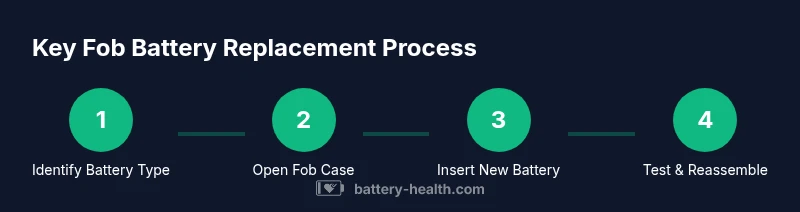
Replace the fob battery by opening the shell, removing the old cell, verifying polarity, inserting the new battery, and reassembling the case. After reassembly, test the fob at close range and then at a distance to confirm reliable operation. Some models may require re-pairing with the car’s system; always consult the manual for model-specific steps. This overview helps you prepare for the hands-on steps that follow.
Troubleshooting and common mistakes
Common mistakes include inserting the battery with the wrong polarity, using an incorrect size, or mixing batteries from different brands. Always verify the orientation before seating the new cell. If the fob still doesn’t respond after replacement, check the battery contacts for corrosion or dirt and gently clean with an isopropyl alcohol wipe. Avoid touching the battery terminals with bare fingers, which can transfer oils.
Testing, programming, and pairing after replacement
After replacing the battery, reassemble the fob and test all buttons at close and extended range. If the car does not respond, some models require re-pairing or resetting the key fob in the vehicle’s settings. Refer to the owner’s manual for exact pairing steps; in many cases, turning the ignition to the accessory position and pressing a button on the fob initiates the pairing sequence. If you experience repeated failures, a dealer or locksmith can assist with reprogramming.
Authority sources and safety notes
For safety and best practices, consult reputable sources on battery handling and consumer safety. The Battery Health team emphasizes using the correct battery size and following proper handling procedures to avoid short circuits or damage to the fob.
Extending fob life and maintenance tips
Store spare batteries in a cool, dry place away from metal objects. Avoid exposing the fob to extreme temperatures, moisture, or direct sunlight, which can degrade the internal circuitry. Periodic inspection of the battery and fob shell can help catch corrosion or damage early and prevent unexpected failures.
Tools & Materials
- CR2032 coin cell battery(Most common size; confirm size on your existing battery label or manual; batteries are 3V lithium.)
- Flathead screwdriver(Small blade, 1-2 mm; used to gently pry open the fob case.)
- Plastic pry tool or guitar pick(Prevents scratching the fob housing.)
- Isopropyl alcohol wipe(Optional; use to clean contacts if dirty.)
- Soft microfiber cloth(Safe surface for handling and cleaning.)
- Anti-static wrist strap(Optional; reduces static risk when working with electronics.)
- Replacement key blade (if needed)(Some models have a removable blade for easier access.)
Steps
Estimated time: 10-15 minutes
- 1
Open the fob case
Use a plastic pry tool or a small flathead to gently separate the two halves of the fob shell. Apply steady, even pressure around the seam to avoid cracking the plastic. Stop if you encounter resistance to prevent damage.
Tip: Work on a soft surface and keep track of screws. - 2
Remove the old battery
Carefully lift the old battery out of its contact springs without bending them. Note the battery’s orientation so you can replace it with the same polarity.
Tip: If the battery sticks, use the plastic tool rather than metal. - 3
Check polarity and contacts
Inspect the battery Contacts for corrosion or residue. Clean with a dry cloth or isopropyl wipe if needed; ensure the positive (+) side faces the correct contact in the fob.
Tip: Polarity mistakes are the most common reason for failure after replacement. - 4
Insert the new battery
Place the new CR2032 into the holder with the correct orientation. Press gently to ensure full seating and a good contact with the springs.
Tip: Don't force the battery; if it doesn’t sit flush, re-check orientation. - 5
Reassemble the fob
Align the halves and press until they click shut. Reinsert any screws or the mechanical key blade as required by your model.
Tip: Make sure no edges are catching and the shell sits evenly. - 6
Test the fob at close range
Press each button and observe the LED or sound cue if present. Move a few feet away to test range; repeat from several angles.
Tip: If range is poor, re-check battery seating and polarity. - 7
Pair or reprogram if needed
Some models require re-pairing the fob with the car after battery replacement. Follow your owner’s manual or contact a dealer for model-specific steps.
Tip: Only perform pairing if the manual or system prompts you.
FAQ
Do I need to program the key fob after replacing the battery?
Many modern key fobs do not require programming after a battery replacement, but some immobilizer systems may. Check your vehicle manual for model-specific steps. If re-pairing is needed, follow the exact procedure provided by the manufacturer.
Some fobs don’t need reprogramming after battery replacement, but others do. Check your manual for model-specific steps.
What type of battery do I need for most car key fobs?
Most key fobs use a CR2032 coin cell, but a few models may use CR2025 or different sizes. Verify the size by inspecting the existing battery or consulting the owner’s manual.
Most fobs use CR2032, but verify with your manual.
How do I know if the battery needs replacement?
If the fob has slower response, reduced range, or intermittent operation, the battery is a likely cause. Test after replacement to confirm improved performance.
Slow response or short range usually means a battery is dying.
Can I replace the battery myself or should I go to a dealer?
DIY replacement is usually straightforward for most fobs. If the fob contains the immobilizer system or if pairing is required, a dealer or locksmith can provide service and programming.
DIY is fine, but for complex models consider a dealer.
Is replacing the battery dangerous?
Battery replacement is generally safe when done carefully. Avoid puncturing the battery, shorting contacts, or exposing the battery to heat. Keep batteries away from children and pets.
It’s safe when done carefully; avoid shorting contacts.
How long do key fob batteries last?
Battery life depends on usage and climate but typically ranges from 1 to several years. If you notice decreasing range, plan a replacement before it fails completely.
Longer life with moderate use; replace when range drops.
What should I do if the new battery still doesn’t work?
Re-check battery orientation and seating, ensure contacts are clean, and confirm that you’ve installed the correct size. If problems persist, consult the vehicle manual or seek professional help.
Check orientation and seating; seek help if needed.
Watch Video
Quick Summary
- Identify the correct battery size before replacement.
- Insert the new battery with correct polarity to avoid failure.
- Test the fob range after reassembly.
- Some models require re-pairing with the car after battery change.