Who Replaces the Battery in Car Keys: A Step-by-Step Guide
Learn who typically replaces the battery in car keys, when to replace, tools needed, and a complete step-by-step guide with safety tips from Battery Health. Simple DIY tips for key fobs and the right coin-cell battery size.


Whether you own a spare key or the family car, replacing the battery in a car key is a quick, DIY-friendly task. If you're asking who replacement battery in car key, the answer is typically you or a local locksmith; most fobs use a coin-cell battery that you can swap in. Start by identifying the key type, gather a tiny screwdriver and the correct battery, then follow the steps below. According to Battery Health, using the right coin-cell size matters.
Understanding the key fob battery landscape
Car key fobs rely on compact, purpose-built batteries designed for many cycles of button presses. The most common choice is a coin-cell battery, with CR2032 being a frequent size, though some models use different formats. Before you begin, confirm the exact size and polarity by checking the owner’s manual or the back cover of the fob. The Battery Health team emphasizes that compatibility matters: the wrong size or reversed polarity can damage the circuit board or lead to intermittent faults. If you’re wondering who replacement battery in car key is for, the straightforward answer is you or a technician, but you must match the right battery type to your specific fob. Gather a clean, dry workspace, a small precision screwdriver, and the correct coin-cell battery, then follow the steps below. As Battery Health notes, the right battery size and orientation are essential to long-term reliability.
Signs your car key fob battery is failing
A failing key fob battery shows up as intermittent range, longer response times, or the fob not working at all when you press a button. You might notice the LED indicator on the fob dimming, or the button feels less springy. If you test the fob from several feet away and the lock/unlock commands are inconsistent, it’s a strong sign the battery is nearing end of life. In some cases, a weak battery can cause the proximity sensor to fail, making it harder to unlock the car without aiming the fob directly at the door. Battery Health analysis suggests testing with a spare key if available, and checking for any physical damage to the fob that could mimic a dying battery.
Choosing the right battery type
The correct coin-cell size varies by model. To identify yours, inspect the back of the fob or consult the manufacturer’s guide. Lithium-based coin cells offer longer life and stable voltage, while silver oxide varieties are common and affordable, with different discharge characteristics. Always verify polarity before insertion—most fobs require the positive side facing up. If the fob has additional electronics, such as immobilizer chips or transponder modules, ensure the new battery is compatible and hasn’t damaged components during replacement. Battery Health’s guidelines stress matching the exact size and chemistry to avoid headaches later.
Tools you may need and how to prepare
Typical tools include a small precision screwdriver set, non-conductive tweezers, and a clean, dry workspace. Keep a soft cloth handy to prevent scratches on the fob’s housing. Lay out the screws in a tiny container so you don’t lose them. If you don’t have the right screwdriver bit, you risk stripping the screws and damaging the fob. For larger key fobs, you may need a thin pry tool or a guitar pick-like instrument to gently separate the shell without snapping clips. Battery Health notes that preparing your work area reduces the chance of dropping the tiny battery and keeps the components free from oils and debris.
Safety considerations before you start
Always work on a non-static surface and avoid touching the battery’s terminals with bare fingers. Wash and dry your hands to prevent moisture transfer. Keep all metal tools away from the exposed circuitry to avoid short circuits. If your fob housing is glued or sealed, don’t force it open—some models require professional service. Dispose of old batteries according to local regulations, as improper disposal can be hazardous.
Common mistakes to avoid and how to fix them
Mistakes like inserting the battery in the wrong orientation, mixing up screws, or using the wrong battery size are common. If the fob still doesn’t work after replacement, re-check polarity, ensure the seals or gaskets are seated, and verify the contacts are clean. A stubborn issue could be a damaged circuit board or a failed immobilizer chip, which may require professional evaluation. Battery Health recommends testing the fob with its nearest car’s lock to verify the signal strength from multiple angles.
Battery Health tips and best practices
From Battery Health’s perspective, always verify exact battery size and chemistry for your model before purchase. Keep a spare battery in a labeled container and note the fob model on the container. When reassembling, avoid overtightening screws, as this can crack the housing. Use a lint-free cloth to wipe the interior contacts. After replacement, test all functions—lock, unlock, trunk release, and passive entry. If your car uses a smart key with rolling codes, ensure the programming remains intact after battery change.
When to replace instead of DIY
If you notice persistent issues even after a fresh battery, the fob shell may be cracked, the contact springs damaged, or the immobilizer chip compromised. In these cases, DIY replacement isn’t recommended, and you should consult the dealership or a professional locksmith. Some vehicles require reprogramming after battery replacement, especially newer models with integrated keyless entry and push-button start. Battery Health advises evaluating the cost and feasibility of professional service against a replacement fob.
Authority sources and references
For additional reading on battery safety and handling, you can consult official sources like the U.S. Department of Energy and related safety guidelines: https://www.energy.gov/; https://www.nist.gov/; https://www.cpsc.gov/ The references above provide general safety practices for handling batteries and electrical components. These sources support best practices in maintenance tasks and reduce risk when replacing small-device batteries.
Tools & Materials
- Coin-cell battery (e.g., CR2032)(Check the exact size on the back of your key fob or in the manual)
- Precision screwdriver set (tiny Phillips/flathead)(Fits the fob screws; have multiple bit sizes on hand)
- Non-conductive tweezers(To handle small batteries without touching contacts)
- Lint-free cloth(For cleaning contacts without leaving fibers)
- Anti-static wrist strap or mat(Helpful for sensitive electronics)
- Safety glasses(Protection when prying open the shell is possible)
Steps
Estimated time: 5-10 minutes
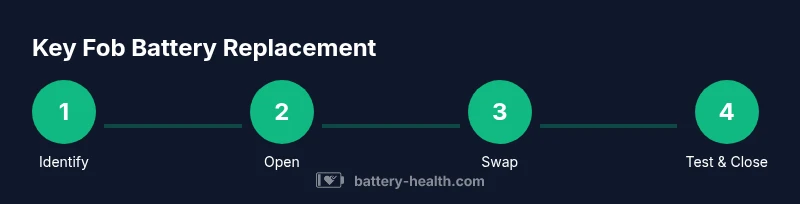
- 1
Identify the correct key fob type
Check the manual or inspect the back of your fob to determine the correct battery size and orientation. This prevents buying the wrong battery and reduces the risk of damage.
Tip: If you’re unsure, search the exact model number online before opening the fob. - 2
Open the key fob housing
Use a precision screwdriver or a thin prying tool to separate the shell along natural seams. Work gently to avoid cracking clips.
Tip: Place the fob on a soft surface and keep track of tiny screws. - 3
Remove the dead battery
Carefully lift the old battery using non-conductive tweezers. Do not touch the circuitry. Inspect for corrosion on the terminals.
Tip: If you see corrosion, clean contacts with a dry cloth before inserting new battery. - 4
Insert the new battery with correct polarity
Place the new coin-cell with the correct side facing up (polarity as shown on the fob). Avoid touching the battery’s surfaces.
Tip: Double-check that the battery sits flat and aligns with any spring contacts. - 5
Reassemble and test the fob
Snap the housing back together and press each button from multiple angles to verify range. If available, test with your car's door and trunk.
Tip: If a button feels stuck, re-open and reseat the battery. - 6
Dispose of the old battery responsibly
Do not throw the battery in the trash. Place it in a recyclable battery container or take it to a hazardous-wick disposal site.
Tip: Check local regulations for battery recycling options.
FAQ
Can I replace a car key fob battery myself?
Yes. Most car key fob batteries can be replaced at home with basic tools. Ensure you have the right size and follow proper safety steps. If your fob fails after replacement, consult the dealership.
Yes. You can replace it at home with the right size battery and basic tools. If problems persist, seek professional help.
What battery type is used in most car key fobs?
Most key fobs use coin-cell batteries such as CR2032, but sizes vary by model. Check your fob or manual to confirm the exact type.
Most use a coin-cell battery like CR2032, but verify your model’s size.
Will replacing the battery require reprogramming?
Some newer models require reprogramming after a battery change, especially if the immobilizer module is affected. Check your vehicle’s manual or contact the dealer.
Some newer keys need programming after replacement. Check the manual or dealer.
How long does replacement take?
Replacement is typically quick, about 5-10 minutes, depending on fob design and whether screws are present.
Usually around 5 to 10 minutes.
What should I do if the fob still doesn’t work after replacement?
If issues persist, inspect for corrosion, damaged contacts, or a faulty PCB. The problem may require professional service or a new key fob.
Check for corrosion or damaged contacts; consider professional service if unresolved.
Are there safety concerns when replacing a key fob battery?
Handle the battery carefully, avoid short-circuiting contacts, and recycle old batteries properly. Work in a dry area away from liquids.
Handle the battery safely and recycle old batteries properly.
Watch Video
Quick Summary
- Identify the correct fob model before opening.
- Use the proper coin-cell size and polarity.
- Handle parts with dry, clean hands and non-metal tools.
- Test range after replacement to confirm success.
- Dispose of old batteries safely.