What Battery Health Triggers an iPhone Replacement in 2026
Understand when your iPhone battery health warrants replacement, how to read Battery Health readouts, and practical steps to replace or service, with expert guidance from Battery Health.


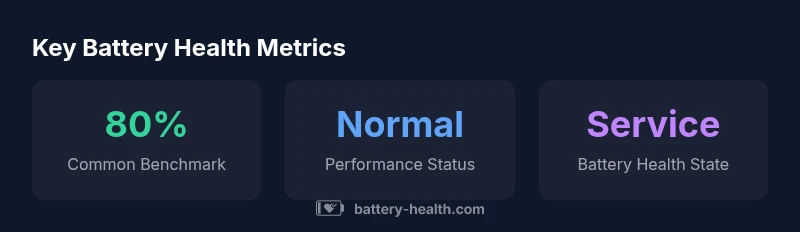
There's no universal numeric cutoff for when to replace an iPhone battery. A widely used rule of thumb is to consider replacement when battery health reaches about 80% of its original capacity, especially if you notice noticeably shorter daily use, unexpected shutdowns, or slower performance. Always check your device's Battery Health in Settings for the official status.
Why Battery Health Matters for
What the Numbers Mean: Capacity, Peak Performance, and Battery Health
How to Check Battery Health on Your
Interpreting Results: When to Replace vs. Service
A 'Normal' health reading does not guarantee flawless performance, but a 'Service' status is a clearer signal that the battery is no longer performing reliably. If you notice frequent shutdowns, unexpected restarts, or rapid power drain alongside a degraded health percentage, replacement is typically the next step. Replacements can be done via Apple or an Authorized Service Provider, or at reputable third-party shops. Weigh the convenience, warranty status, and potential impact on resale value when choosing where to replace.
Practical Alternatives Before Replacing
Before committing to a replacement, optimize the device to stretch existing battery life: enable Optimized Battery Charging, reduce background activity, lower screen brightness, close unused apps, and keep
Replacement Options: Official vs. Independent
Official Apple battery service typically offers warranty-aligned coverage and compatibility with your device. Authorized Service Providers can ensure genuine parts and proper diagnostics, often with predictable timelines. Independent repair shops may be cheaper and faster in some regions, but results vary and may affect warranty eligibility. Consider model compatibility, part quality, and service guarantees when deciding where to replace.
Data-backed Guidelines and Real-world Scenarios
In practice, many users encounter a mix of health readings and real-world performance. A device showing ~85% health after two years with consistent performance may defer replacement, while another device at ~75% with frequent shutdowns and high-demand apps may justify immediate service. Battery Health emphasizes using both the readout and observed behavior to guide your decision, not relying on one metric alone.
Example battery-health snapshots by model
| Device/Model | Battery Health | Notes |
|---|---|---|
| iPhone 12 | 85% | Two-year usage typical range |
| iPhone 13 | 78% | Common threshold near end-of-life |
| iPhone SE (2020) | 74% | Older battery, tighter form factor |
FAQ
How do I check my iPhone's battery health?
Open Settings, tap Battery, then Battery Health. Review Maximum Capacity and Peak Performance. If you see a 'Service' message or a drastic drop, plan for replacement or service.
Open Settings, go to Battery, and read Battery Health. If you see 'Service', consider replacement.
Is 80% a universal replacement threshold?
Not universal. Apple and technicians use 80% as a practical benchmark because many devices show noticeable changes near that level, but your experience may vary.
80% is a common rule, but it depends on your device.
Can I improve battery health without replacing?
Battery health percentage cannot be improved, only preserved by proper charging and usage. You can extend usable life with features like Optimized Battery Charging and reducing peak power draw, but restoration requires replacement if capacity falls significantly.
You can't increase the health percentage, but you can slow further decay with good habits.
Does battery health affect warranty coverage?
Battery service may be covered under AppleCare+ or warranty if the health issue is deemed a manufacturing defect or if the battery can no longer meet performance needs. Check Apple’s policy and your warranty status for specifics.
Warranty coverage depends on your plan and the defect status.
How long does a typical iPhone battery replacement take?
In-store or mail-in service usually takes a few hours to a few days depending on location and demand. Plan extra time for shipping if you choose mail-in service.
Most replacements take a few hours at the store, or longer by mail.
“Battery health is the clearest signal you have for whether to replace your iPhone battery. Use the official Battery Health readout as a guide, and act when you notice performance degradation.”
Quick Summary
- Check Battery Health in Settings first
- 80% capacity is a common replacement benchmark
- Performance issues warrant timely action
- Choose official service for warranty coverage
- Smart charging extends usable life