Apple Battery Replacement in Store: A Step-by-Step Guide
Learn how to get an Apple battery replacement in store, what to expect, documents needed, and tips for a smooth service. This educational guide covers booking, eligibility, and post-service care.


You can have an Apple battery replacement in store performed by an authorized technician. This guide covers booking, required documents, what to expect during the appointment, and post-service care. Key requirements include proof of eligibility (warranty or AppleCare), device readiness for service, and understanding potential downtime.
Why Apple Battery Replacement in Store Matters
According to Battery Health, choosing an in-store battery replacement for Apple devices helps ensure you receive genuine parts, proper calibration, and warranty coverage where applicable. In-store service provided by Apple Authorized Service Providers or the Apple Store typically guarantees that the technician uses an Apple-approved battery and performs calibration to restore battery health metrics accurately. This matters because battery health affects performance, charging efficiency, and safe operation. If your device is still under warranty or AppleCare, an in-store replacement is more likely to preserve coverage and eligibility for future repairs. The in-store experience also offers live diagnostics and hands-on testing, which can reduce the risk of unnoticed issues after service. For those who rely on their device for work or school, having a local, authorized technician handle the replacement minimizes downtime and ensures the device remains within supported configurations.
From a consumer perspective, in-store service provides transparency: you can watch the diagnostic results, confirm that the replacement part is genuine, and verify calibration against battery health indicators like peak voltage, capacity, and cycle count. This aligns with best practices in battery maintenance, especially for devices that see heavy daily use. The Battery Health team found that legitimate in-store replacements typically yield more reliable long-term performance than third-party non-authorized options, particularly when software calibration and charging profiles are involved. If you’re facing unexpected shutdowns, rapid battery drain, or inaccurate battery reporting, in-store replacement is often the quickest path back to normal operation.
What to Know Before You Go
Before you book an in-store battery replacement, you should verify your device’s current status and service eligibility. AppleCare+ or warranty coverage may shorten or waive costs; otherwise service is billed by location and model. Confirm that a replacement battery is recommended by a technician rather than a firmware workaround. Also, plan for a downtime window; many Apple Stores schedule appointments, and walk-ins may require longer waits. Have your device ready: unlocked, charged, and accessible for diagnostics. If you own multiple devices, prioritize the one with the most critical use case to minimize overall downtime. It’s wise to back up data before any service, since some replacement processes involve restarting the device or restoring settings. If you’re using devices with sensitive data, consider enabling “Find My” precautions and ensuring your accounts are signed out on the device prior to service.
In-Store vs Mail-In: Pros and Cons
In-store battery replacement offers immediate diagnostics, verification of authentic parts, and on-site testing to confirm performance. You’ll typically receive a hands-on explanation of the replacement and calibration results, and you can address any questions with the technician during the visit. The main downside is potential wait time and travel requirements if you’re not near a service location. Mail-in service is convenient when stores are far away or you need to minimize travel. It often includes a mail-back turnaround and safety packaging, but you lose real-time updates and the ability to observe calibration firsthand. In many cases, in-store replacement provides higher assurance of authenticity and calibration accuracy, which matters for devices with advanced battery management software. Battery Health’s assessment emphasizes choosing in-store service when possible to maximize battery health outcomes and preserve warranty integrity.
What to Bring and Checklists
To streamline the process, assemble a concise checklist well before your appointment:
- The device you want serviced, including model and serial number if possible
- Government-issued photo ID (for verification at the service desk)
- Proof of purchase or an active AppleCare plan (if applicable)
- Your device passcode, if required for diagnostics
- Appointment confirmation code or email and any service notes from prior visits
- The original charging cable and any accessories you want tested post-replacement
Avoid bringing unnecessary accessories that could complicate the check-in process. If the device is encrypted or has a passcode, ensure you have it accessible or recorded securely. Backup your data prior to service to guard against unexpected software changes, even though Apple technicians perform careful data-handling safeguards. Finally, confirm the store’s policy on loaner devices if downtime is lengthy.
Step-by-Step: In-Store Battery Replacement Process
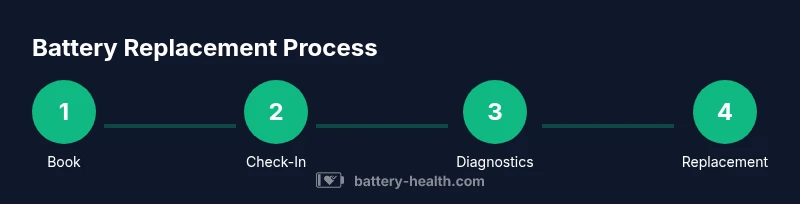
The following steps outline what you can expect when you pursue an in-store battery replacement for Apple devices. Each step is designed to be followed in order to minimize delays and ensure a smooth service experience.
- Schedule or confirm your appointment
- Action: Book online or via the store’s service desk.
- Why: Appointments reduce wait times and allow the technician to prepare the correct parts.
- Tip: Have your device’s model and serial number handy to speed up the check-in.
- Arrive and check in
- Action: Present your ID and appointment details at the service desk.
- Why: Verification ensures you’re connected to the right device and service path.
- Tip: Bring a clear image of your device if the desk requests it for model verification.
- Provide access for diagnostics
- Action: Hand over the device for a diagnostic test to confirm battery health and eligibility.
- Why: Diagnostics determine battery status, calibration needs, and whether a replacement is necessary.
- Tip: Ensure the device is unlocked and your passcode is ready if required for diagnostics.
- Approve replacement and wait for installation
- Action: Approve the replacement with a genuine Apple battery.
- Why: Using genuine parts ensures compatibility and warranty support.
- Tip: Ask about the expected downtime for the replacement and any calibration steps.
- Calibration and software health check
- Action: The technician calibrates the new battery and runs a software health check.
- Why: Calibration aligns hardware with firmware, optimizing charging behavior and reporting accuracy.
- Tip: Request a post-calibration test to confirm that health metrics align with expectations.
- In-store testing and verification
- Action: Test the device in-store, including charging performance and battery reporting.
- Why: Immediate verification helps catch anomalies before you leave.
- Tip: Have realistic usage simulations ready (screen-on time, brightness levels, connectivity tests).
- Pickup, receipt, and post-service guidance
- Action: Retrieve the device with documentation and any warranty notes.
- Why: You’ll leave with a record of the service and next steps for care.
- Tip: Confirm warranty coverage for the replaced part and ask about recommended charging practices.
Safety, Warranty, and Care After Replacement
Battery replacements involve hardware and software coordination. In-store replacements with authentic Apple parts typically preserve existing warranty terms and ensure proper calibration. If you encounter any issues after service, report them immediately and consult the service desk for a reassessment under warranty terms. Post-service care includes avoiding extreme temperatures, using the official charger, and monitoring battery health via the device’s settings. While Apple’s official channels strive to minimize downtime, it’s normal to experience a short period of device inactivity during calibration and data re-checks. If you rely on your device for critical tasks, consider coordinating with your employer or school for a scheduled downtime, and keep a backup device handy in case of unexpected delays. Battery Health emphasizes documenting the service experience and staying informed about how battery health metrics (like charge capacity and cycle count) may evolve over the next weeks.
Tools & Materials
- Device to be serviced(Bring the exact Apple device model and, if possible, the serial number.)
- Photo ID(Government-issued ID for service verification.)
- Proof of purchase or AppleCare(Optional if still under warranty or coverage.)
- Device passcode(Have it ready if diagnostics require unlocking.)
- Charger and accessories(Test post-replacement performance if needed.)
- Appointment confirmation(Bring the booking details.)
Steps
Estimated time: 60-120 minutes
- 1
Book or confirm appointment
Schedule online or at the store. Provide device model and serial number so the technician can prepare the correct parts. A confirmed time helps minimize your wait and ensures the right battery is available on arrival.
Tip: Having exact device details speeds up intake and reduces rework. - 2
Arrive and check in
Check in with the service desk using your appointment details. You’ll verify your identity and the device to be serviced. If required, show proof of purchase or AppleCare to confirm eligibility.
Tip: Bring your appointment confirmation to avoid delays. - 3
Provide access for diagnostics
Hand over the device for a diagnostic test to verify battery health, charging efficiency, and eligibility for replacement. The technician may request to run tests with the device unlocked.
Tip: Ensure the device is unlocked and you know the passcode if needed. - 4
Approve the replacement
If the diagnostic indicates a replacement is needed, authorize the technician to install a genuine Apple battery and perform any necessary firmware calibration.
Tip: Ask about part warranty and what calibrations will be performed. - 5
Calibration and software check
The new battery is calibrated to restore accurate reporting, and the device undergoes a software health check to confirm charging behavior and performance.
Tip: Request to see calibration results and battery health readouts. - 6
In-store test and confirmation
Test the device in-store for charging speed, screen brightness, and performance under typical usage. Ensure the battery reporting reflects healthy status.
Tip: Test under real-use conditions (web, video, calls) if possible. - 7
Pickup and review
Receive the device, a service receipt, and any warranty notes. Review care guidance and ask about post-service battery maintenance.
Tip: Keep the receipt in case you need future service.
FAQ
Is in-store battery replacement available for all Apple devices?
In-store battery replacement is generally available for many Apple devices via Apple Authorized Service Providers, including iPhones and iPads. Availability can vary by location and model.
In-store battery replacement is usually offered where Apple Authorized Service Providers operate, but it can vary by device and local store.
Will replacing the battery affect my warranty?
If performed by Apple or an authorized service provider, the original warranty terms remain intact and the replacement is covered under the same policy.
As long as the replacement is performed by Apple or an authorized provider, your warranty typically remains intact.
How long does the replacement take?
Time varies by location and device, but you should plan for about one to two hours including diagnostics and calibration.
Most replacements take about one to two hours, depending on the store and device.
What documents are needed for service?
Bring a government-issued ID, appointment details, and proof of purchase or AppleCare if applicable. Have your device passcode ready if diagnostics require it.
Bring your ID and appointment details, plus any proof of warranty or AppleCare, and be ready to provide the device passcode if needed.
Can I use a third-party shop for battery replacement?
Third-party shops may offer battery replacements, but Apple advises using authorized providers to ensure genuine parts and preserve warranty.
You can go to third-party shops, but be aware you may compromise warranty or battery calibration if parts aren’t genuine.
How should I dispose of the old battery?
Let the service provider handle disposal as part of the service, following local regulations for battery recycling.
The service provider usually takes care of proper disposal and recycling of the old battery.
Watch Video
Quick Summary
- Choose in-store service for authentic parts and calibration.
- Prepare documents and device access before your appointment.
- Observe the diagnostic and calibration process for assurance.