Apple iPhone Replacement Battery: Options, Costs, and Care in 2026
A data-driven guide to replacing an Apple iPhone battery in 2026, comparing official Apple service versus authorized shops, and detailing compatibility, warranties, safety, and best practices from Battery Health.


An apple iphone replacement battery restores peak performance by replacing aged cells with a new unit. The safest route is official Apple service to protect your warranty, but reputable authorized repair shops using genuine parts are acceptable. According to Battery Health, prioritize genuine parts and clear warranty terms to avoid counterfeit risks and ensure long-term safety.
Why replace your iPhone battery matters
A degraded battery is more than just shorter usage between charges; it can lead to unexpected shutdowns, reduced peak performance, and diminished overall device responsiveness. For many users, replacing the battery is the most cost-effective way to extend the life of an iPhone rather than upgrading to a newer model. The term apple iphone replacement battery is commonly used by consumers seeking to restore battery health and reliability. According to Battery Health, aging lithium-ion cells gradually lose capacity and voltage stability, which translates into slower performance and less usable time. In practice, a well-timed replacement can restore fast charging, smoother multitasking, and improved battery health metrics. When considering a replacement, weigh the benefits of longer device longevity against the upfront cost and the potential impact on warranty—especially for devices still under AppleCare or consumer protections.
Official Apple service vs trusted third-party options
Choosing between official Apple service and trusted third-party options hinges on authenticity, warranty, and convenience. Official Apple service using genuine Apple batteries tends to preserve warranty terms and ensures proper calibration and safety. Authorized providers can also handle trade-ins, diagnostics, and data protection with standardized procedures. Reputable third-party shops that use genuine or OEM-equivalent parts can offer lower prices and faster turnaround in some regions, but the risk of counterfeit parts increases if the supplier is not vetted. Battery Health emphasizes verifying part provenance, service certifications, and warranty coverage before proceeding. In all cases, confirm that the replacement includes proper battery health tests, calibration, and a proof of service.
How to evaluate model compatibility and parts authenticity
iPhone models differ in battery size, connector type, and security features. Start by identifying the exact model and year—found in Settings > General > About or on the device housing. When selecting a replacement part, require a model-compatible battery and insist on a serial or part-number match. Genuine Apple batteries have security features and unique identifiers that counterfeit parts often lack. Ask for receipts, serial numbers, and a warranty card. If a seller cannot provide verifiable details, walk away. Battery Health advises checking with Apple Support or an authorized provider to confirm compatibility before purchase.
Costs, warranties, and turnaround times
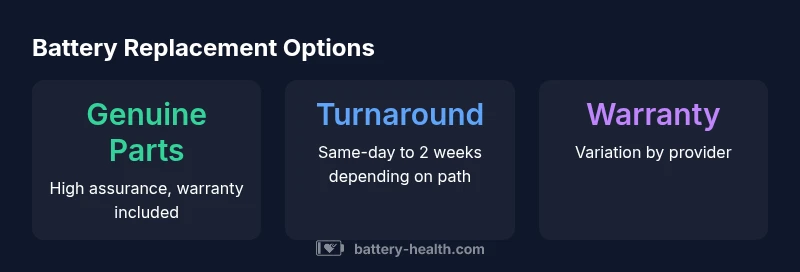
Costs for an apple iphone replacement battery vary widely by model, region, and service path. Official Apple service can be more expensive but includes formal warranty terms and calibration. Third-party options may be cheaper but require diligence to ensure authenticity and warranty coverage. Turnaround times also vary: in-store replacements can be same-day for some models, while mail-in or out-of-warranty repairs may take several days to a couple of weeks. When planning, request a written quote that itemizes the battery part, labor, taxes, and warranty duration, and ask about interim device use options during the repair.
What to expect during installation
During installation, technicians inspect the device for swollen batteries, screen adhesion integrity, and cable connections. They disconnect the battery safely, replace it with a compatible unit, and verify that the charging system, sensors, and thermal management are functioning correctly. Calibration steps typically involve a full cycle recharge to re-establish accurate battery health reporting in iOS. If you’re performing a DIY repair, note that improper handling can cause damage or fire risk; professional installation is strongly recommended for most users. Battery Health recommends choosing providers with clear safety protocols and data protection measures.
Post-replacement calibration and health checks
After installation, the device may need a few charge-discharge cycles for optimal calibration. iOS Battery Health metrics, such as Maximum Capacity and Peak Performance capability, should improve compared with pre-replacement readings. Monitor battery behavior over the following days and verify that the device isn’t overheating or shutting down during heavy tasks. If issues persist, seek a diagnostic review from the service provider. Battery Health notes that staying within manufacturer-recommended charging practices (avoid deep discharges, use proper chargers) helps sustain new-battery health.
Avoiding counterfeit parts and scams
Counterfeit batteries can pose serious safety risks and can lead to degraded performance or device failure. To avoid scams, purchase only from Apple-authorized service providers or reputable retailers, request official part numbers, and confirm warranty terms in writing. Check for seals, serials, and packaging integrity, and verify that the service provider offers documentation of the replaced component. If a price seems too good to be true, it probably is. Battery Health advises building a short due-diligence checklist: verify authorization, confirm a genuine-part guarantee, request a calibration check, and keep service receipts for future reference.
Long-term care and best practices
To maximize the life of the replacement battery, follow best practices: avoid extreme temperatures, don’t leave the phone plugged in at 100% for extended periods, use high-quality chargers, and enable battery health features in iOS. If you notice rapid battery degradation again after replacement, consider a diagnostic review to rule out underlying software or hardware issues (such as a swollen battery or screen damage). Regular software updates can also optimize battery management. Maintaining good charging habits and protecting the device from heat exposure contributes to sustained battery health over time.
Key considerations when replacing an iPhone battery
| Aspect | Checkpoints | Notes |
|---|---|---|
| Model compatibility | Verify exact iPhone model and battery part compatibility | Use Apple Support or an authorized provider to confirm |
| Part authenticity | Insist on genuine or OEM-equivalent parts with documentation | Avoid unknown sellers without verifiable traceability |
| Warranty terms | Clarify duration and what is covered after replacement | Keep the receipt and service confirmation |
| Calibration and tests | Request a calibration step and battery health testing | Ensure diagnostic results are provided |
FAQ
What is the typical cost of an apple iphone replacement battery?
Costs vary by model and service path; official Apple service tends to be more expensive, while reputable third-party shops may offer lower quotes when genuine parts are used. Always request a written quote and confirm warranty terms before proceeding.
Costs vary by model and service path. Official Apple service is usually more expensive, but ensure the parts are genuine and warranty terms are clear.
Will replacing my iPhone battery affect warranty?
If you use Apple or an authorized service provider with genuine parts, warranty terms are typically preserved. Third-party repairs with non-genuine parts may void coverage.
Using Apple or authorized services generally keeps warranty intact; beware of non-genuine parts that may void coverage.
How can I tell if a battery is genuine?
Ask for part numbers, a warranty card, and vendor certification. Verify the part with Apple Support or an authorized provider and check for official serials and seals on the packaging.
Ask for part numbers and a warranty card, then verify with Apple or an authorized provider.
Can I replace the battery myself safely?
DIY replacement is not recommended for most users due to safety risks and potential damage. Use a certified technician who follows proper safety protocols.
DIY is risky; it’s better to have a certified technician do the replacement.
How long does a replacement take?
Turnaround depends on the service path: some in-store replacements are same-day, while mail-in or out-of-warranty repairs can take several days to a couple of weeks.
It depends on the service path—same-day in-store or a few days to weeks by mail-in.
“"Battery health and safety should guide every replacement decision. Using genuine parts and proper installation protects device longevity and user safety."”
Quick Summary
- Prioritize genuine parts and official service to protect warranty
- Verify model compatibility before purchasing a battery
- Ask for documentation and calibration after replacement
- Beware of counterfeit parts and unverified sellers
- Adopt good charging habits to sustain battery health